

Joined:Jul 20, 2017
Uploads:17
Features:1
UC Wins:1


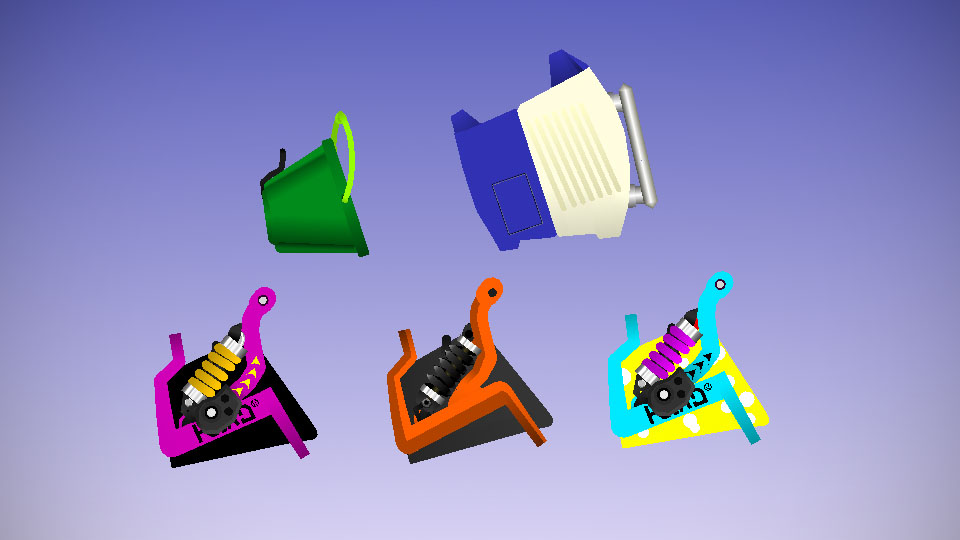
This is a Bucket... They ALL are Buckets... from Splatoon 1-2!
Slosher
The Slosher is a Black n’ Purple Bucket That Sloshes a Straight-like Wave of Ink. Literally go find a Bucket, fill it up with Colored Water, and Throw the Colored Water Outside somewhere as hard as you can. There you go. Splatoon IRL... It’s Counterpart is the Slosher Deco.
Soda Slosher
The Soda Slosher is a Bucket with a Yellow with White Bubbles and Sky Blue Color Palette and Sloshes a Straight-like Wave of Ink. Literally go find a Bucket, Paint it Yellow, White-Bubbles, and Sky Blue, fill it up with Colored Water, and Throw the Colored Water Outside somewhere as hard as you can.
Slosher2
The Slosher2 is The Dark-Gray/Grey n’ Orange Bucket That Is Just the Same as the Other 2 Above, just a Different Sub and Special. Literally go fi-Ima Stop...
Slosher Deco
Same Design as his Brother, Just a Couple of Arrows, and a Different Set of Sub and Special...
Tri-Slosher
The Tri-Slosher is The Cactus-Green Bucket that Looks like a Bucket that you would use for Sand Castles! It has Three Sections inside of it (Hence the Name, Tri-Slosher...) which allows it to Slosh Shorter-Ranged Globs of Ink in 3 Forward Directions going out like this -> |/
You also Throw Ink faster with This!
Sloshing Machine
The Sloshing Machine is Unmistakable, it’s a Washing Machine, That Sloshes Twisting Volleys of Ink! In-Game, Imagine a Horrible Volcano Eruption That looks like a Washing Machine shooting Lava Shaped-like Missiles..
In Conclusion, Sloshers. Are. Deadly!
Slosher
The Slosher is a Black n’ Purple Bucket That Sloshes a Straight-like Wave of Ink. Literally go find a Bucket, fill it up with Colored Water, and Throw the Colored Water Outside somewhere as hard as you can. There you go. Splatoon IRL... It’s Counterpart is the Slosher Deco.
Soda Slosher
The Soda Slosher is a Bucket with a Yellow with White Bubbles and Sky Blue Color Palette and Sloshes a Straight-like Wave of Ink. Literally go find a Bucket, Paint it Yellow, White-Bubbles, and Sky Blue, fill it up with Colored Water, and Throw the Colored Water Outside somewhere as hard as you can.
Slosher2
The Slosher2 is The Dark-Gray/Grey n’ Orange Bucket That Is Just the Same as the Other 2 Above, just a Different Sub and Special. Literally go fi-Ima Stop...
Slosher Deco
Same Design as his Brother, Just a Couple of Arrows, and a Different Set of Sub and Special...
Tri-Slosher
The Tri-Slosher is The Cactus-Green Bucket that Looks like a Bucket that you would use for Sand Castles! It has Three Sections inside of it (Hence the Name, Tri-Slosher...) which allows it to Slosh Shorter-Ranged Globs of Ink in 3 Forward Directions going out like this -> |/
You also Throw Ink faster with This!
Sloshing Machine
The Sloshing Machine is Unmistakable, it’s a Washing Machine, That Sloshes Twisting Volleys of Ink! In-Game, Imagine a Horrible Volcano Eruption That looks like a Washing Machine shooting Lava Shaped-like Missiles..
In Conclusion, Sloshers. Are. Deadly!
This download is a ZIP of 5 files
Slosher 1 (13.44kb)
Slosher 2 (11.72kb)
Slosher Soda (13.76kb)
Sloshing Machine (7.10kb)
Tri Slosher (3.66kb)
Problem with this submission?
Please log in to report this file.





Other popular submissions in weapons category


Hate to burst your bubble but it won’t let me import it to my stick nodes game.
:Spy: This is a bucket!
This is a bucket.
Dear god…
Theres more
No!