

Joined:May 7, 2019
Uploads:4
Features:0
UC Wins:0
Name: Frost Merchandise
Nickname: Bravo (16)
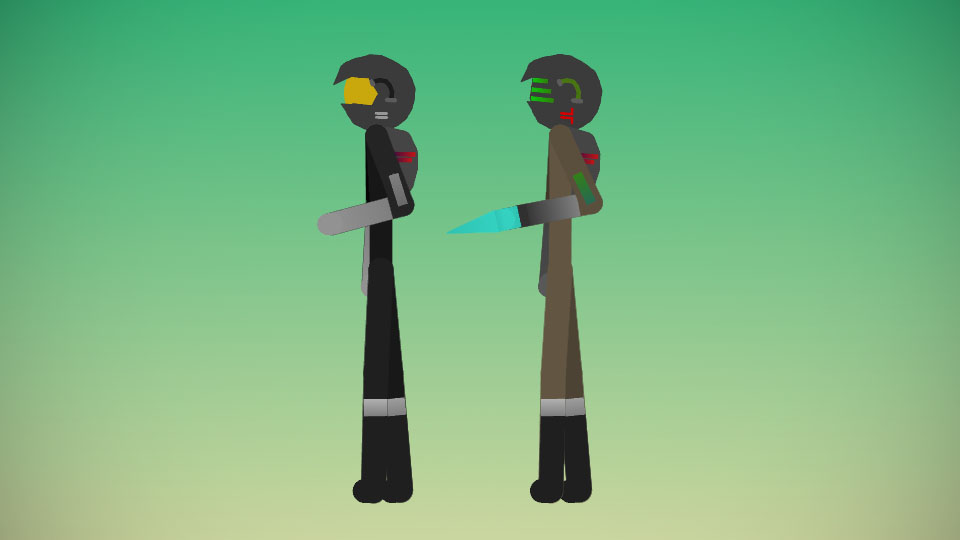
Backstory: Bravo 16, born on January 15th, 2023. As Frost grew, the Engineers soon realized it was time to put him to work. He was trained to use weapons wisely by the age of 15. Don't aim your weapon unless you intend to use it. He was trained to stay alert of his surroundings, to become a mechanic. Four more years after Frost was trained, at age nineteen, he was given a suit equipped with a grappling hook to use at advantage. He was then sent out on a Mission to invade a base, God knows what's in there. How can you invade a base with only a grappling hook? You become alert and stay silent. Find a weapon. Frost found the Mechanical suit in section four of the base. After being trained, Frost was placed in Slot 16, the upper class.
Combat: 8/10
Stealth: 5/10
Awareness: 10/10
Strength: 6/10
Weapon handling: 2/10
Enginering/construction: 9/10
The Mechanical suit is slightly more enhanced. Both versions of the suit are not bulletproof. With it's fabric, Frost can easily be torn apart or even decapacitated. It was made to make your way through Space, build what you have to build, and come back. The Mechanical suit has a Blad that can impale one person at a time, or dismember.
I know the Backstory doesn't make sense, I'll try and update it later on.
Age: 19
Nickname: Bravo (16)
Backstory: Bravo 16, born on January 15th, 2023. As Frost grew, the Engineers soon realized it was time to put him to work. He was trained to use weapons wisely by the age of 15. Don't aim your weapon unless you intend to use it. He was trained to stay alert of his surroundings, to become a mechanic. Four more years after Frost was trained, at age nineteen, he was given a suit equipped with a grappling hook to use at advantage. He was then sent out on a Mission to invade a base, God knows what's in there. How can you invade a base with only a grappling hook? You become alert and stay silent. Find a weapon. Frost found the Mechanical suit in section four of the base. After being trained, Frost was placed in Slot 16, the upper class.
Combat: 8/10
Stealth: 5/10
Awareness: 10/10
Strength: 6/10
Weapon handling: 2/10
Enginering/construction: 9/10
The Mechanical suit is slightly more enhanced. Both versions of the suit are not bulletproof. With it's fabric, Frost can easily be torn apart or even decapacitated. It was made to make your way through Space, build what you have to build, and come back. The Mechanical suit has a Blad that can impale one person at a time, or dismember.
I know the Backstory doesn't make sense, I'll try and update it later on.
Age: 19
This download is a ZIP of 2 files
Bravo 16 (Mechanical Riot Suit) (9.27kb)
Bravo 16 (Blood Hawk Engineering Suit v4) (7.11kb)
Problem with this submission?
Please log in to report this file.





Other popular submissions in people category


What about bravo 15?
I’m afraid he’s back at home, eating chocolate pudding with ice.