

(Guest)
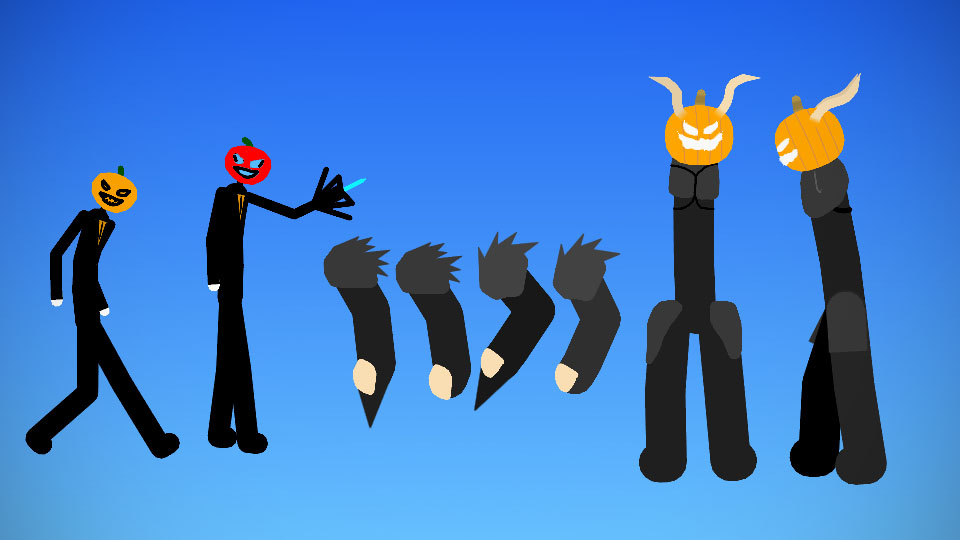
Ok heres the story of sinister X, He was made During halloween 2018 I Didnt submit him because I didnt know how. So i just kepthim until i found him just today, I loved How cool i named him it was like A Cool name i Couldnt get over it. So thats the story of sinister x
#Spooky #Oc
#Spooky #Oc
This download is a ZIP of 10 files
Sinister X Machine Form (6.57kb)
Sinister X (6.35kb)
Sinister-X-Spooky-Ver Arm 1 (3.13kb)
Sinister-X-Spooky-Ver Arm 2 (3.21kb)
Sinister-X-Spooky-Ver Arm 3 (2.97kb)
Sinister-X-Spooky-Ver Arm 4 (2.89kb)
Sinister-X-Spooky-Ver Front Body (9.12kb)
Sinister-X-Spooky-Ver Front Head (12.49kb)
Sinister-X-Spooky-Ver Side Body (3.05kb)
Sinister-X-Spooky-Ver Side Head (9.24kb)
Problem with this submission?
Please log in to report this file.





Other popular submissions in people category


You didn’t credit who made the pumpkin
wait who made it?
Forgot the name
Just search pumpkin until you find it