
Joined:Oct 24, 2021
Uploads:280
Features:23
UC Wins:109


Oct 2nd, 2023
( 3 thumbs )
( 3 thumbs )
 1st
1st 2nd
2nd 3rd
3rd
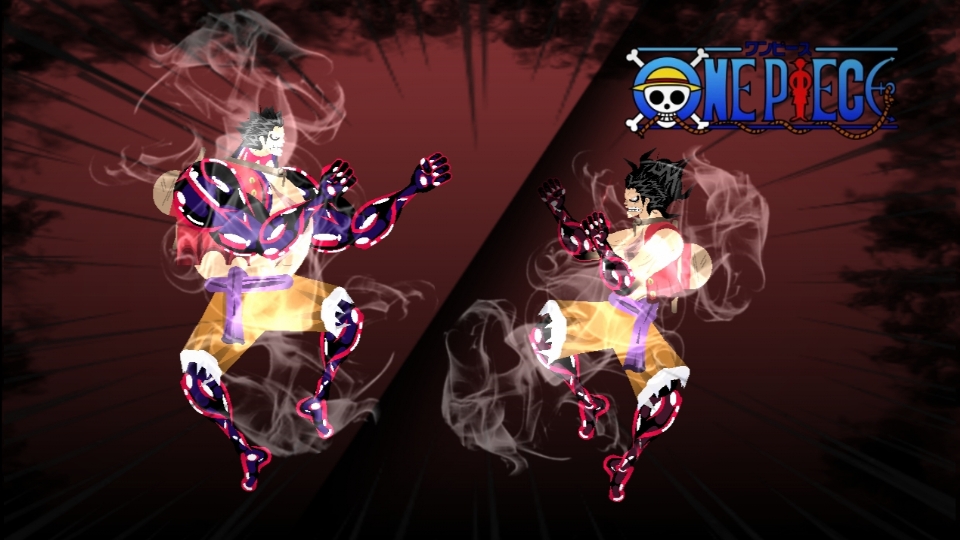
I wanted to show the animation of the "king cobra" and "king Kong" technique, but unfortunately I can only send a 25mb gif, I was just going to do it so that people could understand how it works..So I hope you can use these sticks
Ralph's edit: M8 do a Youtube video and just link it
#onepiece
Ralph's edit: M8 do a Youtube video and just link it
#onepiece
Oct 2nd, 2023
( 3 thumbs )
( 3 thumbs )
1st2nd3rdThis download is a ZIP of 12 files
Luffy(Gear fourth)Arm back (14.37kb)
Luffy(Gear fourth)Arm front (13.96kb)
Luffy(Gear fourth)Body (30.25kb)
Luffy(Gear fourth)Hand (12.98kb)
Luffy(Gear fourth)Head (20.85kb)
Luffy(Gear fourth)King Kong (16.42kb)
Luffy(Gear Snakeman)Arm back (11.99kb)
Luffy(Gear Snakeman)Arm front (11.58kb)
Luffy(Gear Snakeman)Body (28.70kb)
Luffy(Gear Snakeman)Hand (10.68kb)
Luffy(Gear Snakeman)Head (27.00kb)
Luffy(Gear Snakeman)King Snake (26.27kb)
Problem with this submission?
Please log in to report this file.


Other submissions by MTH-:LTC(090


super saiyan luffy
True ralph
🔥🔥 nice
Go Yorichi and Hunter’s metka
Saitama!Saitama!
Amazing
HOW DID YOU EVEN MAKE THIS HUUUHHHHH THIS IS TOOO GOOOOOODDDDDD