

Joined:Jan 8, 2026
Uploads:44
Features:0
UC Wins:0


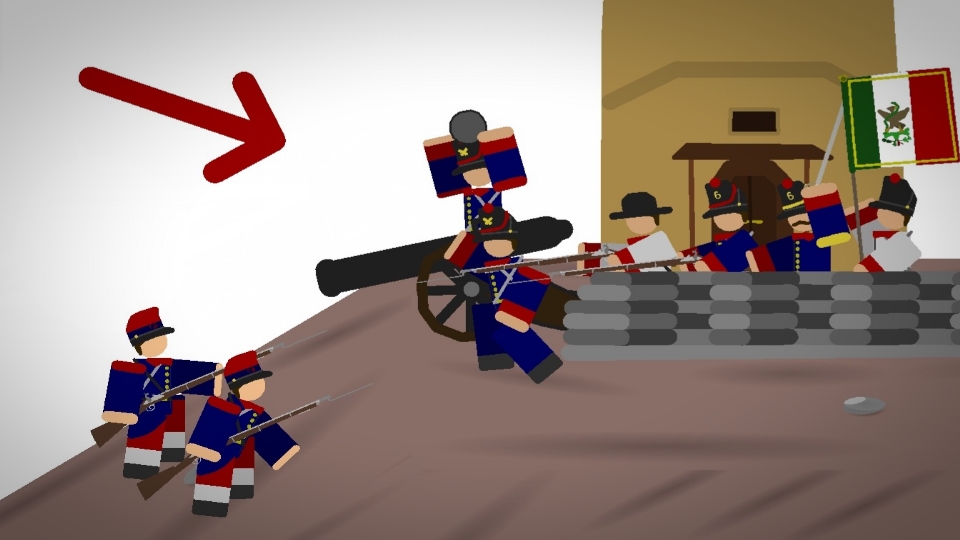
From the Independence of Mexico in 1821 to the Alamo, new technology and problems came, mainly of the second french intervention in the 1860s, but Mexico held ground, especially at the battle of puebla in 1862, and soon won the war with US aid in 1867, overall many men fought and saw the battles that made mexico into a better power. "Viva Mexico!"
#Mexico #USA #France #soldier #roblox
#Mexico #USA #France #soldier #roblox
This download is a ZIP of 15 files
Mexican Banner or Flag (19.90kb)
Mexican Infantry (2rd Regiment) (19.57kb)
Mexican Infantry (6th Regiment) (27.06kb)
Mexican Infantry (militia 1) (14.49kb)
Mexican Infantry (militia 2) (16.52kb)
Mexican Infantry (militia 3) (17.03kb)
Mexican infantry Arm (2rd Regiment) (1.04kb)
Mexican infantry Arm (6th Regiment) (1.04kb)
Mexican infantry Arm (Artillery) (1.04kb)
Mexican Infantry (Artillery) (26.93kb)
Mexican infantry Arm (militia 1) (1.04kb)
Mexican infantry Arm (militia 2) (1.04kb)
Mexican infantry Arm (militia 3) (1.04kb)
Mexican Officer (6th Regiment) (27.57kb)
Mexican Officer Arm (6th Regiment) (1.04kb)
Problem with this submission?
Please log in to report this file.


Other popular submissions in people category


