
Another month and this elusive 1.6.0 update still isn’t out. What gives?
Great question!
No, but seriously, all the technical talk aside, it’s been difficult to get things working the way I want them working (in a cross-platform solution), but I believe I’m coming down the home-stretch. I’d estimate 1.6.0 will be available for Android users within a week or two. Not sure about the release time for the iOS update yet, as that has it’s own issues I’ve yet to look into, but I’ll have more information about that after I’m done with the Android update.
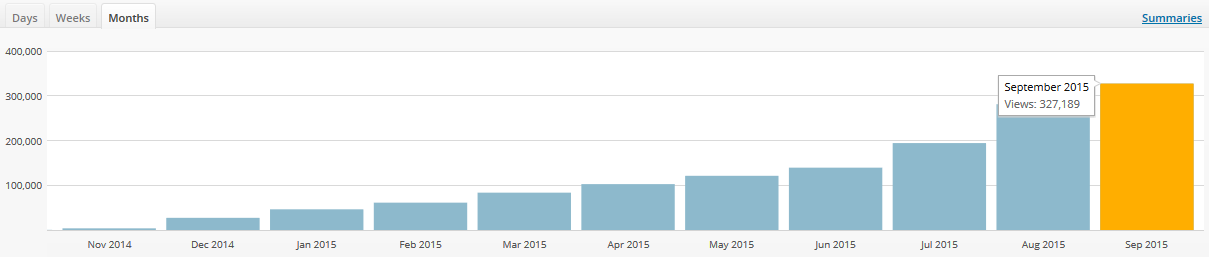
In the meantime, do you see these stats up there (website hits)? September was the biggest month for Stick Nodes yet. It’s insane how the userbase keeps growing month after month. A majority of it is due to you guys, I know many of you share Stick Nodes with your friends and even post your animations on Youtube, Twitter, and Facebook – and I very much appreciate it.

It’s getting harder and harder for me to select just a few stickfigures for the “best of” montages I do each month. I used to just be able to grab the entire month’s worth of submissions, but now the monthly submissions have risen by at least 5x since then – so that’s no longer viable.
Anyway, glad you guys are really enjoying the app, makes me want to continue to develop it to make it even better. Hopefully it won’t take another month for another news post, I plan on having this 1.6.0 update out by then (again, at least for Android users).

Hey Sean. I can’t post forums anymore right?
Can you Optimize it for Smartphone?
In terms of performance, it’s pretty optimal. There may be slowdowns here and there regardless of your device but it depends on the amount of data (many stickfigures/nodes = lots of processing per second).
In terms of the UI (which I feel is what you’re referring) – sorry, but probably not. Stick Nodes is targeted more for larger phones/tablets (mainly due to the processing power required) so the small UI on small/old devices isn’t a priority.
What about colour transparency? Ralph, answer me.
Tell you what, $5 and I’ll give you an answer.
I’m kidding.
Maybe.
But I’ve answered this one a lot too, long story short due to the power limitations of mobile devices, opacity/transparency probably won’t happen, sorry.
But you do it with background image in creating mode…
i suggest a option for move the figures in a direction for quick movements for animators that want to move a figure in a certain direction with out move in other 😀
I think I get what you’re asking, and it wouldn’t be a bad idea. Do you have any ideas as to how to implement it? In other words, how could you activate this type of movement in a simplistic manner for the user?
If I understand correctly, a simple way to do that would be a coordinates system, have a number box for x and y axis’s, so 100 or 1000 is the max in either direction and -1000 is the opposite.
Or something.
Nah that’s crap.
In Photoshop/Flash, for example, holding shift forces movement in only one direction, x-axis or y-axis.
Stop trying to make Stick Nodes like an Adobe product, it’s not going to happen. #meangirls
My idea is better anyway.
im thinking in floating menu but that cant be…
What about direction arrows? when you enable the option pop ups a menu with directional arrows
I want those big dudes
can I have the big dudes
The big dudes are cool
WOW
Hmmm ok