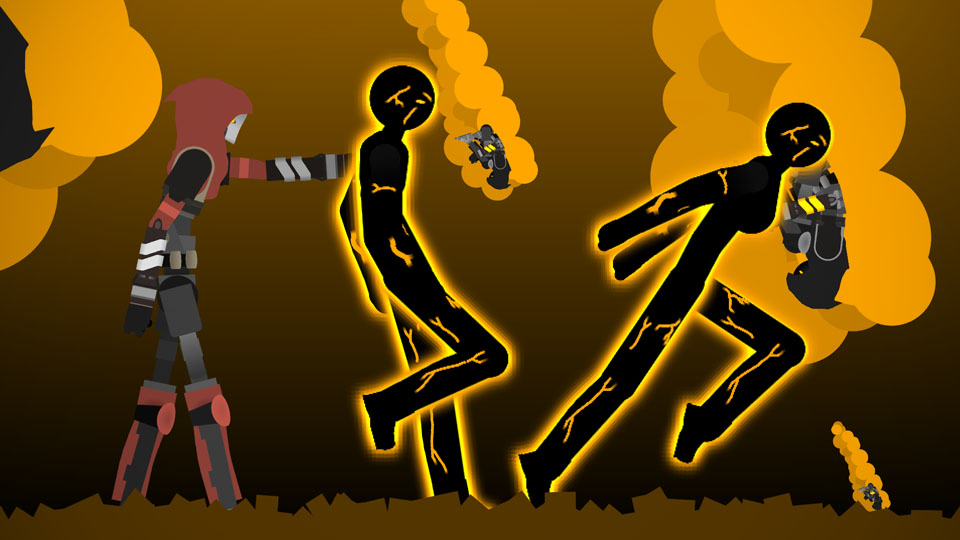
Apex Legends Crypto Pack

Apex Legends Crypto Pack
përky@dravenravenProfile Photo

Joined:Jul 6, 2017

Uploads:48

Features:3

UC Wins:18

occifersubscriberpro-noderfeatured-lvl1uc-winner-lvl3

File:Apex-Legends-Crypto-Pack.zip (56.9 KB)

Date:February 7, 2020

Category:Packs
People

Need 3 thumbs for Users Choice badge!
Profile Photo1st
Crypto is a Korean hacker from Angel City. He had a sister but she's dead or something and he got blamed so now he's on the run and wanted.

This description would be better if I could use my copied clipboard and paste it all here. Thanks for that.

Ralph's edit: You coulda pasted it in the email tho

#Apex

Need 3 thumbs for Users Choice badge!

Profile Photo1st
Download File

Downloaded 2,103 times

(Downloaded 2 times this week)


Rate this stickfigure!
It helps choose the daily feature.

Vote count: 8

This download is a ZIP of 11 files

  • Apex Legends - Legends - Crypto - Fullbody (Pocket Inefficient) (23.84kb)

  • Apex Legends - Legends - Crypto - Torso (Drone Compatible) (20.80kb)

  • Apex Legends - Legends - Crypto - Fullbody (Drone Compatible) (23.84kb)

  • Apex Legends - Legends - Crypto - Fullbody (Pocket Nonfunction) (23.69kb)

  • Apex Legends - Legends - Crypto - Pocket (0.88kb)

  • Apex Legends - Legends - Crypto - ArmB (1.58kb)

  • Apex Legends - Legends - Crypto - Torso (Pocket Compatible) (20.41kb)

  • Apex Legends - Legends - Crypto - ArmA (1.66kb)

  • Apex Legends - Legends - Crypto - Torso (20.64kb)

  • Apex Legends - Abilities - Crypto Survelliance Drone (4.65kb)

  • Apex Legends - Legends - Crypto - Fullbody (23.69kb)

Android How to download stickfigures & sounds:

  • As of 3.2.0, Stick Nodes will no longer automatically find downloaded files in your /downloads/ folder. You must open the file with Stick Nodes explicitly for it to be moved into the correct folder.
  • Download a NODES (or STK) or ZIP file. When done, tap it and "Open With" > "Stick Nodes". See this image for an example.
  • Sounds: Download an MP3 file < 256kb. When done, tap it and "Open With" > "Stick Nodes"..

IOS 13+ How to download stickfigures & sounds:

  • If using Chrome or Firefox, download a NODES (or STK) or ZIP file, select the file and "Open in Stick Nodes" after finished downloading.
  • If using Safari, download a NODES (or STK) or ZIP file, follow these directions.
  • Also for ZIP files, check out this quick and informative tutorial by Auto-Angel.
  • Sounds: With Safari, follow these directions.

Problem with this submission?
Please log in to report this file.

avatar
2 Comment threads
2 Thread replies
0 Followers
 
Most reacted comment
Hottest comment thread
4 Comment authors
Demonic?Daun1lessSonTerminatorRalph (Developer) Recent comment authors
Daun1less
Daun1less

Can You Make Octane?