
Joined:Dec 5, 2017
Uploads:13
Features:1
UC Wins:4


Apr 27th, 2020
( 3 thumbs )
( 3 thumbs )
 1st
1st 2nd
2nd 3rd
3rd
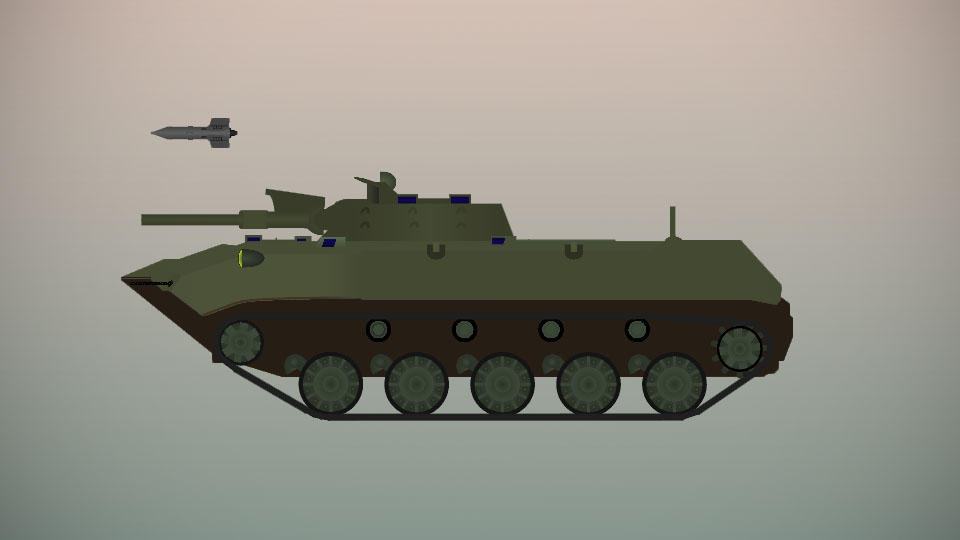
The BMD-1 (Boyevaya Mashina Desanta, Боевая Машина Десанта which means in Russian "fighting vehicle for the airborne") is an airborne infantry fighting vehicle.
It was put in service in 1969 and was developed as a lighter version of the successful BMP-1 so that it could be carried by aircraft. It is armed with the same 73mm 2A28 "Grom" and the 9M14 Malyutka (Малютка) Anti tank guided missile as the BMP-1 and uses the same turret. It can fire HEAT (with about 280- 350mm of penetration of RHA) and HE shells. The malyutka ATGM is fired from a launcher above the barrel and can penetrate about 400mm or RHA.
It is also armed with a coaxial 7.62mm PKT machine gun and 2 7.62mm PKT machine guns in the hull.
The BMD-1 has a top speed of 80km/h on road, 45km/h off road and 10km/h in water (yes it's amphibious). The gun can depress 4° and elevate up to 15°. It is protected by a welded aluminium alloy 10-33mm thick in various areas of the vehicle.
It is crewed by 4 men (1 gunner in the turret, a driver, commander and bow machinegunner all 3 of which are sat in the hull) and can seat another 3 men in the troop compartment in the back. The commander and machinegunner can be compromised to fight as extra 2 infantrymen.
#VDV #IFV #tank #russia
It was put in service in 1969 and was developed as a lighter version of the successful BMP-1 so that it could be carried by aircraft. It is armed with the same 73mm 2A28 "Grom" and the 9M14 Malyutka (Малютка) Anti tank guided missile as the BMP-1 and uses the same turret. It can fire HEAT (with about 280- 350mm of penetration of RHA) and HE shells. The malyutka ATGM is fired from a launcher above the barrel and can penetrate about 400mm or RHA.
It is also armed with a coaxial 7.62mm PKT machine gun and 2 7.62mm PKT machine guns in the hull.
The BMD-1 has a top speed of 80km/h on road, 45km/h off road and 10km/h in water (yes it's amphibious). The gun can depress 4° and elevate up to 15°. It is protected by a welded aluminium alloy 10-33mm thick in various areas of the vehicle.
It is crewed by 4 men (1 gunner in the turret, a driver, commander and bow machinegunner all 3 of which are sat in the hull) and can seat another 3 men in the troop compartment in the back. The commander and machinegunner can be compromised to fight as extra 2 infantrymen.
#VDV #IFV #tank #russia
Apr 27th, 2020
( 3 thumbs )
( 3 thumbs )
1st2nd3rdThis download is a ZIP of 4 files
BMD-1 Turret (16.12kb)
BMD-1 Suspension (24.39kb)
9M14 Malyutka ATGM (8.23kb)
BMD-1 Hull (16.00kb)
Problem with this submission?
Please log in to report this file.
Other popular submissions in vehicles category


BMD-2 when?
Ngl you made me remember this exists n sht (and also look at maybe a slight revamp to it with an addition of the bmd-2)