

Joined:Sep 12, 2020
Uploads:42
Features:1
UC Wins:4


Need 3 thumbs for Users Choice badge!
 1st
1st
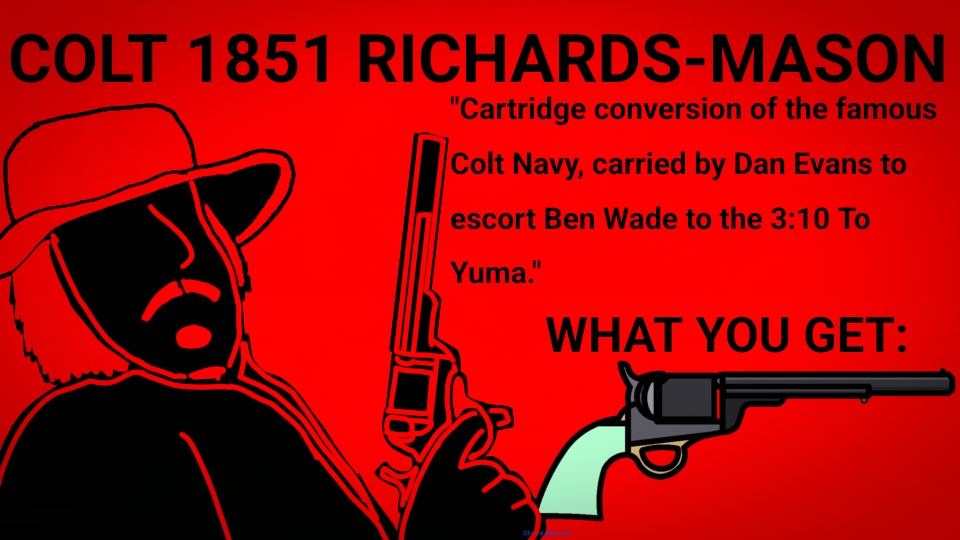
The Colt 1851 Navy Richards-Mason Conversion is a fascinating and historically important revolver that represents the transitional period between percussion arms and metallic cartridge revolvers in the American West. Originally introduced in 1851, the Colt Navy was one of the most popular percussion revolvers of the 19th century. It was a .36 caliber, six-shot, cap-and-ball revolver, favored for its balance, accuracy, and handling. Used extensively during the Civil War and by lawmen, outlaws, soldiers, and Texas Rangers in the postwar frontier.
After the Civil War however, metallic cartridges quickly began to replace percussion caps and paper cartidges. To adapt to the changing firearms landscape, Colt needed to modernize its popular percussion models without discarding its large inventory. Engineers Charles Brinckerhoff Richards and William Mason, both working for Colt, developed a system to convert existing percussion revolvers into metallic cartridge revolvers. This system, known as the Richards-Mason conversion, was applied to several Colt models, including the 1851 Navy.
The Richards-Mason conversion of the 1851 Navy involved several key modifications: the original percussion cylinder was either replaced or machined to accept .38 caliber centerfire cartridges, A breechplate (conversion ring) was installed at the rear of the frame, which included a firing pin and a loading gate for inserting cartridges. A spring-loaded ejector rod was mounted beneath the barrel, allowing users to extract spent casings, and a hammer altered or replaced to strike the firing pin instead of a percussion cap.
Unlike Colt’s later factory-built cartridge revolvers, the Richards-Mason conversions retained much of the look and feel of the original percussion gun, the octagonal barrel, open-top frame, and slender frame remained intact, allowing gunslingers to keep their favorite guns, but now easier and faster to reload.
#Madness #gun #revolver
After the Civil War however, metallic cartridges quickly began to replace percussion caps and paper cartidges. To adapt to the changing firearms landscape, Colt needed to modernize its popular percussion models without discarding its large inventory. Engineers Charles Brinckerhoff Richards and William Mason, both working for Colt, developed a system to convert existing percussion revolvers into metallic cartridge revolvers. This system, known as the Richards-Mason conversion, was applied to several Colt models, including the 1851 Navy.
The Richards-Mason conversion of the 1851 Navy involved several key modifications: the original percussion cylinder was either replaced or machined to accept .38 caliber centerfire cartridges, A breechplate (conversion ring) was installed at the rear of the frame, which included a firing pin and a loading gate for inserting cartridges. A spring-loaded ejector rod was mounted beneath the barrel, allowing users to extract spent casings, and a hammer altered or replaced to strike the firing pin instead of a percussion cap.
Unlike Colt’s later factory-built cartridge revolvers, the Richards-Mason conversions retained much of the look and feel of the original percussion gun, the octagonal barrel, open-top frame, and slender frame remained intact, allowing gunslingers to keep their favorite guns, but now easier and faster to reload.
#Madness #gun #revolver
Need 3 thumbs for Users Choice badge!
1stThis download is a ZIP of 2 files
Colt_1851_Richards-Mason (12.61kb)
Colt_1851_Richards-Mason_Cylinder (1.06kb)
Problem with this submission?
Please log in to report this file.









Other popular submissions in weapons category


still yee’ing your last haw i see
It’s what i do best.
Also accept my Colt Walker stick for gods sake.