
Joined:Sep 12, 2020
Uploads:42
Features:1
UC Wins:4


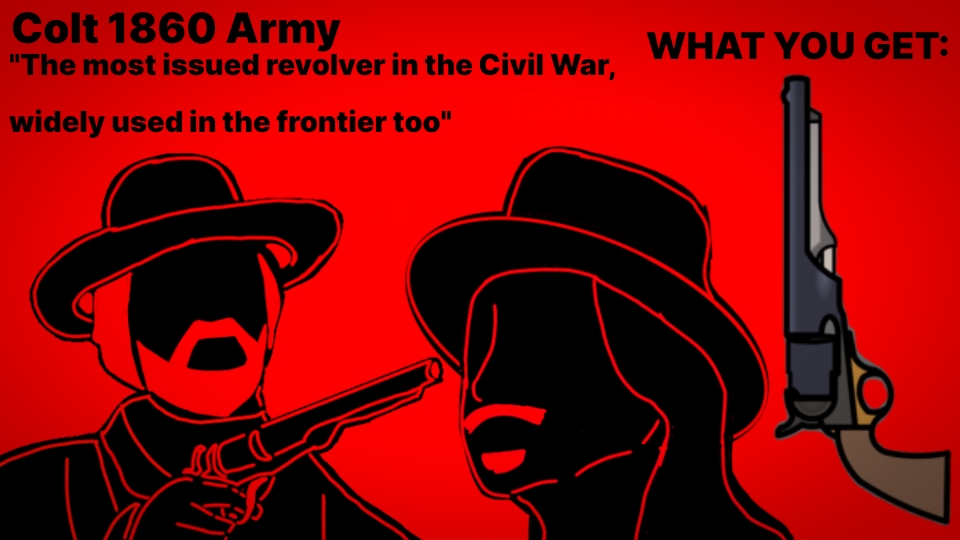
The Colt Army Model 1860 is a cap & ball .44-caliber single-action revolver used during the American Civil War made by Colt's Manufacturing Company.
The Colt 1860 Army uses the same size frame as the .36 caliber 1851 Navy revolver. The frame is relieved to allow the use of a rebated cylinder that enables the Army to be chambered in .44 caliber. The barrel on the 1860 Army has a forcing cone that is visibly shorter than that of the 1851 Navy, allowing the Army revolver to have a longer cylinder. Another distinguishing feature of the Colt 1860 Army, first introduced on the Colt 1855 Sidehammer Revolver, is the "creeping" loading lever.
More than 200,000 were manufactured from 1860 through 1873. Colt's biggest customer was the US Government with no less than 129,730 units being purchased and issued to the troops, but some other buyers of the gun were the Confederate States, Native Americans, The United Kingdom, Canada, Australia, The Empire of Japan, The Empire of Brazil, And The Mexican Empire.
Famous users of the gun include Wild Bill Hickok, that while better known for carrying 1851 Navy Colts, he is know to have owned a pair of 1860 Army conversions.
John Wesley Hardin, The Texas gunfighter and outlaw was said to have favored powerful percussion revolvers including the 1860 Army during his early years.
And like many ex-Confederate guerrillas, the James-Younger gang used 1860 Armies left over from the war during the early years.
#Madness #gun #revolver
The Colt 1860 Army uses the same size frame as the .36 caliber 1851 Navy revolver. The frame is relieved to allow the use of a rebated cylinder that enables the Army to be chambered in .44 caliber. The barrel on the 1860 Army has a forcing cone that is visibly shorter than that of the 1851 Navy, allowing the Army revolver to have a longer cylinder. Another distinguishing feature of the Colt 1860 Army, first introduced on the Colt 1855 Sidehammer Revolver, is the "creeping" loading lever.
More than 200,000 were manufactured from 1860 through 1873. Colt's biggest customer was the US Government with no less than 129,730 units being purchased and issued to the troops, but some other buyers of the gun were the Confederate States, Native Americans, The United Kingdom, Canada, Australia, The Empire of Japan, The Empire of Brazil, And The Mexican Empire.
Famous users of the gun include Wild Bill Hickok, that while better known for carrying 1851 Navy Colts, he is know to have owned a pair of 1860 Army conversions.
John Wesley Hardin, The Texas gunfighter and outlaw was said to have favored powerful percussion revolvers including the 1860 Army during his early years.
And like many ex-Confederate guerrillas, the James-Younger gang used 1860 Armies left over from the war during the early years.
#Madness #gun #revolver
This download is a ZIP of 2 files
Colt_1860_Army (10.30kb)
Colt_1860_Army_Cylinder (2.00kb)
Problem with this submission?
Please log in to report this file.








Other popular submissions in weapons category


