
Joined:Jul 16, 2017
Uploads:39
Features:1
UC Wins:2


Need 3 thumbs for Users Choice badge!
 1st
1st 2nd
2nd
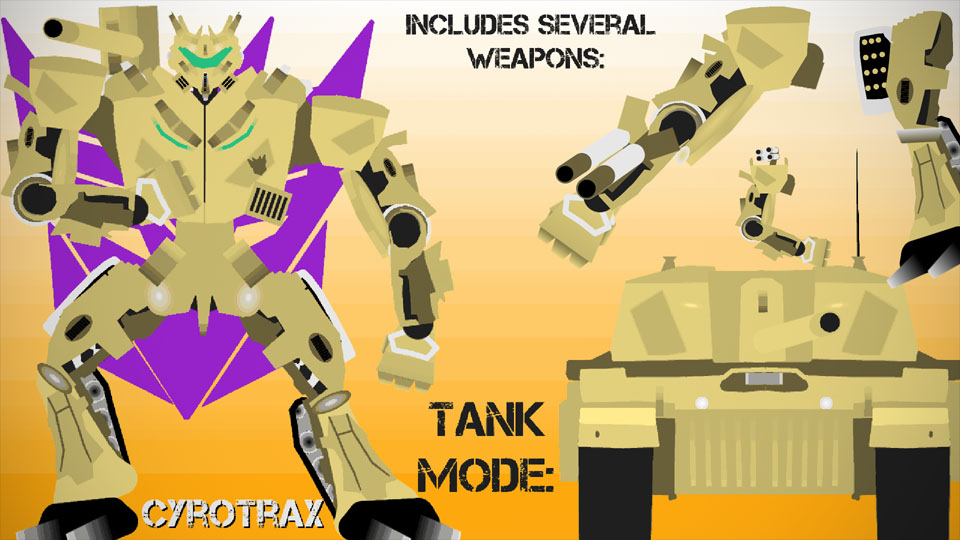
A heavily-armored Decepticon.
Cyrotrax (Pronounced sigh-ro-tracks) is armed to the teeth with weapons, having his alt mode's turret on his shoudler, 4 blasters ln each shouder pad, twin blasters on each arm, and leg-mounted missile pods. And of course, he's packing weaponry in his alternate mode, too, as it's a tank!
Cyrotrax was named and thought up by Ramox, but he asked me to make it into a fig, so credit to him for that stuff.
NOTE: Part of the tank mode only comes as a half. To complete the look, copy/paste it, flip it, and join the halves together. Then, join the turret to it, and you've got a tank mode. You’ll also have to mess with the antennae on the second half, so it looks like the tank in the thumbnail.
#Transformers #Decepticon #ThatsALottaWeapons #Tank
Cyrotrax (Pronounced sigh-ro-tracks) is armed to the teeth with weapons, having his alt mode's turret on his shoudler, 4 blasters ln each shouder pad, twin blasters on each arm, and leg-mounted missile pods. And of course, he's packing weaponry in his alternate mode, too, as it's a tank!
Cyrotrax was named and thought up by Ramox, but he asked me to make it into a fig, so credit to him for that stuff.
NOTE: Part of the tank mode only comes as a half. To complete the look, copy/paste it, flip it, and join the halves together. Then, join the turret to it, and you've got a tank mode. You’ll also have to mess with the antennae on the second half, so it looks like the tank in the thumbnail.
#Transformers #Decepticon #ThatsALottaWeapons #Tank
Need 3 thumbs for Users Choice badge!
1st2ndThis download is a ZIP of 6 files
Cyrotrax Tank Mode 2 (Turret) (3.32kb)
Cyrotrax Leg (20.67kb)
Cyrotrax Head (10.20kb)
Cyrotrax Arm (17.30kb)
Cyrotrax Torso (15.55kb)
Cyrotrax Tank Mode 1 (13.20kb)
Problem with this submission?
Please log in to report this file.


Other submissions by Kaijynn


these transformer figs are all really amazing, this one included
butt ya’ll need to start focusing on side-views
you can’t do much with just a front view :/
I dunno about other peeps, but I plan on making a side view of my bois. I just figured “why not make the front view have a pack of its own?”, because that way, the pack doesn’t have like 50 stickfigures.
Looks pretty good
OH HELL YEAH
Thanks kaiju
No problem.
I found this hard to use, but it looks good
Transformers figs of this style are admittedly somewhat difficult to use, it takes getting used to.
BADASS
Thanos as a robot
luke want that snake