

Joined:Aug 11, 2020
Uploads:99
Features:0
UC Wins:22


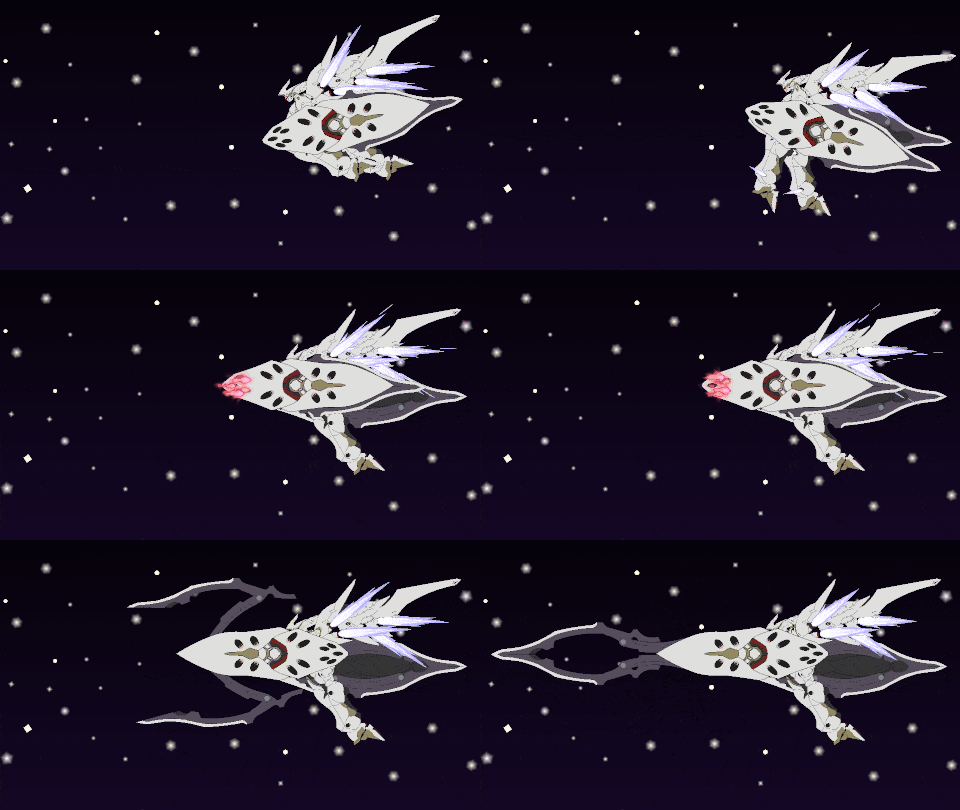
Tharsis (タルシス, Tarushisu) is a Martian Kataphrakt that appears in the ALDNOAH.ZERO television series. It was originally the personal Kataphrakt of Count Cruhteo, an Orbital Knight, until it was later given to and piloted by Count Slaine Saazbaum Troyard, also an Orbital Knight.
The Tharsis is equipped with an Aldnoah Drive that seems to possess limited precognitive abilities - it allows the pilot to see up to 6 hours into the future through its screen. The Tharsis is also a fast Kataphrakt, utilizing maneuvering thrusters to increase mobility on ground and air. This, along with the Tharsis' precognitive abilities, gives it incredible mobility, allowing it to close the distance to the next enemy very quickly and also evade enemy fire with ease. However, the pilot must have fast enough reactions and the piloting skills for Tharsis' precognitive ability to become a significant advantage. The Tharsis is also equipped with two shields, both of which conceal machine guns for ranged combat and blades for close ranged combat.
Armaments:
2x Arm Shields Each of the arms has a large shield mounted on it.
4x Single Edged Concave Blades These blades are stored on the shields, 2 per, usually combined to create a single double edged blade, though the blades can be separated slightly to create a split blade.
10x Machine Guns There are 5 per shield. They are stored on the back of the Tharsis' shield, opposite the blades.
After the death of Count Cruhteo, the Tharsis was taken by Count Saazbaum and moved to his Landing Castle, who remarked the deceased Count Cruhteo was unworthy of the Kataphrakt, possibly implying Cruhteo was not good enough of a pilot to make the most out of Tharsis's precognitive ability, although that could just simply be him insulting Cruhteo.
During the siege on Castle Saazbaum, Slaine returns and enters the Tharsis in the Kataphrakt chamber. Surprisingly, the Tharsis activates for Slaine, even though he himself believes he doesn't possess the activation factor. He seemingly uses it to try and find Princess Asseylum Vers Allusia. Upon hearing Count Saazbaum was in danger, Slaine attempts to reach him instead, easily dodging fire from multiple KG-7 Areions in the process. He eventually finds the Count and stopped Inaho Kaizuka from finishing him off after hearing his speech on his goal of 'ending the cycle of hatred' between Mars and Earth.
Slaine had used the Tharsis in conjuncture with the Dioscuria's Sub-lifter Flight Pack to escape Castle Saazbaum with Saazbaum and Princess Asseylum after it had fallen to the United Forces of Earth.
19 months later, Slaine is seen in the Satellite Belt defeating Andalusia Platoon after their attack on the Martian Transports.
#Mecha #Aldnoah #mech
The Tharsis is equipped with an Aldnoah Drive that seems to possess limited precognitive abilities - it allows the pilot to see up to 6 hours into the future through its screen. The Tharsis is also a fast Kataphrakt, utilizing maneuvering thrusters to increase mobility on ground and air. This, along with the Tharsis' precognitive abilities, gives it incredible mobility, allowing it to close the distance to the next enemy very quickly and also evade enemy fire with ease. However, the pilot must have fast enough reactions and the piloting skills for Tharsis' precognitive ability to become a significant advantage. The Tharsis is also equipped with two shields, both of which conceal machine guns for ranged combat and blades for close ranged combat.
Armaments:
2x Arm Shields Each of the arms has a large shield mounted on it.
4x Single Edged Concave Blades These blades are stored on the shields, 2 per, usually combined to create a single double edged blade, though the blades can be separated slightly to create a split blade.
10x Machine Guns There are 5 per shield. They are stored on the back of the Tharsis' shield, opposite the blades.
After the death of Count Cruhteo, the Tharsis was taken by Count Saazbaum and moved to his Landing Castle, who remarked the deceased Count Cruhteo was unworthy of the Kataphrakt, possibly implying Cruhteo was not good enough of a pilot to make the most out of Tharsis's precognitive ability, although that could just simply be him insulting Cruhteo.
During the siege on Castle Saazbaum, Slaine returns and enters the Tharsis in the Kataphrakt chamber. Surprisingly, the Tharsis activates for Slaine, even though he himself believes he doesn't possess the activation factor. He seemingly uses it to try and find Princess Asseylum Vers Allusia. Upon hearing Count Saazbaum was in danger, Slaine attempts to reach him instead, easily dodging fire from multiple KG-7 Areions in the process. He eventually finds the Count and stopped Inaho Kaizuka from finishing him off after hearing his speech on his goal of 'ending the cycle of hatred' between Mars and Earth.
Slaine had used the Tharsis in conjuncture with the Dioscuria's Sub-lifter Flight Pack to escape Castle Saazbaum with Saazbaum and Princess Asseylum after it had fallen to the United Forces of Earth.
19 months later, Slaine is seen in the Satellite Belt defeating Andalusia Platoon after their attack on the Martian Transports.
#Mecha #Aldnoah #mech
How to use: This download is a Movieclip file. If it contains a joined figure, you can access it by going into the Movieclip object (edit it) and then copying the entire assembled figure inside.Filters: Remember, Movieclip objects may use filters, and if you don't have Stick Nodes Pro these filters will not work and the Movieclip may look very different.
Download File
Downloaded 1,809 times
(Downloaded 21 times this week)
Problem with this submission?
Please log in to report this file.


Other submissions by Asmodeus


Sweet! It’s pretty good. Who’s gonna be next?