


(Guest)
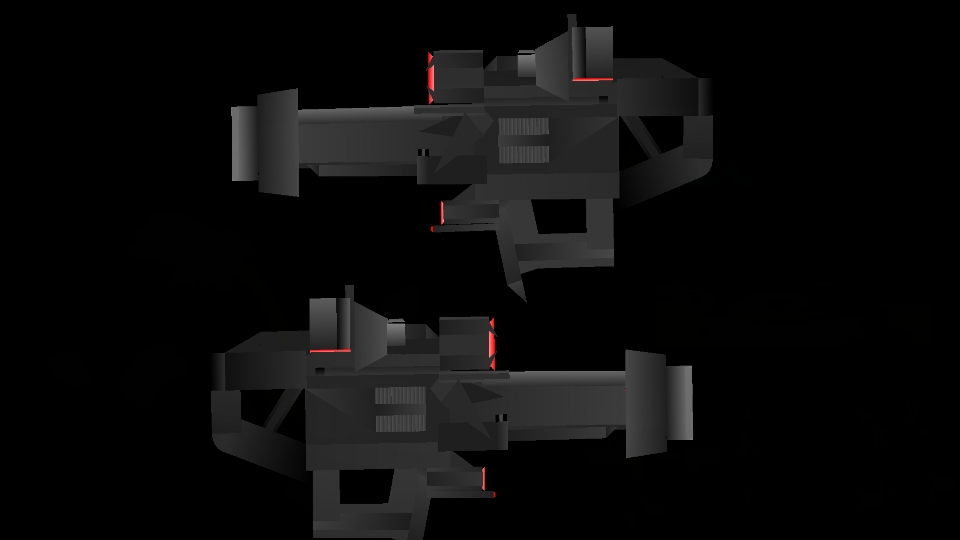
Esta es el arma de Megatron ( a parte de su cañón) de la ptimera película de Transformers del Bayverse.
Para colocarla en el brazo de mi pack, sólo hay que mover la mano hacia atrás y esconderla en el brazo( a la hora de animar se tienen que mover los dedos hacia atrás y de una forma más real) y colocar el arma en el brazo.
Espero que os guste y Hail Megatron!! ;')
#Transformers
Ralph's free translation:
This is Megatron's weapon (apart from his cannon) from the first Transverse film of the Bayverse.
To place it in the arm of my pack, you just have to move your hand backwards and hide it in your arm (when animating you have to move your fingers backwards and in a more real way) and place the weapon in your arm
I hope you like it and Hail Megatron! ; ')
Para colocarla en el brazo de mi pack, sólo hay que mover la mano hacia atrás y esconderla en el brazo( a la hora de animar se tienen que mover los dedos hacia atrás y de una forma más real) y colocar el arma en el brazo.
Espero que os guste y Hail Megatron!! ;')
#Transformers
Ralph's free translation:
This is Megatron's weapon (apart from his cannon) from the first Transverse film of the Bayverse.
To place it in the arm of my pack, you just have to move your hand backwards and hide it in your arm (when animating you have to move your fingers backwards and in a more real way) and place the weapon in your arm
I hope you like it and Hail Megatron! ; ')
Problem with this submission?
Please log in to report this file.








Other popular submissions in weapons category


