
Joined:May 7, 2018
Uploads:87
Features:6
UC Wins:37


Dec 26th, 2019
( 3 thumbs )
( 3 thumbs )
 1st
1st 2nd
2nd 3rd
3rd
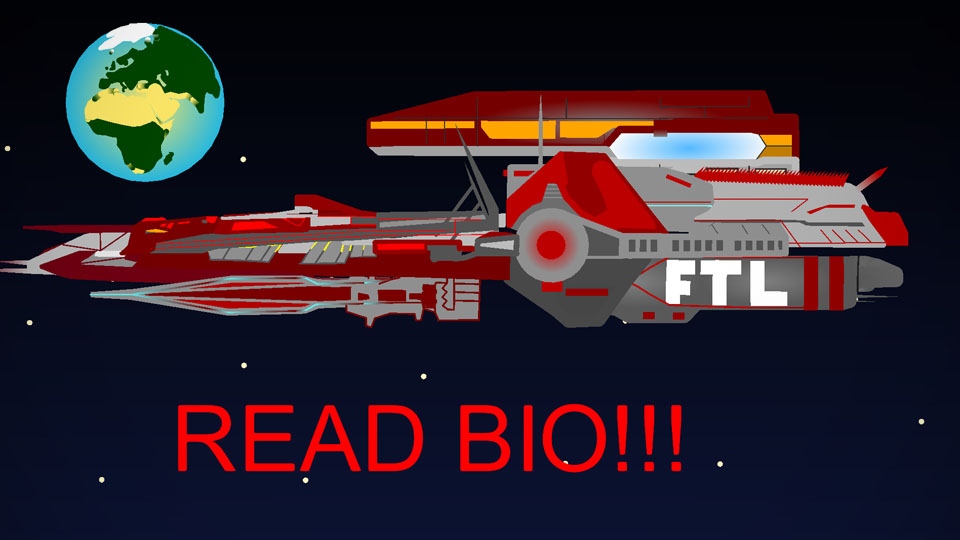
This is the Scout update of the Nukelander. (Version 1-3)
The Scout is a small “spacecraft” that is attached to the reartop of the Nukelander, it’s mostly deployed to scout, as the name says, for other spacecraft, Space Mines, debris ETC.
There is something special about this small scout, it has a water compartment located is the rear middle. This is used when being in a zone where gravity is present. Instead of using fuel, it uses the gravity to move.
Example: The scout wants to move to the right, so what is does is tilt the spacecraft to the right so the water is facing the direction to the core of the gravity, making the spacecraft heavier in the right side and getting pulled by the gravity.
In places where gravity isn’t present it uses fuel.
_____________________ATTENTION________________________
Before downloading, Remove the other Nukelander from the app.
How:
1) Go to import figure.
2) Select the previous Nukelander ( Do not press import)
3) Press ”Remove from device”
Watch this tutorial to see how to setup the nukelander V1-3:
https://www.youtube.com/watch?v=gjhOSMsyc38
This update adds a new feature to the Nukelander, if you prefer other versions, do not download this one.
Other versions :
First Nukelander: http://sticknodes.com/sticks/nukelander-the-biggest-spaceship-pack-zip/
Nukelander remastered: http://sticknodes.com/sticks/nukelander-remastered-pack-zip/
Nukelander silenttalker’s touch: http://sticknodes.com/sticks/nukelander-silenttalkers-touch-pack-zip/
Nukelander Fuel update (V1-2): http://sticknodes.com/sticks/nukelander-silenttalkers-touch-pack-zip/
#nukelander #space #ship #nuke
The Scout is a small “spacecraft” that is attached to the reartop of the Nukelander, it’s mostly deployed to scout, as the name says, for other spacecraft, Space Mines, debris ETC.
There is something special about this small scout, it has a water compartment located is the rear middle. This is used when being in a zone where gravity is present. Instead of using fuel, it uses the gravity to move.
Example: The scout wants to move to the right, so what is does is tilt the spacecraft to the right so the water is facing the direction to the core of the gravity, making the spacecraft heavier in the right side and getting pulled by the gravity.
In places where gravity isn’t present it uses fuel.
_____________________ATTENTION________________________
Before downloading, Remove the other Nukelander from the app.
How:
1) Go to import figure.
2) Select the previous Nukelander ( Do not press import)
3) Press ”Remove from device”
Watch this tutorial to see how to setup the nukelander V1-3:
https://www.youtube.com/watch?v=gjhOSMsyc38
This update adds a new feature to the Nukelander, if you prefer other versions, do not download this one.
Other versions :
First Nukelander: http://sticknodes.com/sticks/nukelander-the-biggest-spaceship-pack-zip/
Nukelander remastered: http://sticknodes.com/sticks/nukelander-remastered-pack-zip/
Nukelander silenttalker’s touch: http://sticknodes.com/sticks/nukelander-silenttalkers-touch-pack-zip/
Nukelander Fuel update (V1-2): http://sticknodes.com/sticks/nukelander-silenttalkers-touch-pack-zip/
#nukelander #space #ship #nuke
Dec 26th, 2019
( 3 thumbs )
( 3 thumbs )
1st2nd3rdThis download is a ZIP of 6 files
V1-3 Nukelander Scout (16.55kb)
V1-3 Nukelander Fuel Tank (11.73kb)
V1-3 Nukelander Bottom (26.40kb)
V1-3 Nukelander Cockpit (9.05kb)
V1-3 Nukelander Rear (28.71kb)
V1-3 Nukelander Top (24.89kb)
Problem with this submission?
Please log in to report this file.






Other submissions by Challas


ship is excellent
description is excellent
instructions to thanos snap the old ship is excellent
Hey man @silenttalker do you remember me?
I think I do. What about it?
Are you silent talker? Because it doesn’t say your username…
Yes i’m, I changed my name to ChallasFRL, if you click om my profile or @silenttalker you will see my name. You may I ask why its still @silenttalker. I canT change the @ thingy
Oh
Probably ralph will fix it in the future.
Look, i have downloaded your nukelander the original red version and i downloaded blue and the others and its like your copying the same body you use on the original but remake it into something new.
It is the same body, I just keep adding parts and in about a year it will be a ship with a lot of compartments. I have another ship called Illumea Protseacia , you can download that one, its a complete new body, but its less detialed in my opinion
I check it out and it looks pretty awesome!
Looks really awesome. I’m definitely using it!
I love the creativity
Thank you, the main base of the nukelander is just a used schematic from GE. The rest is made with my brain (the cockpit, scout and fuel tank)
Ship.
Haha the FTL logo