


Joined:Jul 6, 2017
Uploads:48
Features:3
UC Wins:18


May 19th, 2021
( 3 thumbs )
( 3 thumbs )
 1st
1st 2nd
2nd 3rd
3rd
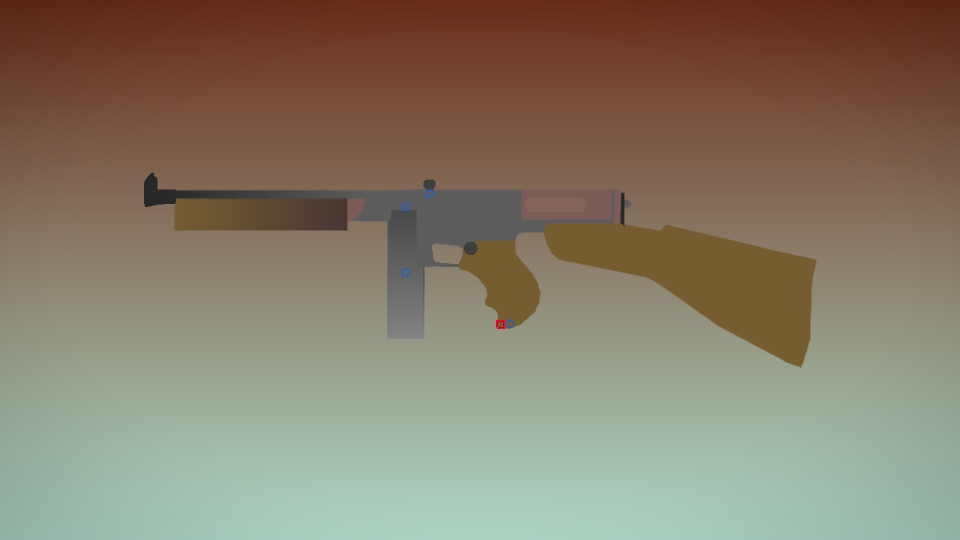
The Siegebreaker is an Assault weapon, obtainable at launch of the game and still is to this day. Being that of a cartoonified SCAR-L, it mostly retains the features of the real rifle.
With a 30-round magazine and reliable fire rate, this weapon can handle any combat situation, especially mid-range battles.
In Fortnite: Battle Royale, this weapon is known as the "Epic/Legendary Assault Rifle" and is the mascot weapon of Battle Royale for its iconic style and reliability in-game. For unknown reasons, the updated model of Chapter 2 overrides the old model in Save the World, causing the Siegebreaker to appear as the Chapter 2 Battle Royale variant. This figure is of the Chapter 1 model.
#fortnite #stw #savetheworld
With a 30-round magazine and reliable fire rate, this weapon can handle any combat situation, especially mid-range battles.
In Fortnite: Battle Royale, this weapon is known as the "Epic/Legendary Assault Rifle" and is the mascot weapon of Battle Royale for its iconic style and reliability in-game. For unknown reasons, the updated model of Chapter 2 overrides the old model in Save the World, causing the Siegebreaker to appear as the Chapter 2 Battle Royale variant. This figure is of the Chapter 1 model.
#fortnite #stw #savetheworld
May 19th, 2021
( 3 thumbs )
( 3 thumbs )
1st2nd3rdThis download is a ZIP of 4 files
Siegebreaker AR - Right (20.32kb)
Siegebreaker AR - Left (19.17kb)
Siegebreaker Magazine - Occupied (1.74kb)
Siegebreaker Magazine - Empty (1.33kb)
Problem with this submission?
Please log in to report this file.




Other submissions by perky


Bro is that the new fortnite
Nope.avi