
Joined:Jun 21, 2019
Uploads:70
Features:1
UC Wins:20


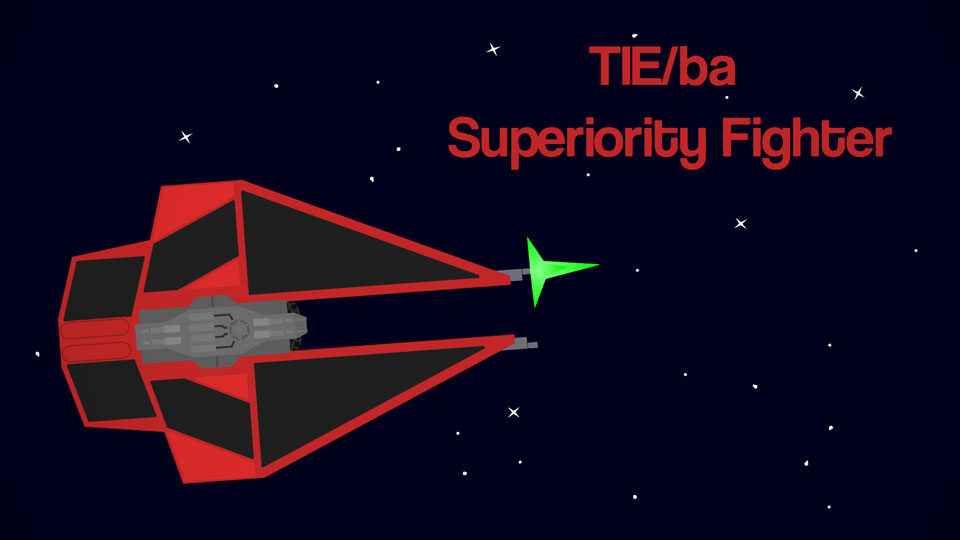
The TIE/ba Baron Space Superiority Interceptor was a class of interceptor that was manufactured by Sienar-Jaemus Fleet Systems for the First Order. The TIE Baron was equipped with a hyperdrive due to the First Order equipping its higher-end models with modern technology, and its all-crimson design suggested the pilot's skills far surpassed those of the Special Forces TIE pilots, who flew in ships adorned with a red stripe only.
The TIE Baron was equipped with four solar collector wings and an antenna on the ship's cockpit. The twin ion engines were powered by two ion reactors with pre-charged deuterium power cells, which were capable of achieving an atmospheric speed of 1,250 kph. It was armed with four wingtip L-s9.7 laser cannons and projectile launchers capable of firing ST7 concussion missiles and mag-pulse warheads. It was well-protected with shielding and contained an ejector seat. The starfighter was equipped with a class 2 hyperdrive.
#Starwars #Spaceship #Space (Star Wars)
The TIE Baron was equipped with four solar collector wings and an antenna on the ship's cockpit. The twin ion engines were powered by two ion reactors with pre-charged deuterium power cells, which were capable of achieving an atmospheric speed of 1,250 kph. It was armed with four wingtip L-s9.7 laser cannons and projectile launchers capable of firing ST7 concussion missiles and mag-pulse warheads. It was well-protected with shielding and contained an ejector seat. The starfighter was equipped with a class 2 hyperdrive.
#Starwars #Spaceship #Space (Star Wars)
Problem with this submission?
Please log in to report this file.
Other popular submissions in vehicles category


Make tie defender
No
Either you made Star Wars of you read way to many Star Wars books.