
Joined:Jun 5, 2024
Uploads:26
Features:6
UC Wins:9


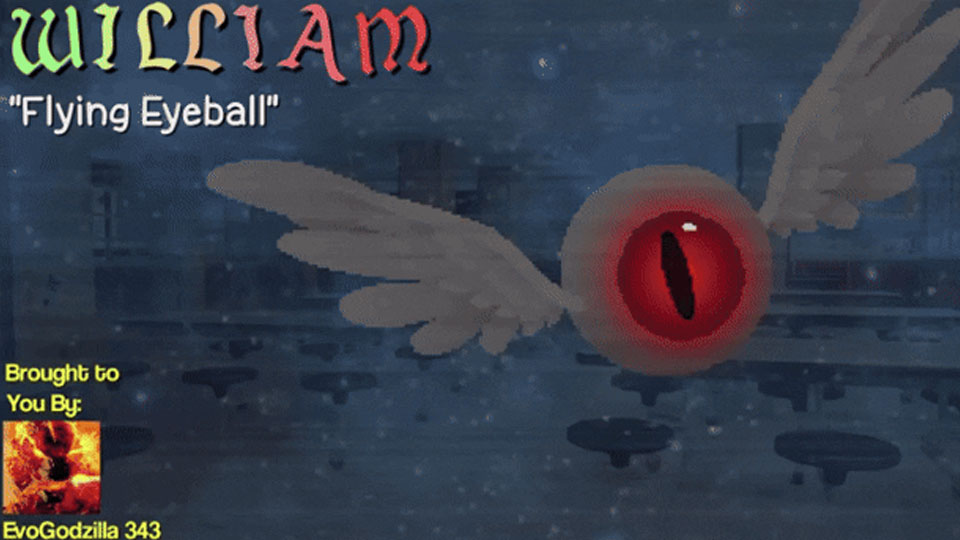
William is Miss Simians Personal Snitch, and takes it upon himself to spy upon her Students. & due to him being this way, his Creepy Appearance, and inability to talk, he doesn’t truly have any friends, not even the rejects talk to him, and Principal Brown even fails to remember his name as a result of being a Background Characters. Despite all this, he’s a Decent guy (most of the time), pretty Honorable & Friendly. But when Someone Crosses him, he shows a Cold, Calculating Side to him.
William also holds Strong Grudges (something I sorta relate to), for example, he stole a bunch of peoples stuff with no remorse, tied Darwin up to a chair & taunted him, tried to both frame Gumball for theft over the stuff he stole, and drown him, all over Gumball throwing a small, minor insult at him. (He also Possesses Telekinesis).
How to Defeat…?
Spray him in the eye with Soap.
#Gumball #TAWoG #Cartoon #Creepy #EyeDude (The Amazing World of Gumball)
William also holds Strong Grudges (something I sorta relate to), for example, he stole a bunch of peoples stuff with no remorse, tied Darwin up to a chair & taunted him, tried to both frame Gumball for theft over the stuff he stole, and drown him, all over Gumball throwing a small, minor insult at him. (He also Possesses Telekinesis).
How to Defeat…?
Spray him in the eye with Soap.
#Gumball #TAWoG #Cartoon #Creepy #EyeDude (The Amazing World of Gumball)
How to use: This download is a Movieclip file. If it contains a joined figure, you can access it by going into the Movieclip object (edit it) and then copying the entire assembled figure inside.Filters: Remember, Movieclip objects may use filters, and if you don't have Stick Nodes Pro these filters will not work and the Movieclip may look very different.
Download File
Downloaded 27 times
(Downloaded 27 times this week)
Problem with this submission?
Please log in to report this file.

Other popular submissions in people category



 wpDiscuz


