

Joined:Jun 20, 2022
Uploads:69
Features:1
UC Wins:6


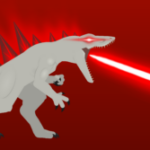
Ralph porfas acepta esta stick figure que si le puse empeño
😀 Mensaje extra Wuazaaaaaaaaaaaaaa *emoji de fantasma insano xd*
Z-PLAY.U Traduccion a eng:
Ralph please accept this stick figure, I did put effort into it
😀 Extra message Wuazaaaaaaaaaaaaaa *insane ghost emoji xd*
Z-PLAY.U Traduccion a coreano:
Ralph는 이 막대 모양을 받아주세요. 노력을 기울였습니다.
😀 추가 메시지 Wuazaaaaaaaaaaaaa *미친 유령 이모티콘 xd*
Z-PLAY Traduccion a Ruso:
Ральф, пожалуйста, прими эту фигурку, я приложил к этому усилия.
😀 Дополнительное сообщение Wuazaaaaaaaaaaaaa *смайлик безумного призрака xd*
Z-PLAY.U Traduccion a arabe:
رالف، أرجوك أن تتقبل هذا الشكل العصا، لقد بذلت مجهودًا فيه
😀 رسالة إضافية Wuazaaaaaaaaaaaaaa * رمز تعبيري شبح مجنون xd*
(Me pase con las traducciones)
#Kaiju #ZVerse #dinosaur
😀 Mensaje extra Wuazaaaaaaaaaaaaaa *emoji de fantasma insano xd*
Z-PLAY.U Traduccion a eng:
Ralph please accept this stick figure, I did put effort into it
😀 Extra message Wuazaaaaaaaaaaaaaa *insane ghost emoji xd*
Z-PLAY.U Traduccion a coreano:
Ralph는 이 막대 모양을 받아주세요. 노력을 기울였습니다.
😀 추가 메시지 Wuazaaaaaaaaaaaaa *미친 유령 이모티콘 xd*
Z-PLAY Traduccion a Ruso:
Ральф, пожалуйста, прими эту фигурку, я приложил к этому усилия.
😀 Дополнительное сообщение Wuazaaaaaaaaaaaaa *смайлик безумного призрака xd*
Z-PLAY.U Traduccion a arabe:
رالف، أرجوك أن تتقبل هذا الشكل العصا، لقد بذلت مجهودًا فيه
😀 رسالة إضافية Wuazaaaaaaaaaaaaaa * رمز تعبيري شبح مجنون xd*
(Me pase con las traducciones)
#Kaiju #ZVerse #dinosaur
How to use: This download is a Movieclip file. If it contains a joined figure, you can access it by going into the Movieclip object (edit it) and then copying the entire assembled figure inside.Filters: Remember, Movieclip objects may use filters, and if you don't have Stick Nodes Pro these filters will not work and the Movieclip may look very different.
Download File
Downloaded 2,229 times
(Downloaded 11 times this week)
Problem with this submission?
Please log in to report this file.




Other submissions by Z-PLAY.U


Oh, thanks for the Russian translation 😊
Fearsome z nix has evolved