

(Guest)
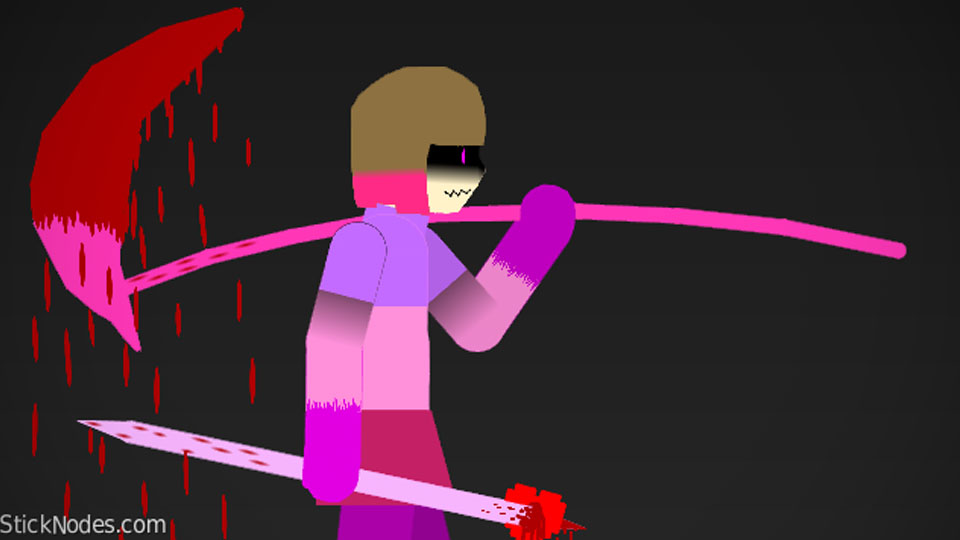
Hello, wassup, hi. This is betty (again), i just remastered my one. (Idk if my other remastered pack came, if it did, remove it.)
I DIDN't use the other guys betty pack, remember it.
I used the chara pack, so it's basically fresh???
I hope it goes on the site, bcs i just like other peoples packs and i just know other people like them too, and i just want people to like my packs as well :3. Remember, it takes me HOURS to make these.
#Glitchtale #Betty #Undertale
I DIDN't use the other guys betty pack, remember it.
I used the chara pack, so it's basically fresh???
I hope it goes on the site, bcs i just like other peoples packs and i just know other people like them too, and i just want people to like my packs as well :3. Remember, it takes me HOURS to make these.
#Glitchtale #Betty #Undertale
This download is a ZIP of 15 files
Creepy smile 3 (26.76kb)
creepy smile 2 (1.58kb)
creepy smile (1.98kb)
betty spear (0.48kb)
Betty arrow (1.91kb)
betty scythe (2.20kb)
GTale_Betty body (19.72kb)
GTale_ true form Betty body (19.19kb)
GTale_ true form Betty body shadow (12.96kb)
GTale_betty arm (0.64kb)
GTale_betty arm back (0.64kb)
GTale_betty sword arm (6.58kb)
GTale_betty sword arm back (6.58kb)
GTale_ true form betty arm (4.39kb)
GTale_ true form betty arm back (4.39kb)
Problem with this submission?
Please log in to report this file.


Other popular submissions in people category


So much blood
This is really cool but i already did it way before and i saw you used my Chara but >:)))))))))))))))))
I just didn’t like your stickfigures because they didn’t have facial animations. Overall I liked them
I know im just too simple to add some facial expressions but you always can modify it
Ok, im not lazy anyway when it comes to making undertale characters.
I still believe in you
Now I can make glitch tale battles cause yezU_U