


Joined:Jun 23, 2018
Uploads:234
Features:19
UC Wins:122


Jul 14th, 2021
( 5 thumbs )
( 5 thumbs )
 1st
1st 2nd
2nd 3rd
3rd
INSTRUCTIONS ON HOW TO ASSEMBLE
(This is a .gif)
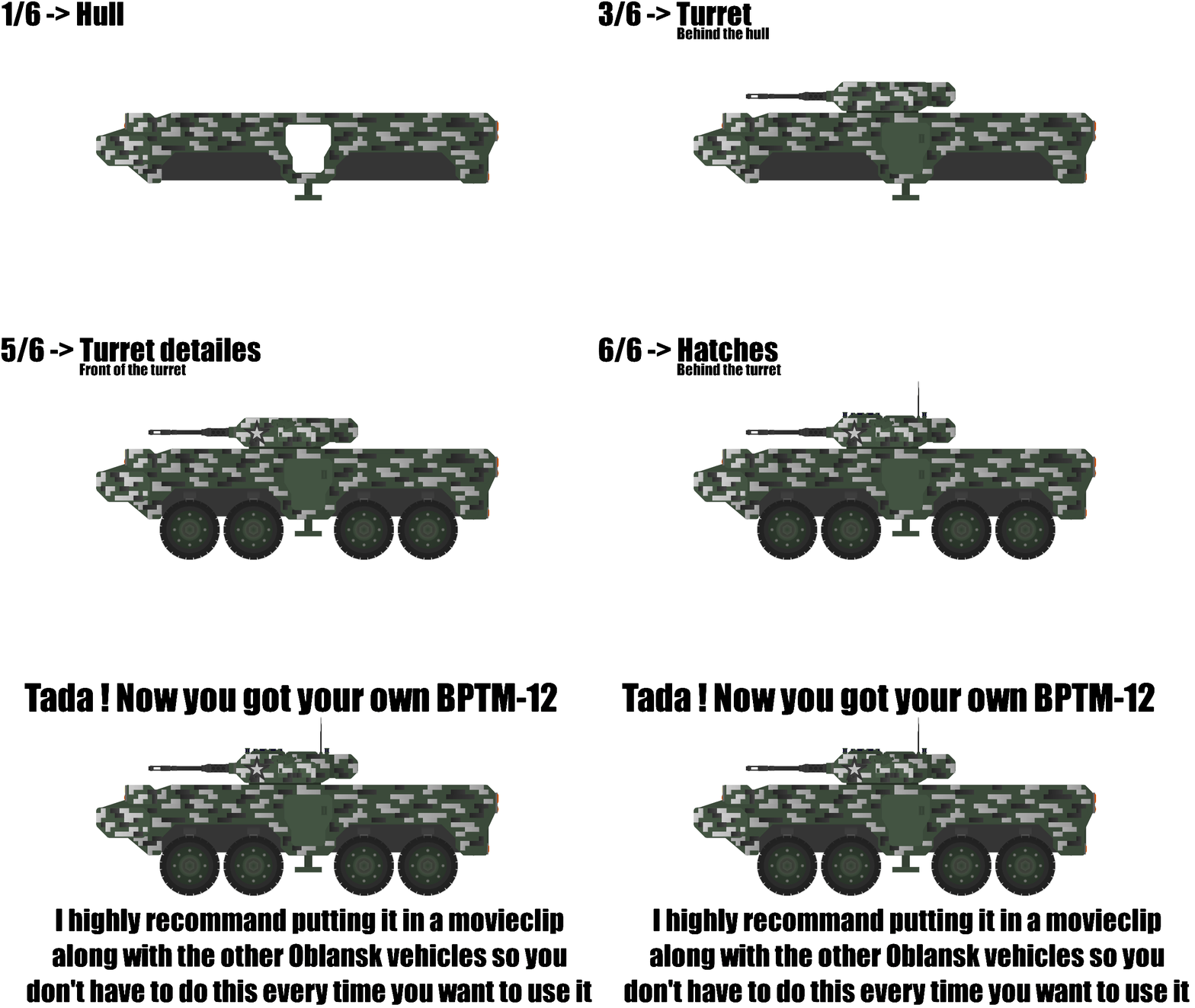
INFO ABOUT IT
The BPTM-12 is an IFV designed by Tehknoboyev, adopted by Oblansk's Armed Forces in 2035, replacing the BTMP-6 in service since 2021.
Unlike it's predesessor, the BPTM-12 can take multiple 30mm rounds in the front without problem, but anything more powerfull can go through like a hot knife in butter.
The vahicle is equiped with a stronger 30mm, open bolt autocannon, equiped with 2 belts: a HE belt for infantry, and an APFSDS one for lightly armored targets.
Other systems missing from the previous model are Laser Warning Recievers and smoke launchers.
With this added wheight, the BPTM-12 had to get a stronger engine, thus it was fitted with a 500hp model.
Dimensions of the vehicle :

QnA
"Oblansk ?"
Oblansk is more or less inspired by Russia. I'm giving nations on an alternate earth their stuff.
"Are there going to be other vehicles ?"
Yes there are others, for Oblansk we have: RBBM 6a2 MBT ; BPTM12 IFV ; SSG-155 SPG ; SPUNP-35 SPAA.
"Is this going to be the only nation ?"
No, but it may be the only nation with camos since it's a pain to make.
#military #tank
(This is a .gif)
INFO ABOUT IT
The BPTM-12 is an IFV designed by Tehknoboyev, adopted by Oblansk's Armed Forces in 2035, replacing the BTMP-6 in service since 2021.
Unlike it's predesessor, the BPTM-12 can take multiple 30mm rounds in the front without problem, but anything more powerfull can go through like a hot knife in butter.
The vahicle is equiped with a stronger 30mm, open bolt autocannon, equiped with 2 belts: a HE belt for infantry, and an APFSDS one for lightly armored targets.
Other systems missing from the previous model are Laser Warning Recievers and smoke launchers.
With this added wheight, the BPTM-12 had to get a stronger engine, thus it was fitted with a 500hp model.
Dimensions of the vehicle :
QnA
"Oblansk ?"
Oblansk is more or less inspired by Russia. I'm giving nations on an alternate earth their stuff.
"Are there going to be other vehicles ?"
Yes there are others, for Oblansk we have: RBBM 6a2 MBT ; BPTM12 IFV ; SSG-155 SPG ; SPUNP-35 SPAA.
"Is this going to be the only nation ?"
No, but it may be the only nation with camos since it's a pain to make.
#military #tank
Jul 14th, 2021
( 5 thumbs )
( 5 thumbs )
1st2nd3rdThis download is a ZIP of 6 files
BPTM-12 hull door (3.16kb)
BPTM-12 hull (27.48kb)
BPTM-12 turret detailes (5.35kb)
BPTM-12 turret hatch (back) (6.17kb)
BPTM-12 turret (12.18kb)
BPTM-12 wheels (17.65kb)
Problem with this submission?
Please log in to report this file.



Other popular submissions in vehicles category


the digital camo is perfect
really good gif showing off how to use it as well