

Joined:May 12, 2022
Uploads:17
Features:0
UC Wins:4


MosuGoji:
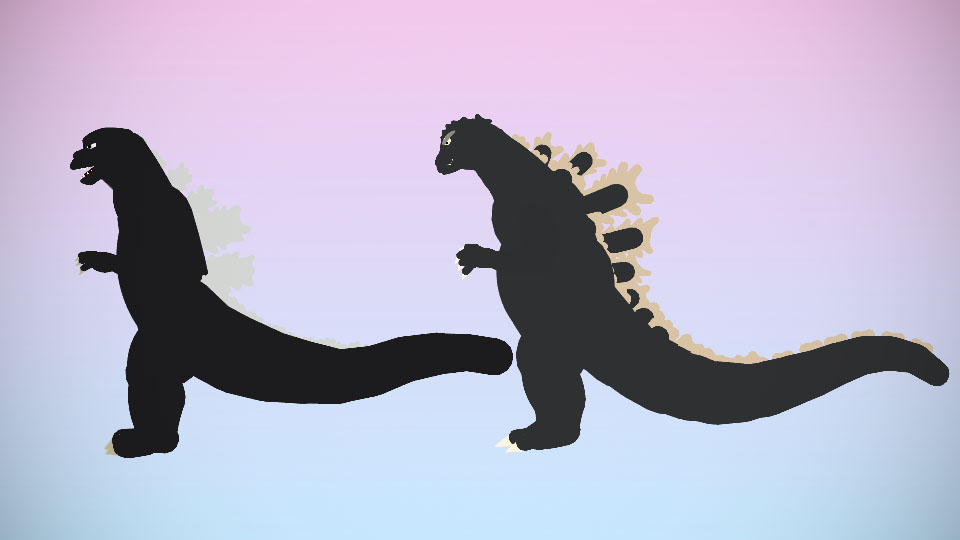
Otherwise known as the 1964 Godzilla. Like the other Showa Era (1954-1975) Godzilla versions, MosuGoji is around 40 meters tall and weighs 20,000 metric tons. He also has his Atomic Heat Ray, incredible durability, and insane strength, which are all his most well-known abilities. This version of Godzilla is known for his shiny-looking brows.
MegaroGoji:
Otherwise known as the 1973-1975 Godzilla. Like all other Showa Era (1954-1975) Godzilla versions, MegaroGoji is around 40 meters tall and weighs 20,000 metric tons. He also has his Atomic Heat Ray, incredible durability, and insane strength, which are all his most well-known abilities. This version of Godzilla is known for his dropkick, which he performed in 1973 while fighting the beetle-like Kaiju, Megalon.
#Godzilla #Kaiju #toho
Otherwise known as the 1964 Godzilla. Like the other Showa Era (1954-1975) Godzilla versions, MosuGoji is around 40 meters tall and weighs 20,000 metric tons. He also has his Atomic Heat Ray, incredible durability, and insane strength, which are all his most well-known abilities. This version of Godzilla is known for his shiny-looking brows.
MegaroGoji:
Otherwise known as the 1973-1975 Godzilla. Like all other Showa Era (1954-1975) Godzilla versions, MegaroGoji is around 40 meters tall and weighs 20,000 metric tons. He also has his Atomic Heat Ray, incredible durability, and insane strength, which are all his most well-known abilities. This version of Godzilla is known for his dropkick, which he performed in 1973 while fighting the beetle-like Kaiju, Megalon.
#Godzilla #Kaiju #toho
This download is a ZIP of 8 files
MegaroGoji (Arm) (3.05kb)
MegaroGoji (Body) (15.83kb)
MegaroGoji (Leg) (1.82kb)
MegaroGoji (Tail) (11.83kb)
MosuGoji (Arm) (3.21kb)
MosuGoji (Body) (21.67kb)
MosuGoji (Leg) (2.23kb)
MosuGoji (Tail) (9.94kb)
Problem with this submission?
Please log in to report this file.




Other popular submissions in miscellaneous category


Thx
You’re welcome.