
Joined:Mar 29, 2020
Uploads:182
Features:15
UC Wins:45


Need 3 thumbs for Users Choice badge!
 1st
1st 2nd
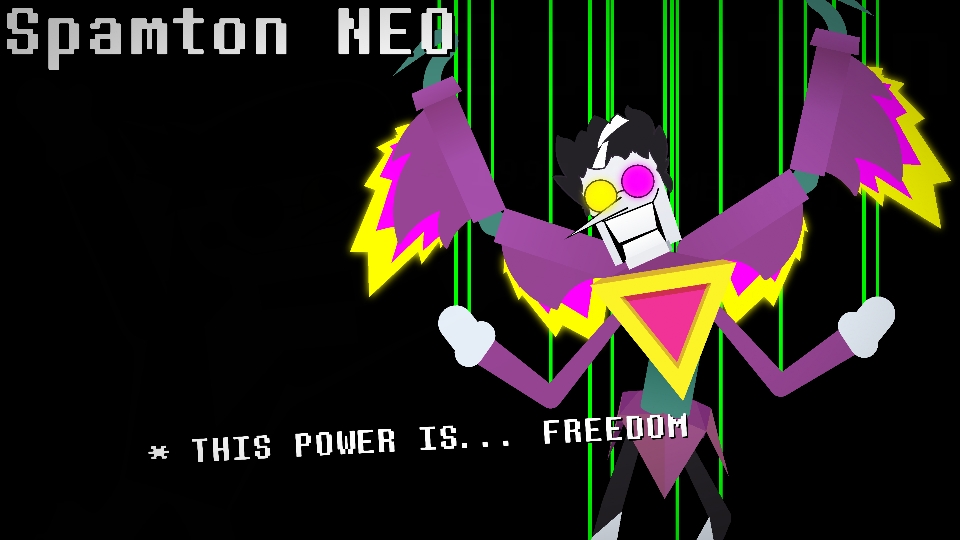
2ndA posable version of Spamton NEO. Keep the "Wing Glow" figures layered behind the Wing, give them a Glow filter with 0.50 and 1.00 intensity, and make the color yellow. Give the "Eye Glow" figure a blur of 0.50. If you don't have Stick Nodes Pro, you don't need to use the "Eye Glow" figures.
The strings in the thumbnail are not included.
#Deltarune
Need 3 thumbs for Users Choice badge!
1st2ndThis download is a ZIP of 14 files
Posable Spamton NEO - Arm (0.75kb)
Posable Spamton NEO - Eye Glow (Front) (0.34kb)
Posable Spamton NEO - Eye Glow (Side) (0.26kb)
Posable Spamton NEO - Head (Back) (12.48kb)
Posable Spamton NEO - Head (Front) (13.06kb)
Posable Spamton NEO - Head (Side) (8.63kb)
Posable Spamton NEO - Leg (1.02kb)
Posable Spamton NEO - Torso (Back) (1.02kb)
Posable Spamton NEO - Torso (Front) (1.95kb)
Posable Spamton NEO - Torso (Side) (0.61kb)
Posable Spamton NEO - Waist (1.77kb)
Posable Spamton NEO - Wing (Body) (3.46kb)
Posable Spamton NEO - Wing Glow (Lower) (1.83kb)
Posable Spamton NEO - Wing Glow (Upper) (2.78kb)
Problem with this submission?
Please log in to report this file.


