


Joined:Jul 26, 2021
Uploads:86
Features:17
UC Wins:46


Need 3 thumbs for Users Choice badge!
 1st
1st#Vegeta #DBS #dbz
Need 3 thumbs for Users Choice badge!
1stThis download is a ZIP of 18 files
(ARM) Vegeta Lower (No Armor (Side) (Broly Movie) (4.95kb)
(ARM) Vegeta Lower (Side) (Broly Movie) (4.95kb)
(ARM) Vegeta Upper (No Armor) (Side) (Broly Movie) (4.42kb)
(ARM) Vegeta Upper (Side) (Broly Movie) (4.42kb)
(HAIR) Vegeta (Side) (Broly Movie) (5.13kb)
(HAIR) Vegeta Super Saiyan (Side) (Broly Movie) (13.13kb)
(HAIR) Vegeta Super Saiyan God (Side) (Broly Movie) (13.13kb)
(HAND) Vegeta (Back) (Broly Movie) (7.70kb)
(HAND) Vegeta (Front) (Broly Movie) (3.17kb)
(HAND) Vegeta (Side) (Broly Movie) (4.01kb)
(LEG) Vegeta Lower (Side (Slight Front (Front) (Broly Movie) (10.13kb)
(LEG) Vegeta Upper (No Armor) (Side) (Broly Movie) (4.84kb)
(LEG) Vegeta Upper (Side) (Broly Movie) (4.84kb)
(TORSO) Vegeta (No Armor) (Side) (Broly Movie) (11.28kb)
(TORSO) Vegeta (Side) (Broly Movie) (17.82kb)
(HEAD) Vegeta (Side) (Broly Movie) (10.08kb)
(HEAD) Vegeta Super Saiyan (Side) (Broly Movie) (10.33kb)
(HEAD) Vegeta Super Saiyan God (Side) (Broly Movie) (10.49kb)
Problem with this submission?
Please log in to report this file.





these packs are really well made, excellent detail
a bit complex but still
also backwards hand in thumbnail rip you
Thank you for the compliment but Vegeta’s hand isn’t backwards, it’s supposed to show that angry fist you know.
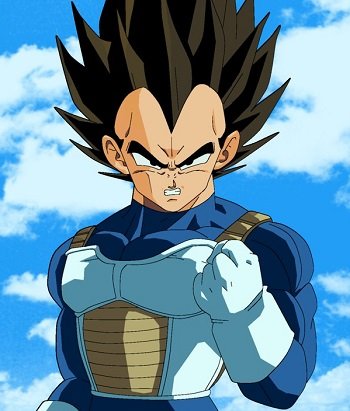
I know but uh its on the right hand its supposed to be on the left
Ifk