
Joined:Apr 2, 2026
Uploads:48
Features:0
UC Wins:2


[Note: This movieclip contains 2 frames, and at first glance, they may not appear different. However, there is actually a difference. the first frame has no rig, and the second frame has a rig. This will apply to my future My Singing Monsters/MSM movieclips. keep that in mind if you plan to use the STKs I release in the future.]
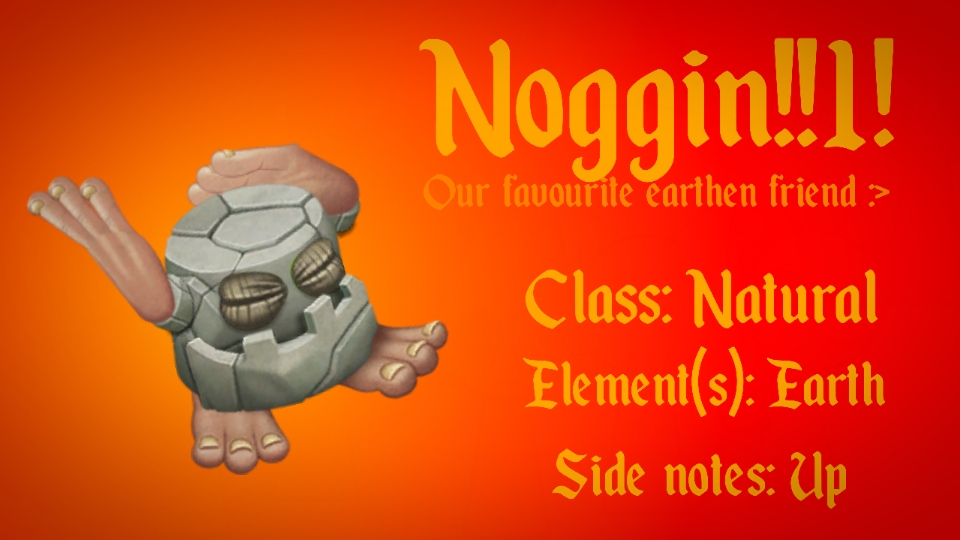
Noggins are basically musical rocks. Deeply in tune with the earth, their simple rhythms echo an island's pulse. The sensation of reverberation produced by a Noggin motivates all other Monsters. Enjoy the first monster that you will (inevitably) ever unlock!
#msm
Noggins are basically musical rocks. Deeply in tune with the earth, their simple rhythms echo an island's pulse. The sensation of reverberation produced by a Noggin motivates all other Monsters. Enjoy the first monster that you will (inevitably) ever unlock!
#msm
How to use: This download is a Movieclip file. If it contains a joined figure, you can access it by going into the Movieclip object (edit it) and then copying the entire assembled figure inside.Filters: Remember, Movieclip objects may use filters, and if you don't have Stick Nodes Pro these filters will not work and the Movieclip may look very different.
Download File
Downloaded 1,103 times
(Downloaded 5 times this week)
Problem with this submission?
Please log in to report this file.







Other submissions by Penguin Pen


