
Joined:Sep 12, 2020
Uploads:42
Features:1
UC Wins:4


"Ben wade can carry the Hand Of God, so why cant i carry the entire damn body of the Devil himself?
Vengance is hereby mine."
~ Text found in a note stored along the gun in it's case, circa 1875
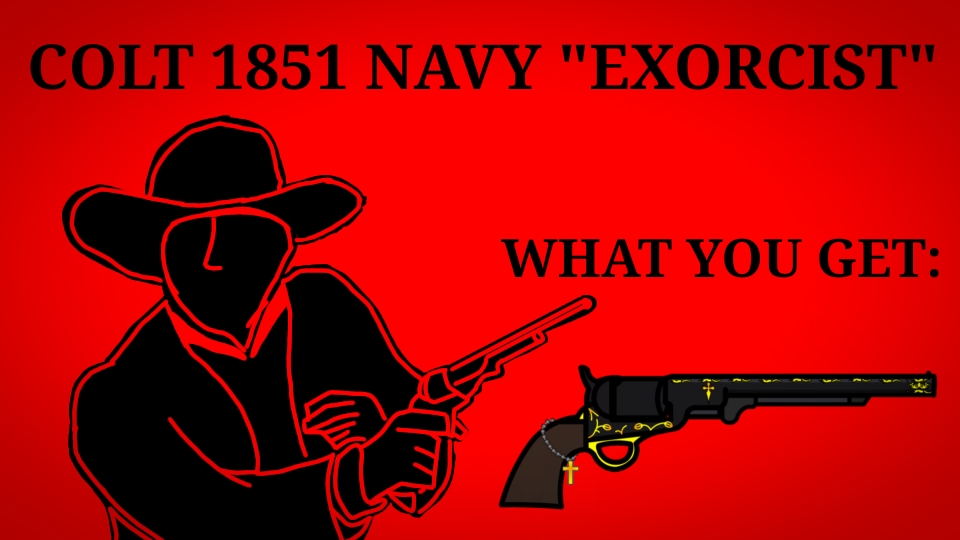
This revolver was found in a small cabin in the woods of New Mexico in December 11, 2009 by a couple of hikers, who promplty reported the finding to the local police force.
Upon arriving to the scene, investigators described it as "Something like a large scale time capsule."
Seemingly appearing out of thin air, the building was made with 19th century materials and technics, however everything was in pristine conditions, as if it were made yesterday.
In the shack was nothing more than a small drawer, containing the gun case inside of it.
In the case was the firearm: a Colt 1851 Navy with a 9" barrel (the manufacturing date on it indicated it was made in 1851 as one of the first models), 12 .36 caliber paper cartridges, and the previously mentioned note written in a very botched form of Latin, which seemed to be ripped off from a much larger piece of paper.
To this day it's not known if it was used, or who was the original owner, but what is known is that it's capable of killing both demon and men alike.
#Madness #gun #revolver
Vengance is hereby mine."
~ Text found in a note stored along the gun in it's case, circa 1875
This revolver was found in a small cabin in the woods of New Mexico in December 11, 2009 by a couple of hikers, who promplty reported the finding to the local police force.
Upon arriving to the scene, investigators described it as "Something like a large scale time capsule."
Seemingly appearing out of thin air, the building was made with 19th century materials and technics, however everything was in pristine conditions, as if it were made yesterday.
In the shack was nothing more than a small drawer, containing the gun case inside of it.
In the case was the firearm: a Colt 1851 Navy with a 9" barrel (the manufacturing date on it indicated it was made in 1851 as one of the first models), 12 .36 caliber paper cartridges, and the previously mentioned note written in a very botched form of Latin, which seemed to be ripped off from a much larger piece of paper.
To this day it's not known if it was used, or who was the original owner, but what is known is that it's capable of killing both demon and men alike.
#Madness #gun #revolver
How to use: This download is a Movieclip file. If it contains a joined figure, you can access it by going into the Movieclip object (edit it) and then copying the entire assembled figure inside.Filters: Remember, Movieclip objects may use filters, and if you don't have Stick Nodes Pro these filters will not work and the Movieclip may look very different.
Download File
Downloaded 3,166 times
(Downloaded 8 times this week)
Problem with this submission?
Please log in to report this file.




Other popular submissions in weapons category


