
-
arcionek


 2017-11-09 22:31:26 UTC
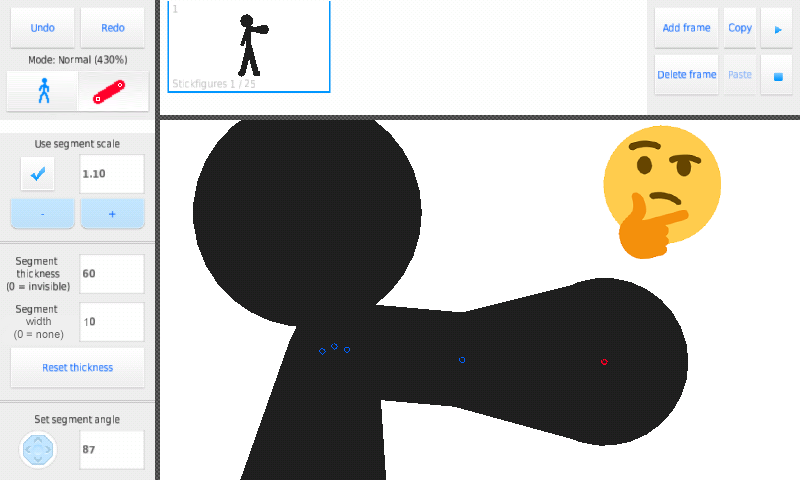
 @Ralph so, I had this idea that might be useful for an update. Basically something that works similiar way Width Tool in Illustrator does it’s job.
The Segment Width would basically add or substract (depending if number is positive or negative) from the end point of the segment’s current thickness. For ex.: 50 Thicknes and -10 Width makes the end point be 40 (if we substracted -50 it would make triangle segment). Something like this would be really damn useful for perspectives and stuff.
Another thing is sub-categories. When you tap on the segment the Stickfigure/Panning/Camera buttons change into Stickfigure/Segment tools.
Would reduce the amount of scrolling, considering that we now have to scroll through filters just to get to that stretchy option and segment scale. Also then it removes segment options on Stickfigure sub-category, so less scrolling.
What is your opinion about it Ralph? Would it be possible?
Stuff like these could open much more possibilities and seems like it would make the app more easier and faster to use.
(Rip my Photoshop skills)
Stick Nodes®
A stickfigure animation app created for mobile devices!
Create your own stickman animations on your Android or iOS device!


Its complicated… I found some mistakes on ur Photoshop…
hm, your width thing is interesting, but I don’t quite 100% understand
I see from your image there is a setting, so what if width was 0?
I like your idea to reduce scrolling though, I’m always trying to make the menus easier and faster to navigate
as much as your segment icon is beautiful 10/10, idk about replacing those mode buttons, kinda want them to be permanent
I’ve though of having tabs or maybe even arrows that bring the menu down to the next category (Stickfigure Tools > *down arrow tap* Stickfigure Filters > *down arrow tap* Segment Tools) something like that, but the UI I have to work out
love the image though lol
Ye lol
Basically if the width was 0, it would leave the segment as it is normally. Simple stuff tbh.
If segment width is negative, the segment decreases it’s thickness until the end point, which is less thicker by the amount of the negative width.
If width is 0, the thickness stays the same
If width is positive, the thickness increases until it reaches the end point of the segment, which is higher than the parent point by the amount of width.
Kinda works like functions.
I wish I could understand this because it sounds cool lol
I kinda understand it from your image
but idk how it work practically, from a UI perspective, might be too complex for such a relatively simple app
It will be useful, But some of the Animators dont get it…
It’s not like they would be forced to use it, and I think if they changed the value they would know what it actually does.