
-
Your Local Toaster (Wingidon)


 2020-09-05 04:17:42 UTC
 @ralph I got a few – a Foreground Figure option, an Auto-figure feature, a “Guide” option for Movieclips, and a “Bind Nodes” option for Movieclips, and an “inherit angle” option for non-static nodes of a stickfigure. Let’s go over these one at a time.
Foreground Figure: This one is kinda simple, basically you select a figure and check a “foreground figure” box. Let’s just put a quick layering diagram in the post realquick, gimme a sec. So basically, there becomes 4 layers of things (in this order, with the top one being the bottom layer):
Background Image
Stickfigures and Movieclips
Foreground Stickfigures and Movieclips
Textfields and cinematic bars
Basically, a foreground stickfigure or movieclip would be used to create UI for a videogame-like animation, or random other crap where you need things to be in front of everything else. They would literally be the exact same as their regular versions except the only things they aren’t in front of are the other foreground moviefigures.Auto Figure – This one is also quite simple – Auto camera, but with stickfigures and/or movieclips. Need a movieclip to move at a constant rate from frame 534 to frame 567? Auto figure it! Making a slowmotion shot but you forgot to move one of the figures and don’t want to have to make all the adjustments to the other figures again? Auto figure said stickfigure! It would have similar UI to Auto Camera and would be usable on stickfigures and movieclips (and maybe textfields too, idk)
“Guide” option for movieclips – this one is complicated, but basically, for movieclips that are supposed to interact with, say, a stickfigure or another movieclip, you create a dummy in the movieclip that’s supposed to interact with the other where the other moviefigure would go, and then set it as a guide figure. Said figure would show in the animation workspace but not while the animation is playing. This would be useful for, like I said, movieclips that need to interact with other movieclips. It could also be used as a sort of sub-graphic-swap, where you literally take a stickfigure that you need to interact with the movieclip, and then trace the guide with said stickfigure, and then reuse the movieclip later, trace the guide with a different stickfigure, and so on so forth.
Inherit Node Angle – I couldn’t think of a better name for this, but basically, say you’ve got a non-static node attached to a character’s waist, and you need said node to rotate with the character’s waist but couldn’t be bothered to do it manually. You animate for a bit and oh no! You forgot to do it manually! Basically, you would add the tool/pewpewwgun/wrench/whateverwhocares.jpg to the stickfigure and check the “inherit node angles” box. What this would do is, it would inherit the angle from its children as well as its parent. Say you’ve got a node with four children. – You’d still be able to fully customise its angle, but if “Inherit Node Angle” is on, it would get 25% of the changing in each child’s angle. Say the children are all at angle 0. Child#1 move to the angle 80. The parent would move to the angle 20 with it. Then child#2 moves to angle 40. The parent then moves to angle 30, and so on so forth. This would be useful for things such as holsters on a character’s waist or something.
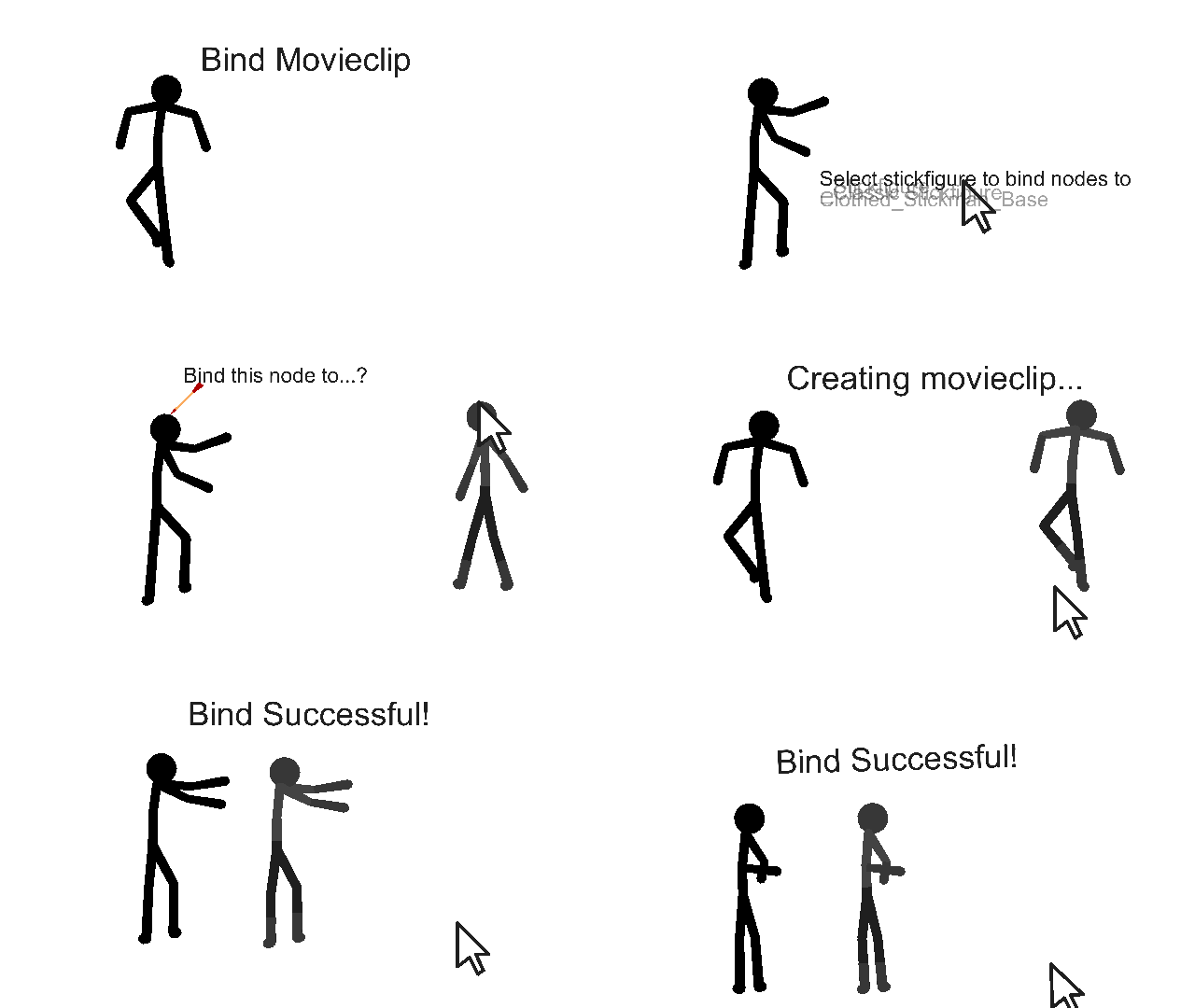
Finally, a “Bind Nodes” option for movieclips – This one is also quite complicated, but basically, it’s a manual graphic-swap. While in a movieclip, you may tap a “bind nodes to other stickfigure” option. This would add the current movieclip to the library if it isn’t already there, and create a copy of it. From there, it would give you a “tap stickfigure to replace” prompt. You’d select a stickfigure from your Stickfigure Library’s dropdown menu. It would then start going through the original figure’s non-static nodes all like “Bind this node to…? Bind this node to…? Bind this node to…?” until all nodes in the original figure have been “binded”. Note that if there’s some nodes you don’t want to change in the second figure, you may tap a blank space to unbind them when they get asked about. Confused? Here, I’ll attach an animated gif. I’m going to predict that this feature in particular is going to get rejected, but it’s worth a shot.
Stick Nodes®
A stickfigure animation app created for mobile devices!
Create your own stickman animations on your Android or iOS device!


Actually, if you look closely, those are two different stickfigures
Good point, but I feel the need to overdetail everything
The bind node is a very interesting idea , switching animations from one fig to a completly different one could be very usefull.
u’m not reading all of that..
school.jpg
Foreground Figure
lol @ the most complicated way of asking for layers I’ve seena good idea, but, yeah as mentioned – this is layers, which is prominent in programs like Flash
SN would benefit bigly, yes, but I’ve mentioned before it’s just a bit too much 1) to shove into a small UI and 2) to revamp the app from the ground up to implement
so…it’s SN PC only, if and when
Auto Figure
actually i’ve considered things like this beforeand will actually be adding something “kinda” like it to movieclips soon
node angle
this gives me ragdoll vibesan interesting concept tho
Bind nodes
I have to admit this one got meit’s pretty good (the GIF helped a lot because it addresses the main issue with this suggestion usually – there’s not a guaranteed 1:1 relationship with all nodes, so it can’t work)
still has flaws (again, the node relationships – what if you bind the foot to the hand in your GIF example? how do you “disallow” that – or allow it…how would it behave? etc)
still very interesting tho, with the way you presented it
i give you credit for actually coming up with and fleshing out some, kinda new-ish ideas
(besides layers lol)
all very complicated tho dam
but…we’ll see
i’m already considering adding something *else* to SN I’ve said “no” to for years
| (again, the node relationships – what if you bind the foot to the hand in your GIF example? how do you “disallow” that – or allow it…how would it behave? etc)
Well, it would be allowed, but it would produce some funny results with a stretchy node. That’s what stretchy nodes are for, is it not? To make things look 3D and to get funny results.
Otherwise, yeah, I’m looking forward to maybe seeing one of these (if any) in the app in version 9.3.7 (lol)
Also you didn’t cover the guide option yo, what’re your thoughts on it?
binding would be insanely good though,
like how shonen animes reuse animation for differen characters to save time…
i could do the same 🙂 by binding movieclips, hence saving time and energy…
ralph if you don’t add this i’m coming to ur home