
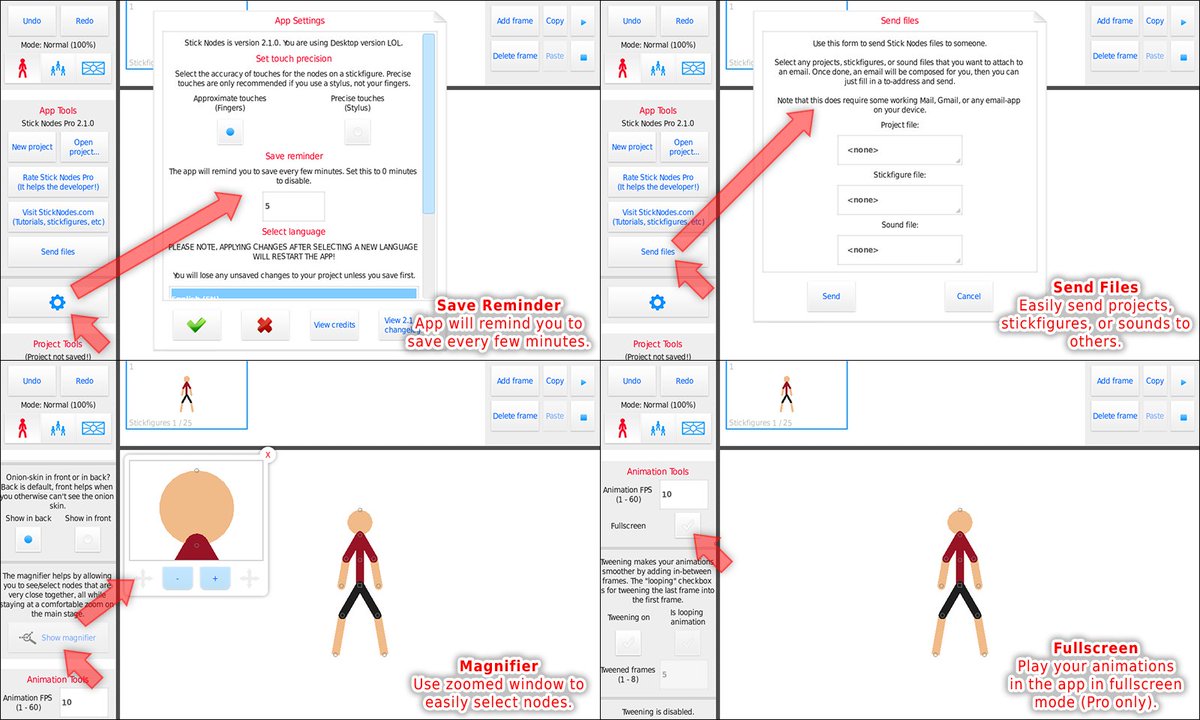
 The magnifier update is now out for iOS!
Sorry that took a while, had to spend a bit of time fixing some export/MP4-export crash issues, but should help with those who experienced those crashes on lower-end iOS devices.
Version 2.1.2 (For iOS)
This is essentially the 2.1.0/2.1.1 update that was previously released for Android, but now is out on iOS.
- New magnifier (look under “Project Tools”). This will make it easier to grab nodes!
- You can now play your animations in fullscreen (Pro only).
- Easier to send files to someone, look under “App Tools” for the “Send files” button!
- Save reminder, the app reminds you to save every 5 minutes. You can change this in “App settings”.
- Knob buttons for angles are easier to use, and show rotation in real-time.
- Exporting/MP4-exporting crash fixes.
Version 2.1.2 (For Android)
- Fix for an issue that made it difficult/impossible to select nodes with the magnifier.
TheDarkDemon.com Forums
TheDarkDemon.com is a close partner of the Stick Nodes community (we actually share the same web server). It’s a really great community of animators, mainly Pivot, but overall is a great place to showcase your work/Youtube channel and get tips/comments and just overall chat with other animators.
I’ve actually been a member of that community since 2005 when I first found Pivot and even though TheDarkDemon.com is technically the spiritual successor of the original (that underwent bad management), it’s still alive and kicking over a decade later. Give them a visit and create an account if you’re so inclined.

And that goes to show, you can’t mimic the CHIM
Haha that was fake
jailbreak in roblox got its official release today
Cool
Hello mr ralph how does the magnifier actually work? I tried turning nodes through the magnifier but it just moves the magnifier screen…
I’ll have to make it clearer in the next update – only for selecting nodes. Once selected, grab the node in the main area (it will stay selected) and draw like normal.
If dragging nodes in the magnifier were a thing 1) it would have same issue of navigating around clusters of nodes and accidentally moving things and 2) you can’t move segments much when zoomed in 1000% (because you simply can’t see out of the bounds very much).
So yeah, just use the magnifier to select the node you want, then grab it and draw on the main area.
Oki
Also whats the name of the computer thingy on the latest update video?(the computer thst you were using to make the sticknodes 2.0.0 version)
This one https://sticknodes.com/sticks/desk-computer-nodes/
Soo, video/GIF backgrounds?…
Can it be done?
Cause i would love to video a car journey somewhere and the animate a stickman running over building and sking across road banisters!
you trying to get me to jump off of something tall?
OPACITY
Does anyone know how to add it to YouTube?
FAQ section go!
https://sticknodes.com/faqs#youtube
No one likes the FAQ section
Can i ask? What happens when i download the pro version in android? Will my free version get replaced by the pro version? Or both will be there?if both of it is there can you safely delete the free one and keep the pro version? (You said they share the same folder….im thinking that if i delete the other one…al my stickfigs will get erased..
On Android you’re fine, they both share a folder, but uninstalling doesn’t delete the folder.
The magnifier is useless…
come at me I’m ready
It’s useless
: (
IT’S NO USE!