
Joined:Jun 29, 2022
Uploads:17
Features:3
UC Wins:6


Jun 25th, 2026
( 3 thumbs )
( 3 thumbs )
 1st
1st 2nd
2nd 3rd
3rd
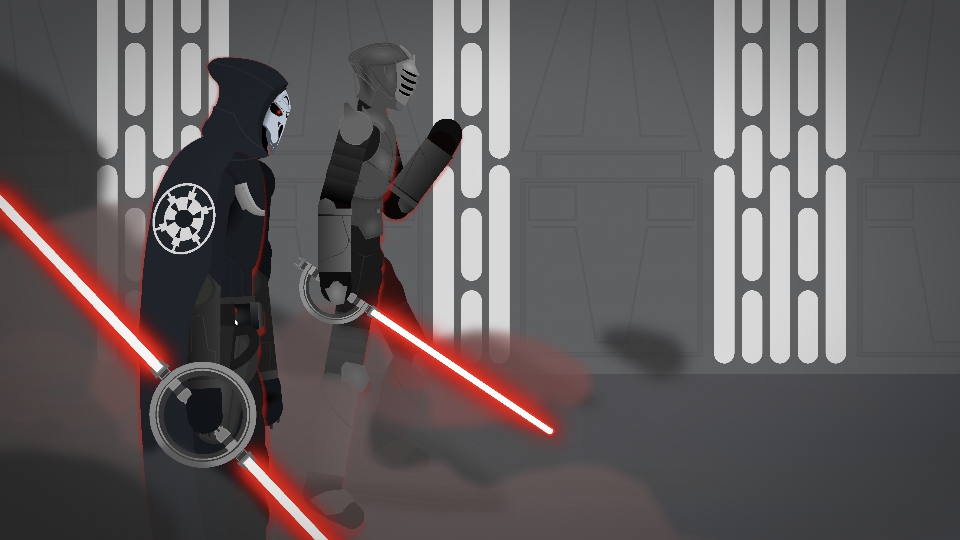
The 1st Brother, commonly known as Marrok, is an elite and skilled member of the Imperial Inquisitorious and the Jedi order before it. Marrok was a highly competent inquisitor with exceptional skills at tracking down surviving Jedi due to his force ability know as psychometry and intense interrogations as well as his amazing dueling capabilities able to temporarily match Darth Maul and stall Ahsoka Tano. After the fall of the empire he became a mercenary and eventually was killed by Ahsoka.
The 11st brother, nicknamed The Crow, is also an elite and skilled member of the Imperial Inquisitorious. Resorting to fear and intimidation he was able to track down many Jedi survivors. Although skilled in lightsaber combat and able to injure Darth Maul in a fight his best feats come from his ability to work effortlessly with other inquisitors as a team. His main weakness is his overconfidence which has led to experienced Jedi to gain an upper hand on him which ultimately led to his defeat by Ahsoka Tano.
These two are some one of the most effective Jedi killing teams and the greatest aura farmers second only to Darth Vader himself. These guys come with their own capes and two variations of an improved iconic inquisitor spinning lightsaber.
#starwars #soldier #sith #aura #knights #futuristic (Star Wars)
The 11st brother, nicknamed The Crow, is also an elite and skilled member of the Imperial Inquisitorious. Resorting to fear and intimidation he was able to track down many Jedi survivors. Although skilled in lightsaber combat and able to injure Darth Maul in a fight his best feats come from his ability to work effortlessly with other inquisitors as a team. His main weakness is his overconfidence which has led to experienced Jedi to gain an upper hand on him which ultimately led to his defeat by Ahsoka Tano.
These two are some one of the most effective Jedi killing teams and the greatest aura farmers second only to Darth Vader himself. These guys come with their own capes and two variations of an improved iconic inquisitor spinning lightsaber.
#starwars #soldier #sith #aura #knights #futuristic (Star Wars)
Jun 25th, 2026
( 3 thumbs )
( 3 thumbs )
1st2nd3rdHow to use: This download is a Movieclip file. If it contains a joined figure, you can access it by going into the Movieclip object (edit it) and then copying the entire assembled figure inside.Filters: Remember, Movieclip objects may use filters, and if you don't have Stick Nodes Pro these filters will not work and the Movieclip may look very different.
Download File
Downloaded 1,225 times
(Downloaded 138 times this week)
Problem with this submission?
Please log in to report this file.










Other popular submissions in people category


