

Joined:Jun 21, 2026
Uploads:2
Features:0
UC Wins:0
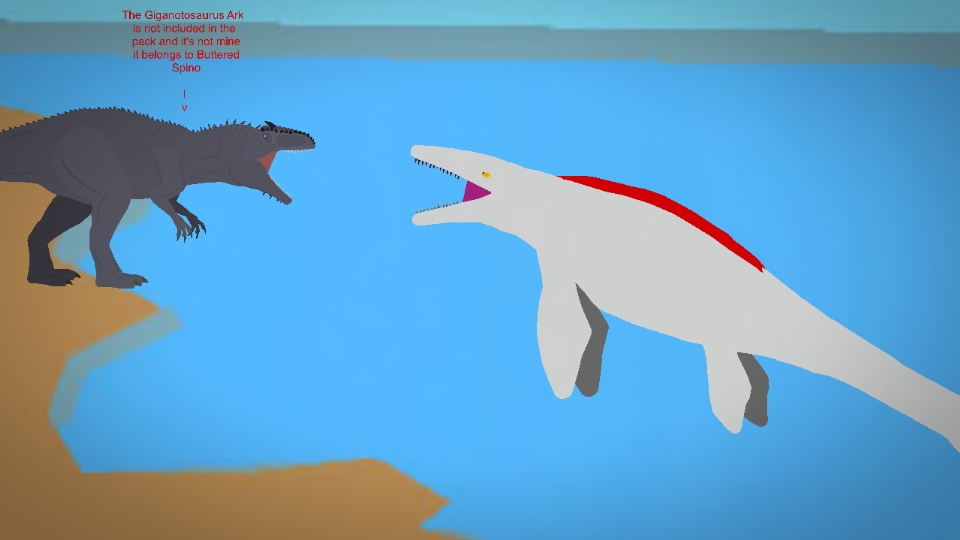
Hello, I'm Titanfight993, a new member of Stick Nodes. I like the dinosaurs from Ark and Jurassic World, and I like Kaiju. Obviously, there are Ark dinosaur figures on Stick Nodes, and the Ark Mosasaurus is a favorite of many of you. But it's been a while since there's been an Ark Mosasaurus figure, so I decided to create this one for you to use in your animations. So, what do you think of this figure? ...and as long as you want to use it, you must give me credit when using this figure.
Rules Before Downloading and Using:
1. Do not claim it as your own figure.
2. Do not put a link to this figure in the description of your videos if you use it to make your animations.
3. Do not edit the figure without my authorization.
4. Do not give this figure away to anyone.
5. If someone asks you who the
Mosasaurus Arca figure belongs to and if they want it, tell them it's not yours, but belongs to Titanfight993.
6. Do not complain to me about why the Giganotosaurus Arca figure that's in the thumbnail of the Mosasaurus Arca figure isn't included in the movie clip of the Mosasaurus Arca figure. That Giganotosaurus Arca figure isn't mine, nor did I create it; it belongs to Buttered Spino. I hope you comply with these rules.
Download it and I hope you like it! enjoy! ATTE : Titanfight993
#Ark #Mosasaurus #Dinosaurus #dinosaur
Rules Before Downloading and Using:
1. Do not claim it as your own figure.
2. Do not put a link to this figure in the description of your videos if you use it to make your animations.
3. Do not edit the figure without my authorization.
4. Do not give this figure away to anyone.
5. If someone asks you who the
Mosasaurus Arca figure belongs to and if they want it, tell them it's not yours, but belongs to Titanfight993.
6. Do not complain to me about why the Giganotosaurus Arca figure that's in the thumbnail of the Mosasaurus Arca figure isn't included in the movie clip of the Mosasaurus Arca figure. That Giganotosaurus Arca figure isn't mine, nor did I create it; it belongs to Buttered Spino. I hope you comply with these rules.
Download it and I hope you like it! enjoy! ATTE : Titanfight993
#Ark #Mosasaurus #Dinosaurus #dinosaur
How to use: This download is a Movieclip file. If it contains a joined figure, you can access it by going into the Movieclip object (edit it) and then copying the entire assembled figure inside.Filters: Remember, Movieclip objects may use filters, and if you don't have Stick Nodes Pro these filters will not work and the Movieclip may look very different.
Download File
Downloaded 936 times
(Downloaded 98 times this week)
Problem with this submission?
Please log in to report this file.







Other popular submissions in miscellaneous category


