
Joined:Aug 18, 2019
Uploads:31
Features:1
UC Wins:8


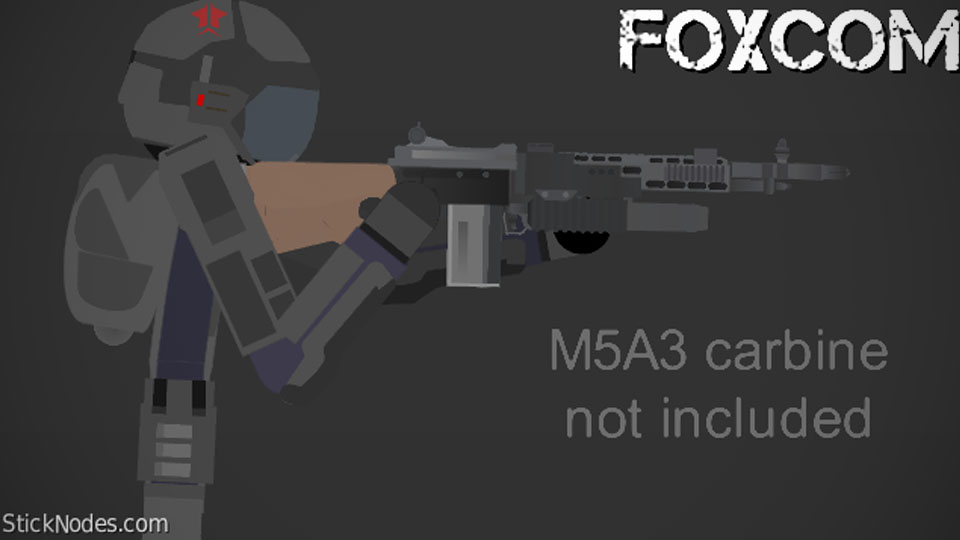
Its been a while since i posted something decent. so heres something that might be worth looking at.
i call it the FOXCOM trooper , FOXCOM is actually an abreviation of "foxtrooper combatant". it was named as is because i had designs for "foxgirl soldiers" which i may post sometime sooner or later (that design is anime inspired).
however this isnt that , this is the actual soldier of Foxcom. its my own varient of Explosive Bullet's Virotech trooper. this is meant to reflect the virotech design so thats why i kept the arms the same , though i may just remake that.
the idea behind this ,before we start shouting "SMECKLDORF!" , is that after "apocalypse part8: conclusion" some remnent of virotech ends up joining sides with the NSC (northern soviet confederation , check the group if you want to) , at which point they are renamed FOXCOM. the name was chosen firstly because they were deployed alongside NSC special forces on covert operations , where the "being as cunning as a fox" phrase comes into play.
they are equipped with a mix of the old virotech combat suit and the newer NSC graphene armour (the NSC soldier design has changed btw , i'll post that later on).
hope you like , ok bai 🙂
#soldier #NSC
i call it the FOXCOM trooper , FOXCOM is actually an abreviation of "foxtrooper combatant". it was named as is because i had designs for "foxgirl soldiers" which i may post sometime sooner or later (that design is anime inspired).
however this isnt that , this is the actual soldier of Foxcom. its my own varient of Explosive Bullet's Virotech trooper. this is meant to reflect the virotech design so thats why i kept the arms the same , though i may just remake that.
the idea behind this ,before we start shouting "SMECKLDORF!" , is that after "apocalypse part8: conclusion" some remnent of virotech ends up joining sides with the NSC (northern soviet confederation , check the group if you want to) , at which point they are renamed FOXCOM. the name was chosen firstly because they were deployed alongside NSC special forces on covert operations , where the "being as cunning as a fox" phrase comes into play.
they are equipped with a mix of the old virotech combat suit and the newer NSC graphene armour (the NSC soldier design has changed btw , i'll post that later on).
hope you like , ok bai 🙂
#soldier #NSC
This download is a ZIP of 2 files
FOXCOM soldier (26.02kb)
FOXCOM soldier (arm) (4.78kb)
Problem with this submission?
Please log in to report this file.










Other popular submissions in people category


Cool
SMECKLDORF
no but seriously neat guy, like the helmet a lot
also “smeckledorf” is for when you smeckle someone’s stickfigure and slightly edit it, if at all, and call it your own
Ooooooohhh ok
Pretty solid I like it.