

Joined:Jun 29, 2026
Uploads:41
Features:0
UC Wins:1


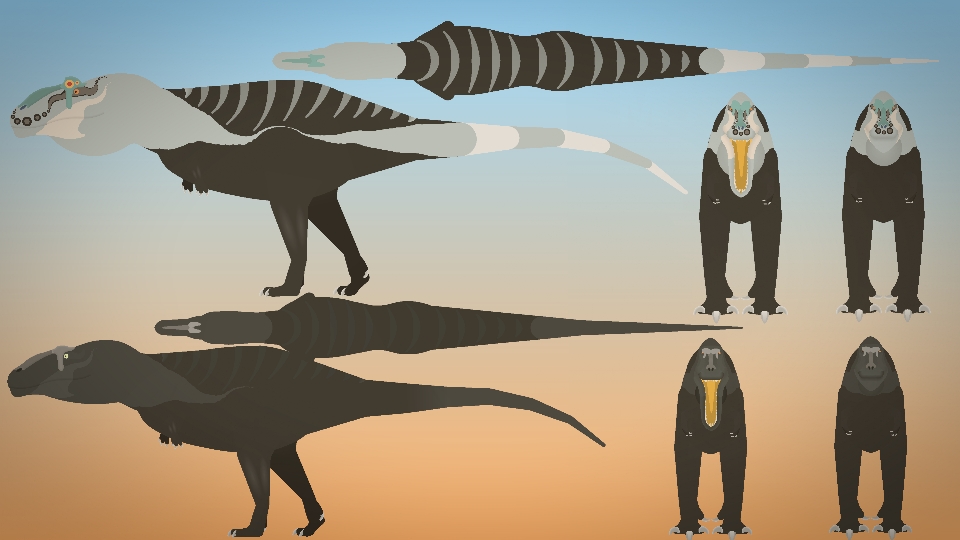
After the absolute success of the Tyrannosaurus, i decide to upload my Giganotosaurus now.
What’s on the horizon?
Currently, I have 2 BRAND NEW Ultimate Packs in the progress being an Ultimate Morrison & Campanian North America Pack as well as updating my prior movieclips, most notably the Ultimate Cenozoic Pack 3, now with more animals than Osta1’s original roster with around 40-50+ animals with a VAST majority of them being original and all of them being overhauled in some major way… also more Multiview animals
DISCLAIMER: This has the same file name as my older Giganotosaurus. Be sure to rename the older Giga's movieclip name before you download this if you want to keep (or replace it, you do you).
#Dinosaur #Argentina #Carolinii
What’s on the horizon?
Currently, I have 2 BRAND NEW Ultimate Packs in the progress being an Ultimate Morrison & Campanian North America Pack as well as updating my prior movieclips, most notably the Ultimate Cenozoic Pack 3, now with more animals than Osta1’s original roster with around 40-50+ animals with a VAST majority of them being original and all of them being overhauled in some major way… also more Multiview animals
DISCLAIMER: This has the same file name as my older Giganotosaurus. Be sure to rename the older Giga's movieclip name before you download this if you want to keep (or replace it, you do you).
#Dinosaur #Argentina #Carolinii
How to use: This download is a Movieclip file. If it contains a joined figure, you can access it by going into the Movieclip object (edit it) and then copying the entire assembled figure inside.Filters: Remember, Movieclip objects may use filters, and if you don't have Stick Nodes Pro these filters will not work and the Movieclip may look very different.
Download File
Downloaded 3,078 times
(Downloaded 29 times this week)
Problem with this submission?
Please log in to report this file.







Other popular submissions in miscellaneous category


Xd
por mais que tenha gigas mais bem feitos esse e muito util porque ele tem outras visoes tipo de lado a classica de frente e de cima enquanto 99 porcento dos gigas o tem a visao de lado