

Joined:Aug 11, 2020
Uploads:99
Features:0
UC Wins:22


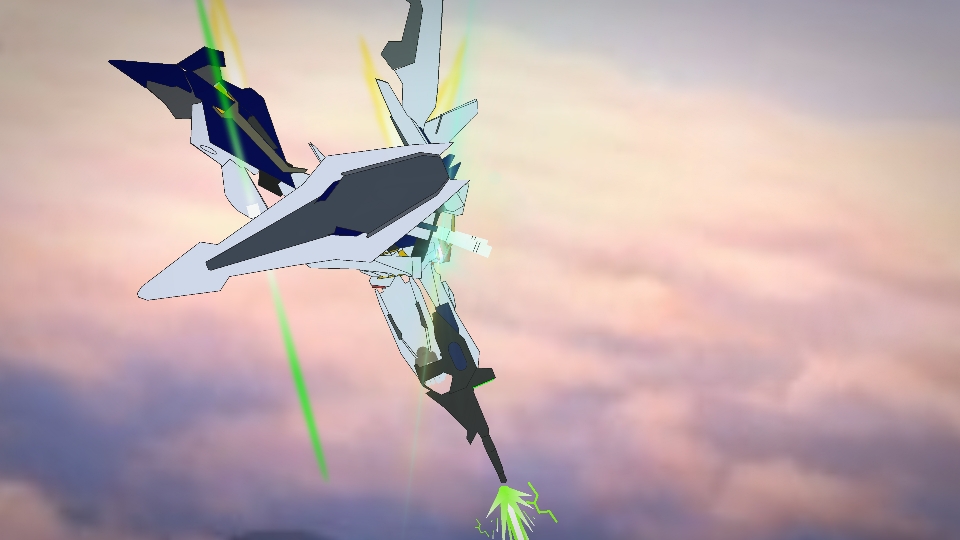
The RX-105 Ξ Gundam, also known as the Xi Gundam , is a mobile suit that appears in the Mobile Suit Gundam Hathaway movie. Procured by the Anti-Earth Federation movement Mafty for the attack on the Adelaide conference, it was piloted by Mafty Navue Erin.
It and the RX-104FF Penelope were classified as fifth-generation MS and are said to have been developed and constructed by Anaheim Electronics. It was a unique MS with a built-in Minovsky Flight Unit and was equipped with the latest Beam Barrier system. Since the Penelope relied on optional units to obtain similar functions, it can be said that the Xi Gundam was a truly completed fifth-generation MS that could function independently. Furthermore, it was armed with standard equipment such as a Beam Rifle and Shield, as well as Funnel Missiles that made it a unique, heavily armed unit. The large arms were also one of its iconic external features and the forearms also functioned as containers for Triple Missiles. The Xi Gundam was an MS of an extremely high degree of perfection which fought against the Penelope and the Circe Unit with Hathaway Noa as its pilot
#Gundam #Mecha
It and the RX-104FF Penelope were classified as fifth-generation MS and are said to have been developed and constructed by Anaheim Electronics. It was a unique MS with a built-in Minovsky Flight Unit and was equipped with the latest Beam Barrier system. Since the Penelope relied on optional units to obtain similar functions, it can be said that the Xi Gundam was a truly completed fifth-generation MS that could function independently. Furthermore, it was armed with standard equipment such as a Beam Rifle and Shield, as well as Funnel Missiles that made it a unique, heavily armed unit. The large arms were also one of its iconic external features and the forearms also functioned as containers for Triple Missiles. The Xi Gundam was an MS of an extremely high degree of perfection which fought against the Penelope and the Circe Unit with Hathaway Noa as its pilot
#Gundam #Mecha
How to use: This download is a Movieclip file. If it contains a joined figure, you can access it by going into the Movieclip object (edit it) and then copying the entire assembled figure inside.Filters: Remember, Movieclip objects may use filters, and if you don't have Stick Nodes Pro these filters will not work and the Movieclip may look very different.
Download File
Downloaded 728 times
(Downloaded 5 times this week)
Problem with this submission?
Please log in to report this file.










Other popular submissions in people category


Hathaway Noa’s Dorito giant Gundam