

Joined:Feb 16, 2025
Uploads:11
Features:0
UC Wins:0


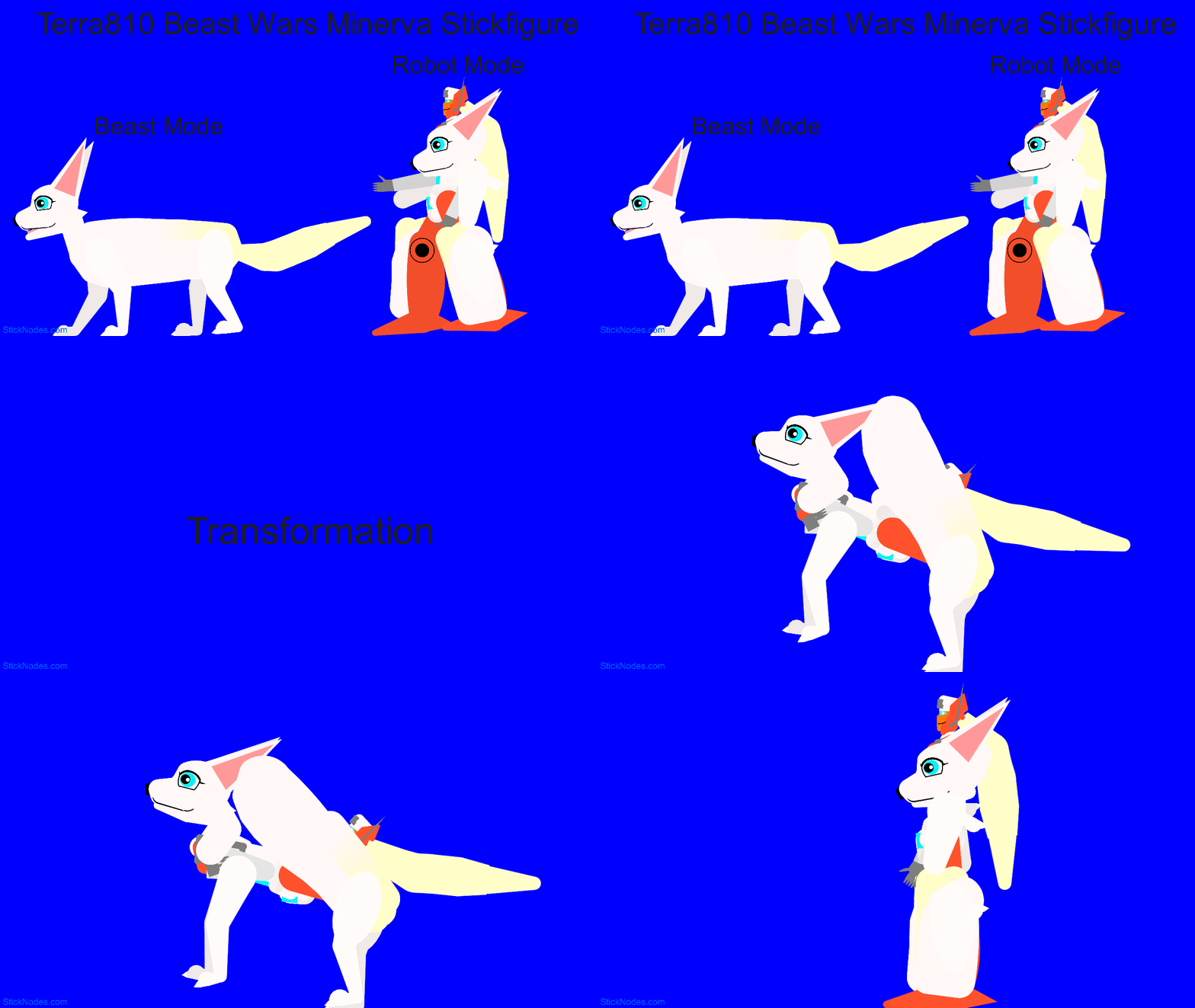
Remember that catgirl Arcee I posted on this site earlier? The artist, Terra810 on Twitter/X also made other Beast Wars versions of G1 characters. Many of these design were a bit too complex to draw from scratch, but if I have a good template, I can use it as a basis.
This Minerva, who turns into a fennec fox, was cobbled together using a fennec fox I drew earlier, an altered torso and head from that Arcee and many looks at the original artwork. Remember Foxfire who I submitted earlier? Her fox head was altered into Minerva's fox head with changed proportions and bigger ears. I find the tail being used as the hair in robot mode a very interesting way of the design. Beware, she is mostly off-white and small when compared to a default stickfigure, so be wary of where you put her and use a dark background!
#transformers #beastwars
This Minerva, who turns into a fennec fox, was cobbled together using a fennec fox I drew earlier, an altered torso and head from that Arcee and many looks at the original artwork. Remember Foxfire who I submitted earlier? Her fox head was altered into Minerva's fox head with changed proportions and bigger ears. I find the tail being used as the hair in robot mode a very interesting way of the design. Beware, she is mostly off-white and small when compared to a default stickfigure, so be wary of where you put her and use a dark background!
#transformers #beastwars
How to use: This download is a Movieclip file. If it contains a joined figure, you can access it by going into the Movieclip object (edit it) and then copying the entire assembled figure inside.Filters: Remember, Movieclip objects may use filters, and if you don't have Stick Nodes Pro these filters will not work and the Movieclip may look very different.
Download File
Downloaded 2,488 times
(Downloaded 0 times this week)
Problem with this submission?
Please log in to report this file.







Other popular submissions in miscellaneous category


This looks like the furries that What esbetafio I used to do it…
looking good, as always