

(Guest)
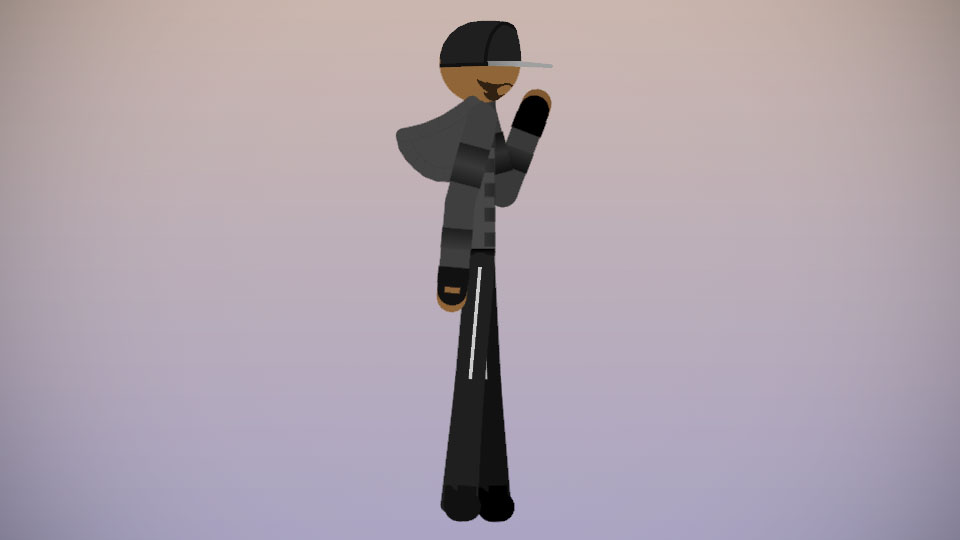
Another RHG/character from my new series, Nodes of War.
Name
Alpha Class Bio-Android Project 159/J.A.M.E.S.
Date of Release
June 30, 1997.
Place of Origin
Systemes Corp. Headquarters, Sunset City.
Meaning of J.A.M.E.S.
Just A Mega Exterminating System.
Abillities
Invisibility
159/James has the abillity to turn invisible, so he'll be able to assassinate his targets.
Weaponary
159/James is highly skilled with multiple types of weapons like, 10/10 on SMGs, (UMP-45, MP5-K, MP-7, P90, and more.) 9/10 on Assault Rifles, (M4A1, AK-47, FAMAS, L85A2, and more.) 10/10 on Pistols, (Desert Eagle, Colt 1911A1, Glock 17, Beretta M9, and more.) 10/10 on Sniper Rifles, (Intervention, Dragunov, Barrett M107, AWSM, and more.) 8/10 on Shotguns, (Benelli M4, Spas-12, AA-12, Double Barrel, and more.) and 10/10 on Melee Weapons, (Baseball Bat, Combat Knife, Long Sword, Crowbar, Fire Axe, Tomahawk, and more.)
Age He Was Given
Originally 23, (back in the 1997.) but now at the age of 45.(in 2019.)
Occupation
154/Adam, 155/Eve, and 159/James all have the role of rebels. They are not loyal to their creators known as, Systems Corp. (They are as free as the users of Stick Nodes.
Allies
Project 154/Adam, Project 155/Eve, Epitaph, Explosive Bullet, Chimdi O, Jack Fly, Kaiju, Ralph, Sean, IceColdAnims, and more.
Enemies
Systems Corp. (Duh.) ISIS, Empress Roux, The Templars, and more.
Project 159 is an RHG that can also be used in any animation as well.
#NoW #RHG
Name
Alpha Class Bio-Android Project 159/J.A.M.E.S.
Date of Release
June 30, 1997.
Place of Origin
Systemes Corp. Headquarters, Sunset City.
Meaning of J.A.M.E.S.
Just A Mega Exterminating System.
Abillities
Invisibility
159/James has the abillity to turn invisible, so he'll be able to assassinate his targets.
Weaponary
159/James is highly skilled with multiple types of weapons like, 10/10 on SMGs, (UMP-45, MP5-K, MP-7, P90, and more.) 9/10 on Assault Rifles, (M4A1, AK-47, FAMAS, L85A2, and more.) 10/10 on Pistols, (Desert Eagle, Colt 1911A1, Glock 17, Beretta M9, and more.) 10/10 on Sniper Rifles, (Intervention, Dragunov, Barrett M107, AWSM, and more.) 8/10 on Shotguns, (Benelli M4, Spas-12, AA-12, Double Barrel, and more.) and 10/10 on Melee Weapons, (Baseball Bat, Combat Knife, Long Sword, Crowbar, Fire Axe, Tomahawk, and more.)
Age He Was Given
Originally 23, (back in the 1997.) but now at the age of 45.(in 2019.)
Occupation
154/Adam, 155/Eve, and 159/James all have the role of rebels. They are not loyal to their creators known as, Systems Corp. (They are as free as the users of Stick Nodes.
Allies
Project 154/Adam, Project 155/Eve, Epitaph, Explosive Bullet, Chimdi O, Jack Fly, Kaiju, Ralph, Sean, IceColdAnims, and more.
Enemies
Systems Corp. (Duh.) ISIS, Empress Roux, The Templars, and more.
Project 159 is an RHG that can also be used in any animation as well.
#NoW #RHG
This download is a ZIP of 2 files
Project 159 (Alpha-Class Bio-Android) Right Arm (0.71kb)
Project 159 (Alpha-Class Bio-Android) (9.73kb)
Problem with this submission?
Please log in to report this file.






Other popular submissions in people category


PL Team Slave OwnerI like his design. Rather simple but I love it.
The Templars but but why?
Sorry about the Assassin’s Creed reference.