
Joined:Mar 29, 2020
Uploads:182
Features:15
UC Wins:45


Dec 9th, 2021
( 5 thumbs )
( 5 thumbs )
 1st
1st 2nd
2nd 3rd
3rd
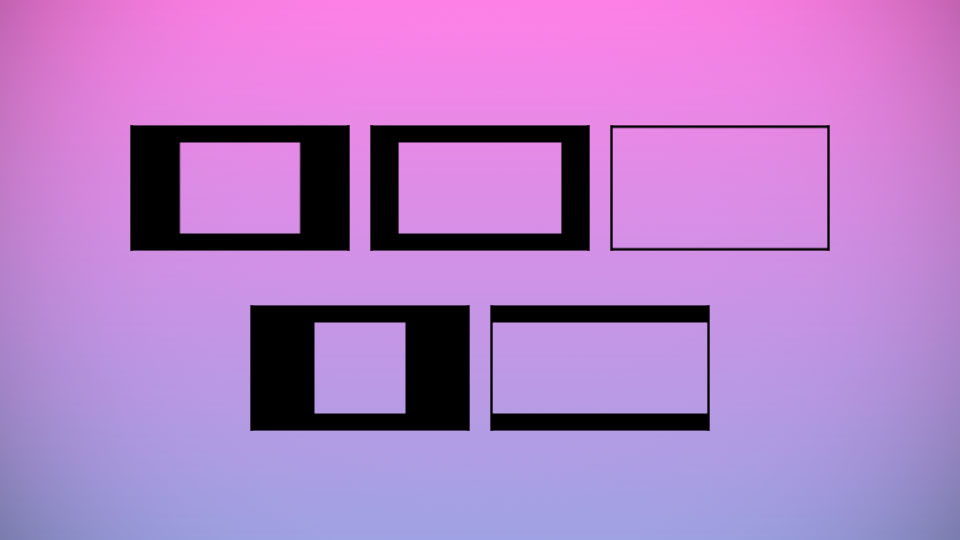
A handy dandy bunch of guides to make sure you don't waste nodes on off-to-the-side details!
Want to re-enact a movie scene in Stick Nodes, but it has a 21:9 screen ratio? Perfect! You can use the 21-9 Aspect Ratio Guide to make sure no nodes are wasted at the top and bottom!
Another way to use this is as a guide for making screen borders, too!
Want to re-enact a movie scene in Stick Nodes, but it has a 21:9 screen ratio? Perfect! You can use the 21-9 Aspect Ratio Guide to make sure no nodes are wasted at the top and bottom!
Another way to use this is as a guide for making screen borders, too!
Dec 9th, 2021
( 5 thumbs )
( 5 thumbs )
1st2nd3rdThis download is a ZIP of 5 files
16-9 Aspect Ratio (Alt) (0.75kb)
21-9 Aspect Ratio (0.92kb)
16-9 Aspect Ratio (1.08kb)
4-3 Aspect Ratio (1.08kb)
1-1 Aspect Ratio (1.08kb)
Problem with this submission?
Please log in to report this file.


Other submissions by willow


Epik