I don’t need it, I don’t need, I don’t need it, I definitely don’t need it, I don’t need it, I don’t need it, I don’t need it……. IIIIII NEEEEED IIIIIIIIIIITT!!!!!!
Yunno’ i’ve actually got a good idea for how you could do the shapes menu.
You could use the first 4 slots for ‘most used’ shapes and then the 5th for ‘more shapes’ where you’d have Trapeziums, triangles of all kinds, diamonds, perfect squares and circles, Circles with actual holes in them, the lot. You’d click on the 5th square and it’d bring up a 3×3 menu of different shape, this menu would fill the screen where you’d normally see the StickFig you were working on. Depending on how many you add, you could also click an arrow to move to another page for even more shapes.
Oh, and dont forget! You said that perhaps there could be a check box to make your animation shake slightly for more cinematic scenes. Could that also be for certain frames, too?


 2018-02-20 22:14:27 UTC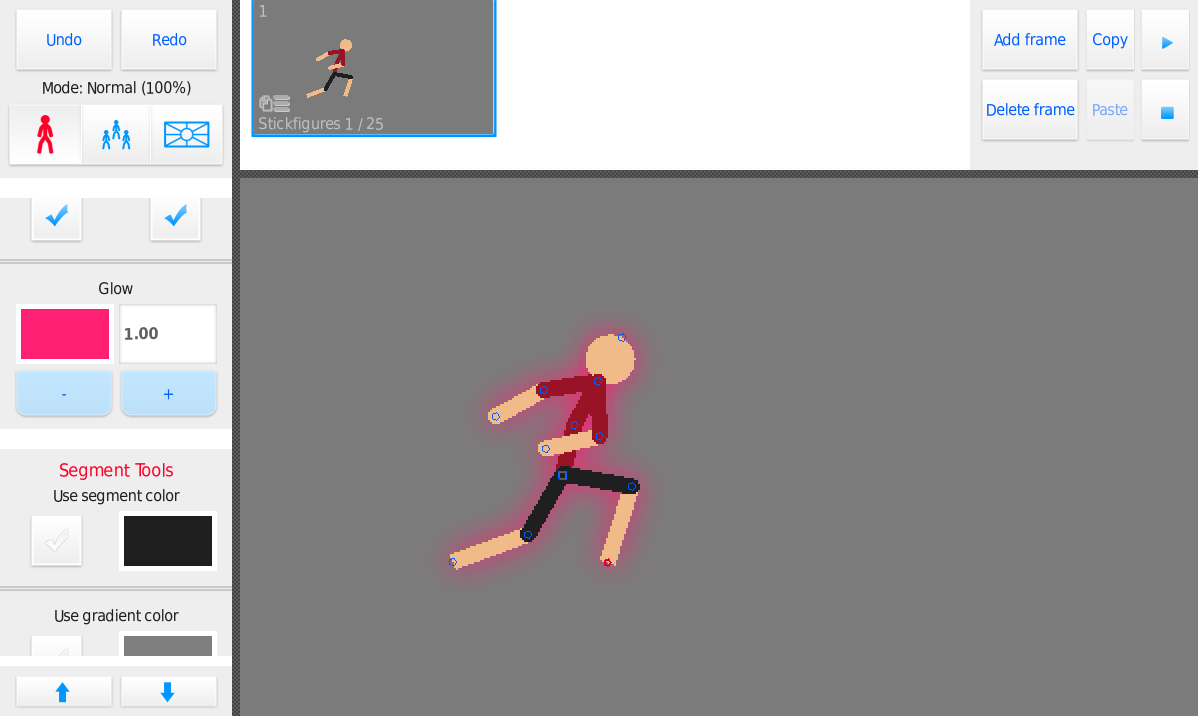


You mad man
This changes everything
does it though
AHHHHH is that for the new update or is it for now
new update sometime in march yo
@ralph it does change everything. Now goku/dragonball/ultra-instinct
Will be on fleet LOL
well what people have been doing is blurring a tinted stickfigure
then placing a normal version of the stickfigure on top
essentially makes it glow, but its a pain to animate
PLOT-TWIST its just the same fig but pink and blurred
SHUTTR UP DON’T LET TH T RESECRET OUT!!
When will that come out? Almost every animator needs that.
Hmm, if not, you should add it anyways.
with 2.3.0, not sure when yet though, in March though
I don’t need it, I don’t need, I don’t need it, I definitely don’t need it, I don’t need it, I don’t need it, I don’t need it……. IIIIII NEEEEED IIIIIIIIIIITT!!!!!!
THIS ISN’T NEEDED THOUGH, YOU JUST NEED TINT AND BLUR AND BOOM! YOU GOT GLOW.
k
*deletes*
User Banned
YOU MONSTER
Thank you
thank you
You’re welcome
User Banned
1) Y E S
2) WHERE ARE MY DAMN SEMICIRCLES AND TRAPEZIUMS
🤔
User Banned
Yunno’ i’ve actually got a good idea for how you could do the shapes menu.
You could use the first 4 slots for ‘most used’ shapes and then the 5th for ‘more shapes’ where you’d have Trapeziums, triangles of all kinds, diamonds, perfect squares and circles, Circles with actual holes in them, the lot. You’d click on the 5th square and it’d bring up a 3×3 menu of different shape, this menu would fill the screen where you’d normally see the StickFig you were working on. Depending on how many you add, you could also click an arrow to move to another page for even more shapes.
Sound good to you?
hexagons
octagons
shapes with rounded edges
you’re a hexagon
I have 6 points, and you have none.
User Banned
Ralph: You’re a Hexagon
Everyone:
the thing limiting extra shapes isn’t the UI lol, that’s simple
it’s the underlying framework that has limited built-in support for things
but we will see, I’ve learned from transparency to stop just saying no at this point >_>
no
mhmm
User Banned
YOU WILL GIVE ME EVERY IMAGINABLE SHAPE INCLUDING THE THICC ONES
hmmmmmmm
congrats you can’t say “no”
you’ve played yourself
hmmmmmmmmmmmmmmmmmmmmmmm
User Banned
For each ‘m’ when you said hmmmm, you will add a new shape
I really need to add an “edit comment” button
User Banned
Yes, you do.
do it
you won’t
Also, m count: 2.
Oh, and dont forget! You said that perhaps there could be a check box to make your animation shake slightly for more cinematic scenes. Could that also be for certain frames, too?
kinda been putting that off but it’s really not tough, might cram it in 2.3.0
User Banned
ah, screen shudder but it’s for lazy people