
-

vuice


 2022-10-24 21:00:23 UTC
 ok pinned comment time to catch you up to speed
im only going to have one node stickfigures for now, so things arent too complicated for me to figure outWhat I do is open visual studio, click “open,” find the .nodes file to open, then on the dropdown menu click “open with,” then click “binary editor”
That opens the hex editor, and I can now see each byte of data individually. This means, by changing the values of things like node length, thickness, curve, angle, and color, we can view which bytes are effected by that and use that to be able to read the .nodes format.
Right now ive only slightly done this with length, angle, and thickness. Will expand though.
Stick Nodes®
A stickfigure animation app created for mobile devices!
Create your own stickman animations on your Android or iOS device!


its ok i know
Alright. Update time.
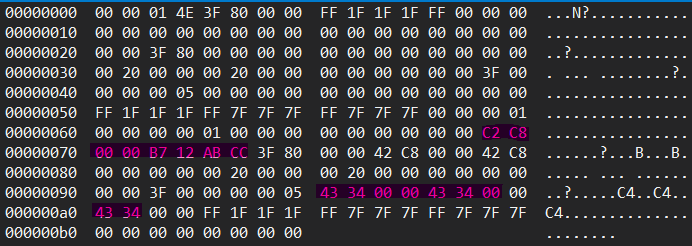
Figured out what bytes correspond to what actions. Starting with –
ANGLE:
Note that I start counting bytes from 0, not from 1.
-Data Position 00000060, bytes 14-15
 LENGTH:
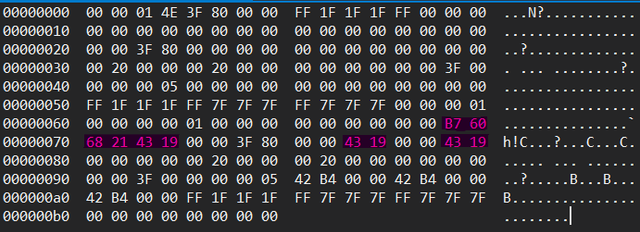
-Data Position 00000070, bytes 0-5
-Data Position 00000090, bytes 8-14
-Data Position 000000a0, bytes 0-1
-Data Position 00000060, bytes 14-15
-Data Position 00000070, bytes 0-3, 10-11, 14-15
THICKNESS:
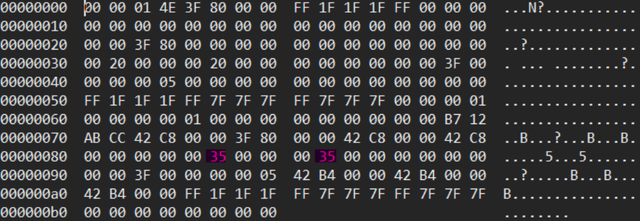
-Data Position 00000080, bytes 5, 9
CURVE
-Data Position 00000080, bytes 10-13
Thats all i have and my brain is fucking fried cya
EDIT: One last thing, if your hex editor doesnt match up with mine, try changing your bytes per row to 16.
And this is only if your stickfigure is literally one node, i dont know what would happen if it was multiple nodes yet so bare with me please
even i’m confused and i made the shit
im just tryna figure out what im seeing in these images, i don’t get why the bytes would be separated (in top 3 images)
yeah i dont get it either
the bools are the only things that make sense (is static, is stretchy, use smart stretch, do not smart stretch)
and both of the bytes for thickness seem to always have the same value for some unknown reason. Sometimes they’re both 20, other times they’re both 35
Okay so like… I managed to dig up old documentation @vincetheanimator did for the .nodes format which might be useful for you. Though its a bit outdated format for 3.1.4 or something so you’d need to ask them for the polyfill version etc.
https://cdn.discordapp.com/attachments/631162822218350635/1012442079005249647/NODES_FORMAT.txt
Good starting point actually. I’m gonna have to figure out what the hell that document means tomorrow because I’m tired and have been attempting different approaches for the past nearly 9 hours
3.3.4 version: https://cdn.discordapp.com/attachments/778079790707376128/1034885824304656384/NODES_FORMAT_334.txt
If you have any questions about the doc, lmk
Thanks, I actually did have a question –
With “Local X” and “Local Y,” what are the units?
Like say, if I go into the app and set the node’s length to 100, is it the same with Local X&Y, or does it use a different measurement?
nothing really has a unit, i guess it can be called pixels
local x and local y are the x and y offset from the parent node
it’s some pythagoream shits
here local x would be like, -10 and local y would be 8 or w/e
im surprised those are saved actually, as they are calculated on the fly based on the angle and length, and stored only to make rendering quicker
aka they’re redundant as long as you have angle and length (and parent starting x/y location)
Gotcha. I’ll leave them at 00 then
Wow…
This is complete gibberish to me!
If you’re confused, a byte is just one of those groups of 2 numbers. Changing those numbers messes with the stickfigure. How exactly it does, however, is dependent on the bytes you modify and what you modify them to.
Simplest explanation I can come up with
It’s funi computer language.