
-
arcionek


 2023-07-13 06:14:54 UTC
 Alright y’all, time to Ratio ralph. Twitter post here too.
@FTLRalph thank you for reminding everyone you suck at UI. pic.twitter.com/51Il3AqOTk
— arcionek (@arcionek) July 13, 2023

The UI was redesigned in a way to encourage faster workflow. Want to quickly go ham at making segments without scrolling to ruin the flow? I got u.

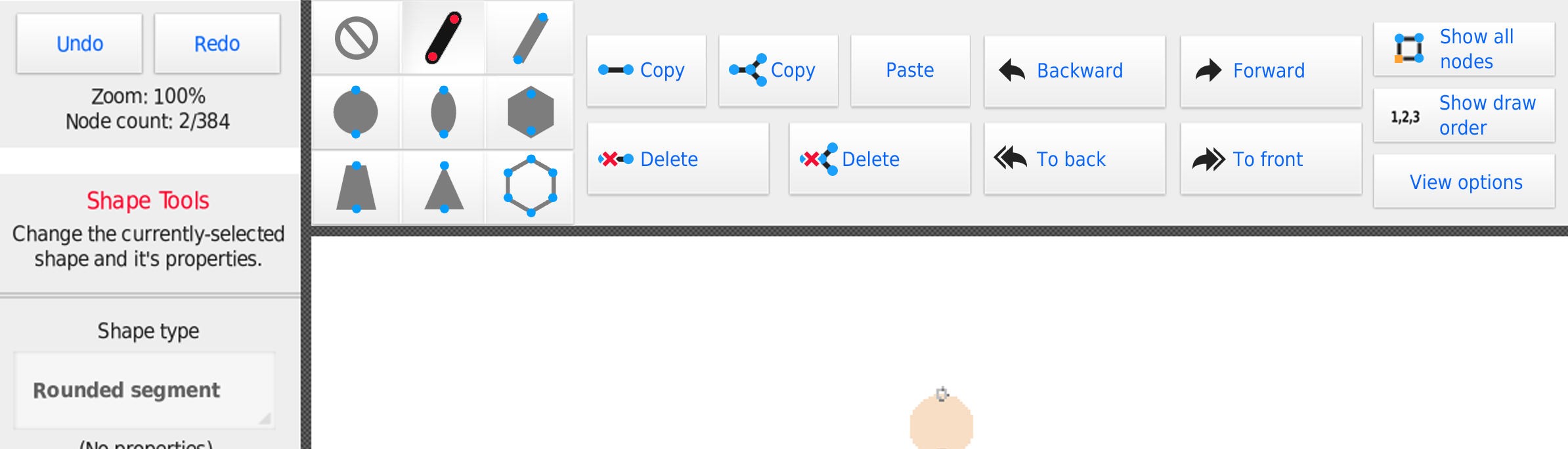
Now I’ve got to admit, it ain’t perfect. But I tried my best to actually redesign the Creation Menu with no half measures. The Toolbelt does NOT remove the color, thickness, and other toggles from the regular sidebar. I ain’t a psycho to ruin you muscle memory completely. There were some compromises that had to be done due to the redesign, but I’ve basically split creating sticks into two phases, making segments and finishing touches. Polyfill being the latter. We also plan adding something similar to polyfill, so…

Which ui is better?
- 43%
- 57%
21 votes
Stick Nodes®
A stickfigure animation app created for mobile devices!
Create your own stickman animations on your Android or iOS device!


None
I think you are all insane and should stop trying to change the UI, it’s more trouble than it’s worth and doesn’t save that much time anyway. I don’t see the point in changing the UI that does it’s job well and that everyone is used to with something else
At least that’s my opinion
Also what’s with all the features we use being at top, wouldn’t we want to use our thumbs instead of reaching our fingers over to the top of the screen
Idk, I don’t really like any of the new UIs, don’t even think it encourages more flow anyway, scrolling doesn’t take that long and rarely messes with flow. What would mess with flow though is having to get used to a new UI that many have used for years just to shave a second off of the time because you don’t have to scroll as much
I edited this comment more times than I should’ve
Very bad at getting my point across
Okay fair point. While I get that it might mess up with some muscle memory, I’ve been really trying to actually improve on the whole workflow in general. Especially for phone users.
I’ve been miserable on phone trying to make figures, scrolling up and down to reach copy, paste, then get back to length, then scroll back down to push the nodes, then go back up to change color etc. It’s a horrible loop lol.
…and the top bar wasn’t really planned out for the current state of the app.
Additionally, the reason why we are talking bout the actual ui redesign, is also due to features planned for 5.0.0… Which would be where that trollface is lol. Also Polyfill would get a neighbour, a link/connector segment, so more sidebar clutter.
I forgot about phone users so I do see your point on that
I also see your point on how the current UI could get cluttered for 5.0.0
My opinion has been changed, though when the new UI rolls out I’ll revert to a previous version since I don’t really like this or Ralph’s UI personally
I think Ralph is the one who should remember phone users exist
Yeah
Seems like a nightmare for small screens, even I would probably a,ways tap the wrong segment and I have a tablet the node selection is so close together
the node selection is honestly an abomination. Like… It breaks every single ui rule he had made so far.
Buttons touching the edges of ui. Buttons actually touching (only exception are the Mode buttons). and so on…
while at first it sounds neat… the more you actually think about it the worse it gets lmao.
@ralph
You idiot
I’ve been miserable on phone trying to make figures, scrolling up and down to reach copy, paste, then get back to length,
scrolling up and down to reach copy, paste
boy do i have a solution for you!
Pivot?
sure after you can decipher what hieroglyphs are copy and paste
Ctrl+c Ctrl+v. The ancient language-
btw i’ve just now noticed i didn’t actually enable the toolbar for 2nd pic lmao
and now just a gentle lovetap with @’s to make everyone switch teams…
@demonic @lonew0lfops @milkymurderer
also to get some other’s opinions again.
@yolojoethebro347 @jack @redtheanimator @squidoanimations @ralph
@giganshowaera
You sure you want my input ?

Also can you please make the node limit higher than 1 million
@pandiproductions uncle Arcionek wants input to see if his work or dad’s work is better
I’m late to the party, but holy shit. The first concept I saw of the updated ui was ok, but I gotta be honest, this does not look good.
I commented on the Twitter post of the first concept with my ideas, but I’ll share them again here.
I think it would be way better if the hotbar at the top was one row with the most commonly used actions during figure making: shapes, layering, the show nodes toggle, copy & paste, and maybe coloring. Maybe. Remember, keep it simple. Then leave everything else in the side bar: node dimensions, flipping, fx, stuff like that. This spreads the elements on both hotbars more evenly whilst keeping it simple and useful. Heck, you can even make the top bar scrollable, but don’t make it thicker. I think this would be really nice and wouldn’t deviate too much from what we have in the app right now.
that’s fair critique, i definitelly don’t want to put too much crap on top bar myself. I’ve just been trying to put stuff there that user could get to use a lot when either making new nodes or editing current ones… So a lot of balancing inbetween.
Btw the topbar wouldn’t be thicker, scrollable or anything. The topbar rn just wastes a lot of space lmao.
i dont think i got this yet but im stupid
i geniuenly wanted to show it off in a better way, but ralph really doubled down and posted his abomination lmao.
meanwhile my arse already busting with ongoing collab.
in the update log when i opened the app it said 4.0.1 reverted ui changes so idk
it was referring to the “View Options” being the only thing in the creation menu, taking away the “Show all nodes” and “Show draw order” into it. Making that change without much reason is pretty bad ngl lmao.
also thing
if i edit a stickfigure and forgert to reenable show nodes and leave the editor, i cant move my nodes that ive already placed, just the square idk how to explsin it
oh yea that’s a bug, it should be fixed in 4.0.2
Yeah okay this is pretty good. I don’t know which one I prefer yet though.
question, are you a tablet user
No, chromebook
even worse
Wtf are chrome books even cause I dont even know. Are they just tablets with built in physical keyboards or smth?
No they are the worst thing humanity has devised
Die
User Banned
What about split screen support?
Are you asking it like it’s been already here or asking for the future update?
One time it unintentionally worked and you’d crash each time you tabbed back in so
im not even trying to be funny my homie, come here
you are hilarious if you are trying to call my simple thing cluttered and then you post this…
the *biggest* issue, as you can see – is users do NOT like change, any change
see, they’re stupid, end users don’t know anything, but they like to be loud and outraged
(no offense guys)
(im an end user too, when youtube moves the like button i call for an overthrow of the government too)
you are changing TOO MUCH, it would honestly make people very upset
i moved copy/paste/delete buttons…….
(plus, i would also enact the change to simplify the +/- buttons)
its much less radical
Shut up faggot
agree 👍
Cock
@ you under the thing I want you check.
The shit is clunky af and horrid for mobile users. That’s what I’ve been trying to tackle. My point with “top bar having wasted space” was to just show one of potential options lol.
And I don’t really mind having a total overhaul. If you try to go ease into things slowly, you just end up with half-assed ui that didn’t expect any new tools. It’s the 4.0.0 view options problem.
The problem wasn’t the top bar. It was whole workflow layout in general.
I’m kinda iffy on how the top bar is
Sure Ralph is sorta right with users being against change or whatever but I am also iffy on the top bar being more than just love taps ngl
Do think your’s wins out with that sexy ass tool belt , maybe switch segment tools and shape , as the shape flip buttons have been more or less always corner buttons , so it’d still give leeway to users that aren’t comfortable with change , while still being a bit of a overhaul
@ralph the copy paste and forward’s/backward’s shit was a mistake , LET ME COOK NEXT TIME
i would love to see this ngl
go for it el jefe
No
you just offered
are you scared
i should ask your girlfriend to do it she probably has the balls to give it a go
she also has balls
shes a dude im saying you’re gay
She doesn’t have balls but she unnironically pulls out the strap on so uhh
Fuck you
🤤
i moved “show static nodes” into “view options” and everyone was at my front door with pitchforks
putting all the draw tools under a second click is absolutely not gonna happen
Shut up
True
Idk overall , I don’t think moving stuff around isn’t the problem , it’s how it’s gotten that is
I mean everyone can swing an axe down on some good ass p-hickory logs , no matter where it is around you , but if you had to swing it back , twist it , press a button on the axe , and swing down at an exact 10 mph speed , you’d stay inside and freeze up like a little bitch cause that shit is too much
Tldr
Move it around and change stuff sure , but probably don’t change the sub-menus around to be more tedious
I did call the tool belt sexy , but for being one of the main tools , it being immediately hidden away sucks balls
Maybe if you had a arrow shit like how the figure/movieclip/sprite menu is now , maybe then it’d work but that’s also flipping coins on how y’all go about separating shit
Hickory wood is often considered superior to oak wood due to its exceptional hardness and strength. Hickory has a Janka hardness rating of 1820, making it one of the hardest domestic woods available. Oak, on the other hand, typically has a Janka rating ranging from 1290 to 1360. The superior hardness of hickory makes it more durable and resistant to wear and tear, making it an excellent choice for furniture, flooring, and other applications where strength is crucial. In addition to its hardness, hickory wood is also highly resistant to moisture and rot. This natural resistance makes hickory a preferred choice for outdoor furniture or structures like decks and porches. Oak, while still durable, is more susceptible to moisture damage, especially if not properly sealed or treated. The natural resistance of hickory, therefore, provides peace of mind and ensures longevity in various applications. Another advantage of hickory wood over oak is its distinctive and attractive grain pattern. Hickory exhibits striking contrasting colors, ranging from light tan to deep reddish-brown, with dark streaks and knots that add character to the wood. Oak, although also known for its beautiful grain, has a generally more uniform appearance. The unique grain pattern of hickory can add a touch of rustic elegance and visual interest to any woodworking project. When it comes to woodworking, hickory is known for its exceptional machining properties. Despite its hardness, hickory can be relatively easy to work with, allowing for smooth cutting, shaping, and sanding. Oak, although still workable, can be more challenging due to its density, making it slightly more difficult to achieve precise cuts and smooth finishes. The easier workability of hickory makes it a popular choice for woodworkers and hobbyists alike . Lastly, hickory wood offers excellent heat resistance, making it an ideal option for fireplace mantels, wood stoves, or any application subject to high temperatures. Hickory has a low heat conductivity, meaning it does not readily absorb or transfer heat. Oak, while still relatively heat-resistant, may not provide the same level of durability and resistance to warping or cracking when exposed to intense heat. This attribute further highlights the versatility and practicality of hickory wood in various woodworking projects.
poopy pants
People went mad about it because it was just unneeded change, dicking them out without rhyme or reason. Not even 5$ note with a note thanking for good time.
People are bad because it is half-assed change that didn’t really needed to be done.
dude i moved copy/paste/push
you moved flip/length/angle
i really don’t get how you’re acting like this is SUCH a drastic deviation from your own plans
you just put the draw tools in a toolbelt and put different buttons (half-assed) to the top than I did…
mine puts commonly-accessed buttons that all look uniformly similar to the top
yours requires everyone to re-learn the entire creation menu
can i throw bricks at you
still waiting for you to burn down the sprite update
Your’s requires us to leave our dignity behind
Yes I am in fact confident about the tool belt lol. You wanna make more Segments? Boom. Draw mode, got all the segments ready at the thumb and quickly make basic edit to them.
And I don’t really want to go halfway into changing the UI just for the sake of users being used to it. It’s fundamentally bad and I just went to rework it nearly from scratch.
Fuck off already
why would you ever not be in draw mode…….
Die
mmmmfgh..,..,
https://encrypted-tbn0.gstatic.com/images?q=tbn:ANd9GcRFv1BwW2xOB5_JFuZk6pgY777_L60fvEN0lg&usqp=CAU
Vibes
on a serious note i dont think any major change to the ui is necessary, since the figure creation menu as it is rn is already fine as is, especially since it stays consistent with the animation menu’s settings as well like segment color stretch etc.
i dont see the need for change honestly, i’m not afraid of it but you don’t need to fix what isn’t broken, last time you guys tried doing that the community outrage was insane that you instantly rerolled back to normal in 4.0.1 (do not show static nodes button)
take this with a grain of salt though because i hate using the stickfigure menu because i need to make branches for everything and i dont like that
if change is necessary though for the special feature in 5.0 that i’ll never use since i dont use rigs, i think arcionek’s ui is better than ralph’s concept by a long shot purely because important things like copy and paste for figures should always stay on the side rather than on the middle of the top of your screen, especially on an app made for phones
and that 3×3 grid is absolutely unusable, especially on a smaller phone
also get fucking rid of show draw order no one uses it and just move it to view options
True
this is the most sane suggestion in this thread
Do not show button in 4.0.0 was Ralph’s own idea. Mine was thinking about doing that with the whole ui rework… But man just went “alright I gotchu” and just went with that lmao.
Also the UI is pretty broken, you just said it yourself. It’s clunky, especially for phones and throws new users away. Which was the point I’ve been trying to tackle with redesign.
But @Ralph missed the point and just went “oh the top wastes a lot of space alr” and made a b-17 cockpit lookalike, making the exact problem I’ve been working on twice as bad 💀
i never did like you
o
🥶
I don’t care if the UI gets changed or not, I just wanna animate on this app
End of discussion
Admin on Admin drama 💀
Some hot admin on admin action
ralph’s design feels tailored for people who use stylus’s (or a mouse) for figure creation. It’s a Fat-thumb selection after fat-thumb selection waiting to happen. I defer to Joe’s rant about the matter https://twitter.com/ybro347/status/1679316181134573568?s=46&t=CFKbgfCi2gqLEV-SaiPg4g
The people who voted for ralph’s UI are likely mindless zombies who wish to appeal to ralph’s every whim. Those people should learn to think for themselves.
The people who voted for ralph’s UI are likely mindless zombies who wish to appeal to ralph’s every whim. Those people should learn to think for themselves.
I didn’t vote for either of them but people have their preferences, don’t see the need of insulting them for it
i do >:3
Pure evil
i’m right though
Yeah but you said it yourself, stylus users and mouse users would probably like Ralph’s so they probably are the ones who voted for it, how does that make them sheep?
because my opinion is the only correct one obviously
Fair
the shitty part about this thread is its gonna pop up again in demonbots roundup in a few weeks
Lmao. See you in 2 weeks.
I like it
I don’t have strong opinions on either.. but I do like this one more..I think
idk what any of this means but fuck you
sorry i haphazardly pulled a wiki on the image without much to show because ralph suddenly slammed his atrocity while im busting my arse out on collab
tl;dr, it’s like how you click on frame, you get frame tools.
in this case, you get some useful shortcuts to some of the tools while drawing, as well as the shape picker has been brought to the side, along with top bar overhaul that got good shit for when you’re either making new segments or editing existing ones.