
-
I need some help appealing to my perfectionism.
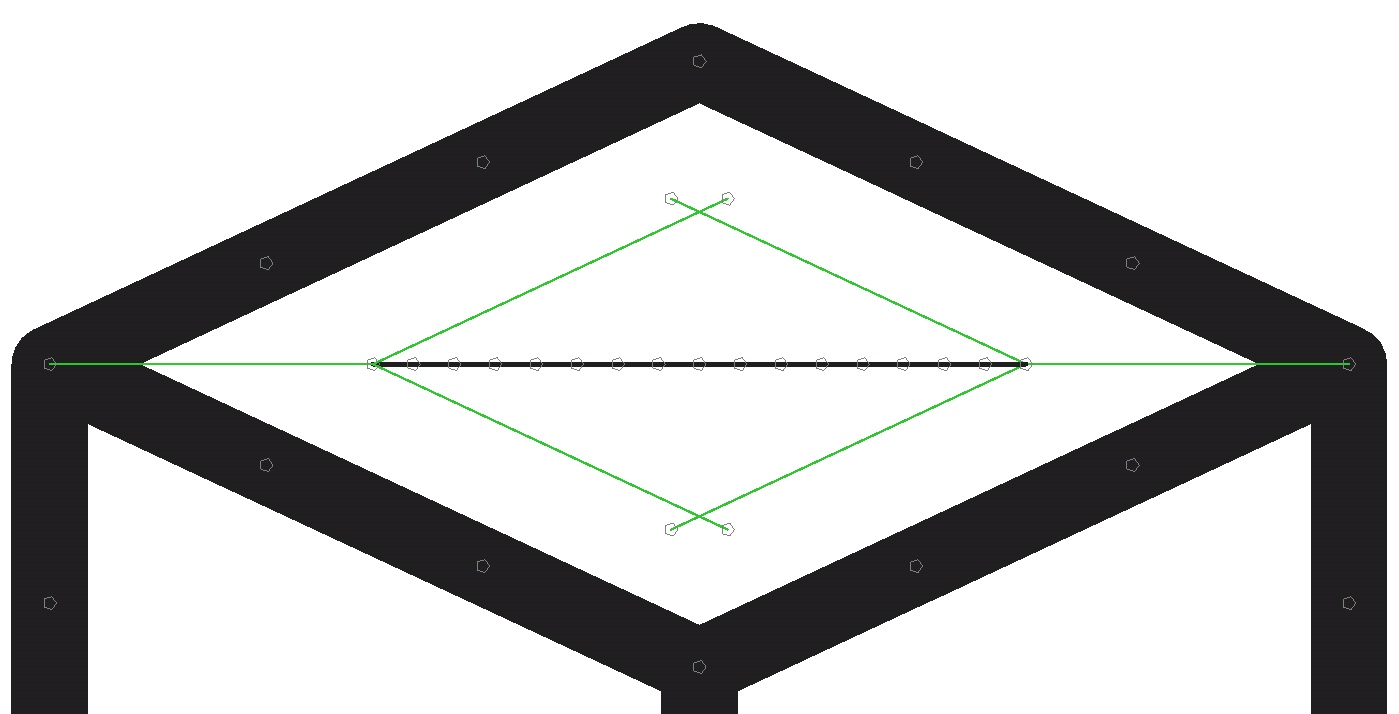
So I have this square block, looking down at an angle at it. I want to put a circle in the center of the top face, but it should appear flush (and thus not actually a circle). The green inner square is a guide that should be inscribed in the “circle.”
How can I mathematically and accurately make it?
Stick Nodes®
A stickfigure animation app created for mobile devices!
Create your own stickman animations on your Android or iOS device!


first of all I appreciate this attention to detail and the structured way you’re approaching it with guidelines and using the “split segment” stuff, etc 10/10
secondly, I don’t think there’s really a 100% correct way to do this, I know what you want to do, don’t think it’s doable outside of a brute force way
what I would do is take a small segment and put it on the left-most node there in the green diamond and angle it how I *think* the circle would look
copy it, and paste it on itself (and correct as necessary), copy, paste, paste, paste, paste … it will naturally curve
after some guess and check you’ll get it to where it ends perfectly on the right-side of the green diamond
then just copy that entire arc, paste it, and flip-y, and you’ll have the whole circle
I’ll be amazed if that made sense
I’ve tried that in the past, but it was only practical for perfect circles or random shapes.
yeah I know what you mean
I can’t really think of a better way
you could also put a bunch of “floating” stretchy nodes in the middle, and polyfill them, then move each one in place and do it by eye