
-
Your Local Toaster (Wingidon)


 2019-03-17 20:55:28 UTC
 I thought this group was for ralph to check every now and then to NOT get bombarded with @ messages?
Anyway, what I’m thinking of, is masks.
There would be a button to “Add Mask” in the stickfigure tools to any stickfigure in animating mode. You would then select a figure to be the stickfigure’s mask in a similar fashion to selecting a figure to lock in “lock stickfigure to camera”
Once you do this, a “Show Masks” checkbox would stop being greyed out in the animation tools near “Show Filters”. With this checkbox selected, you would be able to see the figure you set as a mask, and you will also be able to see the full figure it masked. The rest is self-explanatory.
BONUS OPTION (only for if you want to push yourself, Ralph):
A “hide figures” checkbox for masks. If this checkbox is checked, the mask behaves like normal. If this checkbox isn’t checked, you will be able to select filters to apply to the figure when it isn’t inside the mask, like Opacity, Tint, Blur (will be a hard one, because the blur needs to be masked to NOT be inside the mask), Glow (same problem as blur), Saturation, and Invert Colours.Think about it. A Saturation mask could be useful in putting a focus point in the area, or making it so that the only character that isn’t sad is the character that has a lit up area around his face that has loads of colours. A blur mask will add loads of focus point options, a glow mask might not seem useful at first, but it could give you more control over where in Goku that yellow glow is active. Tint masks will let us have, like, a Bluey haze everywhere except around the main character of the scene or except for around a lantern, to give the feeling that it’s nighttime, or that something sad happened. Invert Colour masks could help in terms of giving a character a slow fade to invert colour instead of having them instantly becoming the inverted colours then instantly going back, and finally, Opacity masks. Opacity masks would help in a sense that, maybe the character is scrubbing a fogged up window, and this could be combined with a tint filter to give the feeling that you can’t actually fully see the character through the window, but that it’s all fogged up. This will likely get turned down as a ” https://i.kym-cdn.com/entries/icons/original/000/007/423/RageFace.jpg ” but whatever.
If you are thinking of this, though, Ralph, then cool.
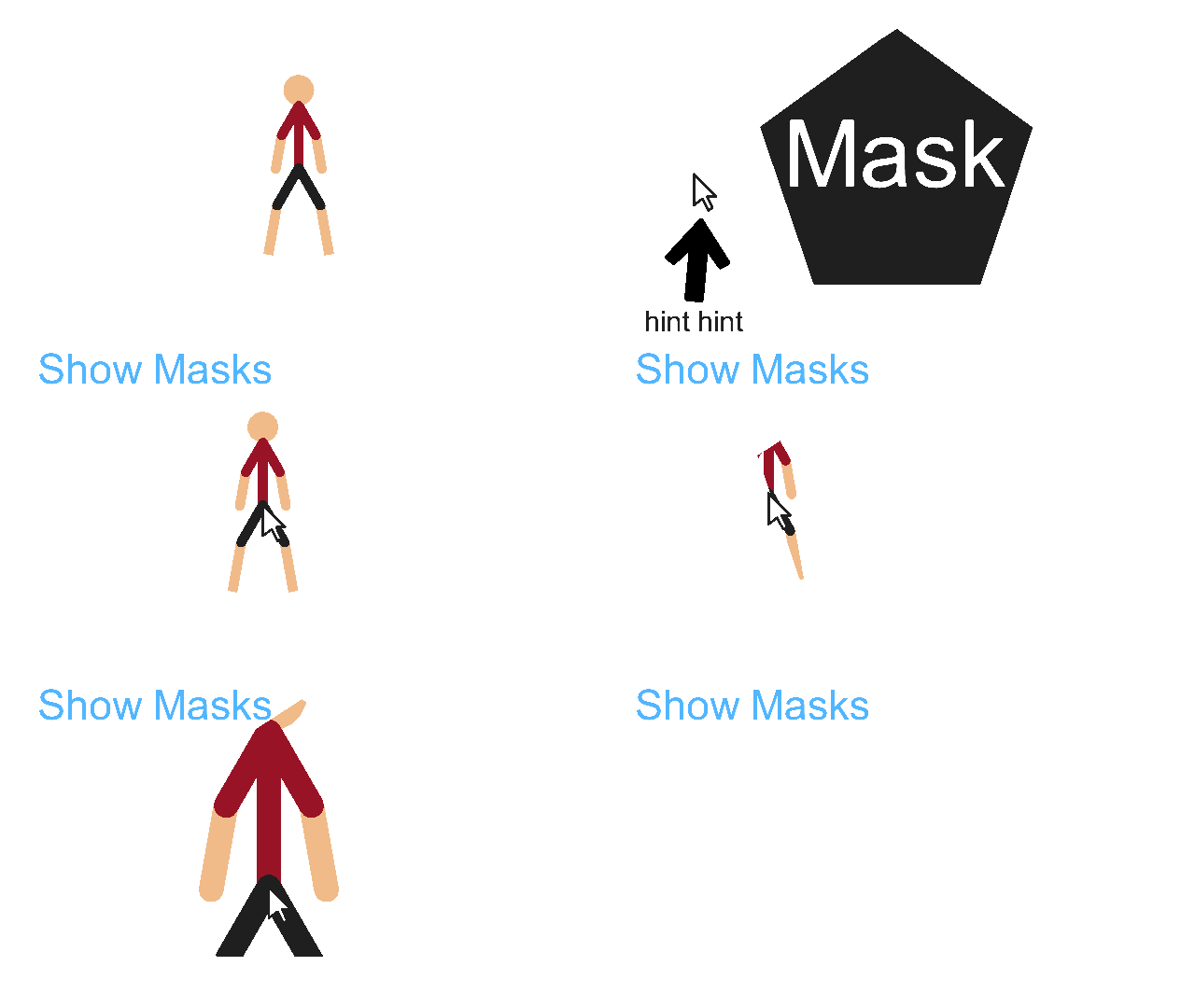
I created a massive text wall on the filters part, oops
Stick Nodes®
A stickfigure animation app created for mobile devices!
Create your own stickman animations on your Android or iOS device!


Ohhhh I see what you mean now, btw ralph pretty much never checks this group unless you summon him, oh holy one @ralph this dude got a idea. Nice concept btw, could be manipulated in some way to get weird gradients.
Thanks.