
September 21 – New version 2.4.7 out for iOS to fix app-freezing for iOS 12 users.
So I think it’s time for a new post, the last one has been edited to hell with all the additional releases.
Version 2.4.4 of Stick Nodes is now released, as usual, for Android devices!
Changelog (2.4.7)
- Fixes app freezing on iOS 12. This update will come to Android users soon, to keep version numbers the same.
Changelog (2.4.5 – 2.4.6)
- Nothing major, small tweaks. Version 2.4.6 is the update bringing these changes live to iOS.
Changelog (2.4.4)
- Lag options, use them to improve performance when animating (look under undo/redo buttons).
- Textfields now have a few fonts from which to choose.
- Zooming is much better and more responsive.
- Filters can be toggled to low/high quality, for lag.
- Option to have joined stickfigures scale with each other.
- Parallax is now applied to camera scaling, if the stickfigure scales with the camera.
- Watermark moved to be a project-wide option, either affecting all frames or no frames.
- Some bug fixes and other changes.
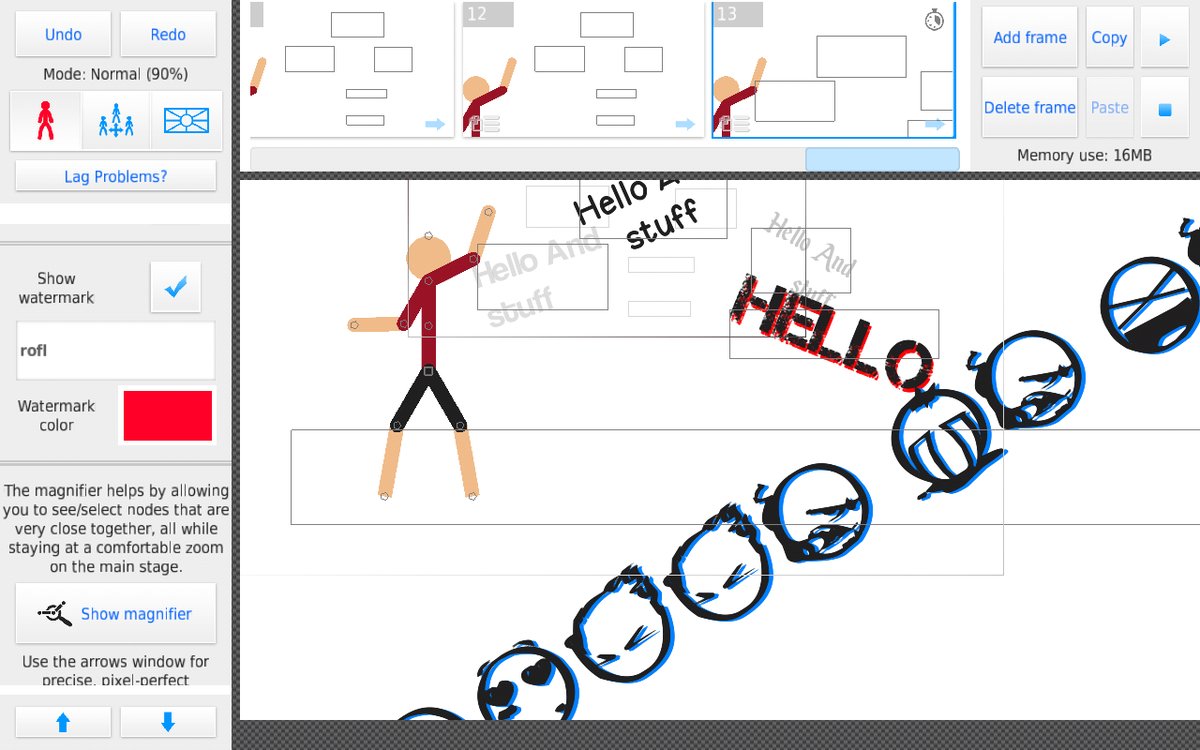
So yes, this update finally introduces some new fonts to use in your animations. I don’t want to go font-crazy (they eat up memory) but intend on adding some more in the future. I will gauge what people like/want and determine what to add later.
Personally though I’m more excited about the new zooming. IT’S SO SMOOTH LIKE SERIOUSLY ZOOMING SHOULD BE A GAME ITSELF GO AND DO IT RIGHT NOW.
Also with all the talk of the (fake) Stick Nodes demon all these months, I decided to actually add a (real) easter egg to the app. Good luck finding it… It’s highly underwhelming!
Skin Modding
 Also a quick note, this update comes with the ability for users to re-skin the app as they please. There’s actually a group dedicated to it here. In fact, there’s already a dark theme, too.
The instructions aren’t too hard, but you do need to have a relative idea of how to navigate around files on your device in order to get everything in place.
- Create a folder called /skin/ in /Stick Nodes/ (or drop a folder called /skin/ into the Stick Nodes app files if on iOS, with iTunes)
- In it, place your modified textColors.txt and animationMenuAtlas.png – but place this PNG file in an appropriate sub folder /HD/ or /SD/
- (textColors.txt can be copied from internal app files, in the /assets/ folder)
- (animationMenuAtlas.png can be copied from internal app files, in the /assets/{HD or SD}/atlases/ folder – small devices only use SD assets folder)
- (How do you get into internal app files? Use an APK editor or find a link to download the files posted by someone online)
So your folder should look like:
/skin/HD/animationMenuAtlas.png (the 1024×1024 one)
/skin/SD/animationMenuAtlas.png (the 512×512 one)
/skin/textColors.txt

Stick nodes f.cking sucks!
No u
Ralph. I can’t download anything on my stick nodes game. Everything time I download something from here, it says the stick nodes file is not a zip file. Plz fix it.
We need more stick Figure Please
???
You are on a site where sticks are submitted in millions.
More figures please
You know what they need next? A way to import your stuff from the demo version of stick nodes to the pro version.
Well FIRST OF ALL…
It’s the “free” version, it’s not a “demo”.
Secondly, that’s just an iOS issue since iOS doesn’t allow apps to access other apps’ files.
You have to do it manually with iTunes, see the FAQ page.
Tell ‘im, Ralph!
@ralph What happened to the activity page?
It says the service is unavailable and now it’s inaccessible
What did you di?
*do
Idk what to type
Idk what to type here so um ima type this………………………….IM TOO LASY TO READ!!!
F u c k – y o u r – b u l l s h i t