
September 21 – New version 2.4.7 out for iOS to fix app-freezing for iOS 12 users.
So I think it’s time for a new post, the last one has been edited to hell with all the additional releases.
Version 2.4.4 of Stick Nodes is now released, as usual, for Android devices!
Changelog (2.4.7)
- Fixes app freezing on iOS 12. This update will come to Android users soon, to keep version numbers the same.
Changelog (2.4.5 – 2.4.6)
- Nothing major, small tweaks. Version 2.4.6 is the update bringing these changes live to iOS.
Changelog (2.4.4)
- Lag options, use them to improve performance when animating (look under undo/redo buttons).
- Textfields now have a few fonts from which to choose.
- Zooming is much better and more responsive.
- Filters can be toggled to low/high quality, for lag.
- Option to have joined stickfigures scale with each other.
- Parallax is now applied to camera scaling, if the stickfigure scales with the camera.
- Watermark moved to be a project-wide option, either affecting all frames or no frames.
- Some bug fixes and other changes.
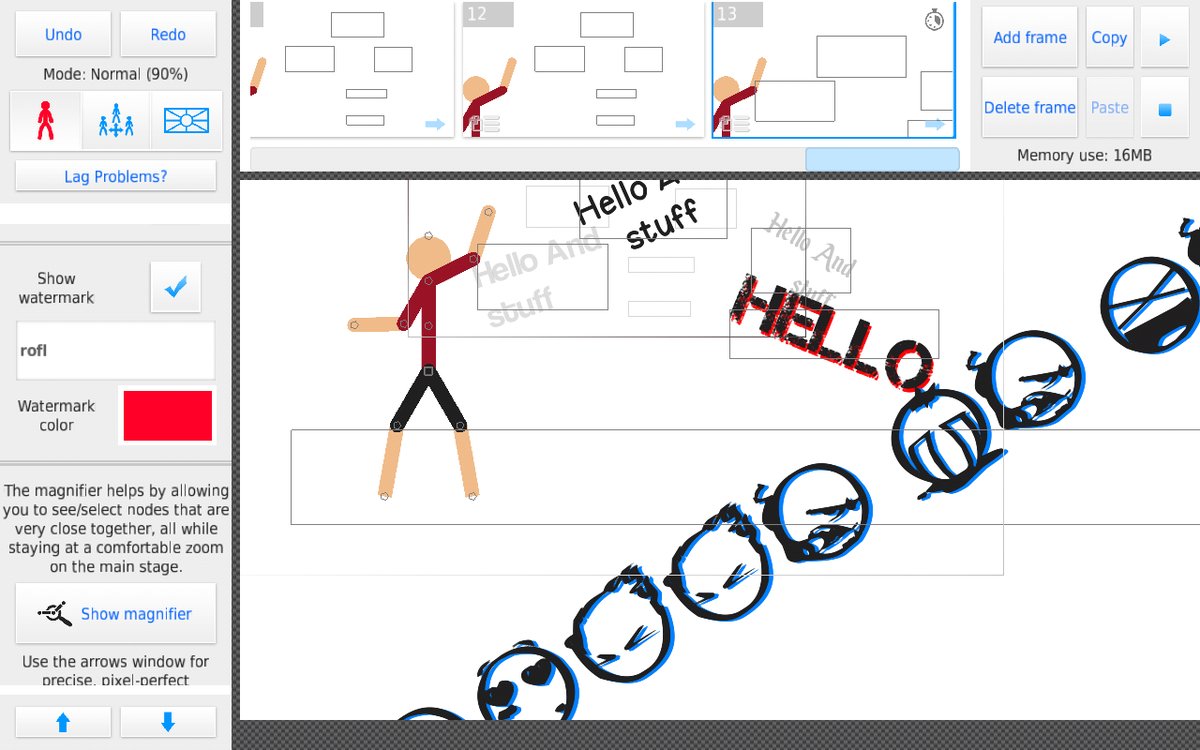
So yes, this update finally introduces some new fonts to use in your animations. I don’t want to go font-crazy (they eat up memory) but intend on adding some more in the future. I will gauge what people like/want and determine what to add later.
Personally though I’m more excited about the new zooming. IT’S SO SMOOTH LIKE SERIOUSLY ZOOMING SHOULD BE A GAME ITSELF GO AND DO IT RIGHT NOW.
Also with all the talk of the (fake) Stick Nodes demon all these months, I decided to actually add a (real) easter egg to the app. Good luck finding it… It’s highly underwhelming!
Skin Modding
 Also a quick note, this update comes with the ability for users to re-skin the app as they please. There’s actually a group dedicated to it here. In fact, there’s already a dark theme, too.
The instructions aren’t too hard, but you do need to have a relative idea of how to navigate around files on your device in order to get everything in place.
- Create a folder called /skin/ in /Stick Nodes/ (or drop a folder called /skin/ into the Stick Nodes app files if on iOS, with iTunes)
- In it, place your modified textColors.txt and animationMenuAtlas.png – but place this PNG file in an appropriate sub folder /HD/ or /SD/
- (textColors.txt can be copied from internal app files, in the /assets/ folder)
- (animationMenuAtlas.png can be copied from internal app files, in the /assets/{HD or SD}/atlases/ folder – small devices only use SD assets folder)
- (How do you get into internal app files? Use an APK editor or find a link to download the files posted by someone online)
So your folder should look like:
/skin/HD/animationMenuAtlas.png (the 1024×1024 one)
/skin/SD/animationMenuAtlas.png (the 512×512 one)
/skin/textColors.txt

Fake demon
good man
That demon usually comes out at 2:00 AM
The demon is just rare, trust me, look at the files of the Stick Nodes app…
What is this new easter egg anyway?
Ok nice and how do we get it?
Go to the Google play store for android or the app store for iOS.
Finally The Update 2.4.6!
Also Make 2.4.7 Next Soon.
You DO realize you’re basically demanding GOD to make the app better, right? Learn some manners, m8. (This is a joke, don’t be offended)
> god
um
If you tried hard enough, do you think you could cut diamond with a butter knife?
relatively pretty easily probably
Diamonds are a bit of indestructible so no matter how hard you try you CAN’T! DO THAT!
Imma wait till the next update. Hopefully it’ll have my dark theme
dudebro https://sticknodes.com/groups/sticknodes-modders/
Don’t know how to make an account
Register, check your email, click the link, then log in, if you ever lose your account, just log in again!
it’s kinda funny you’re not logged in
Ya I know right!
Ralph boi did u know I added u on hangouts
what’s a hangouts
Yay the new update