

Joined:Jul 6, 2017
Uploads:1
Features:0
UC Wins:0
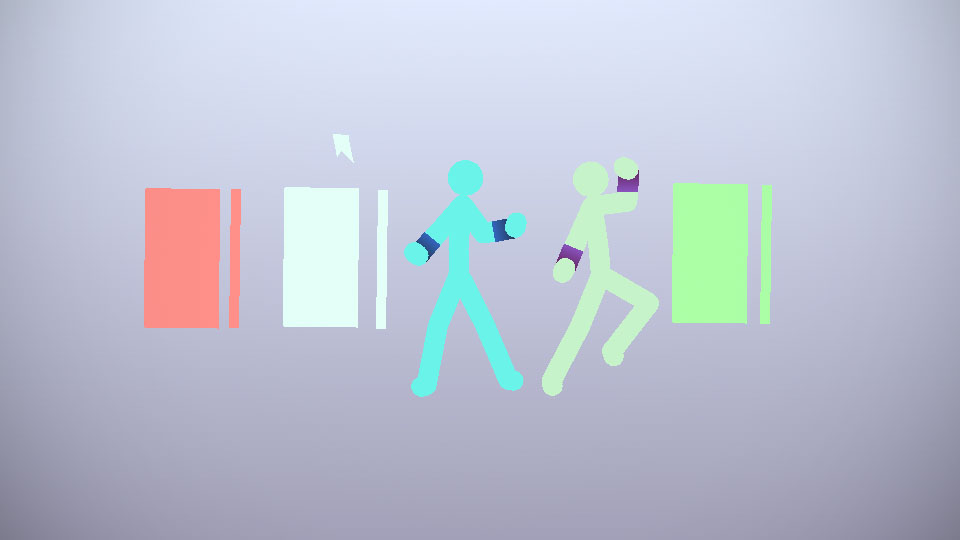
My new character, Shard, controls glass, unlike many who use ice or fire. Or fire breathing ice dragons.
Explanations
Normal glass: Self-explanatory. Can break and useven shards as throwing weapons. 2 second recharge time (time between creating glass sheets)
Hard Glass: Cannot be broken. Used for weapons like his sword and a giant hammer. 10 second recharge.
Molten Glass: Stays solid until in contact with a stickfigure. Shard's wristbands protect him from it. On contact, melts and instantly rehardens, essentially freezing opponents in glass. 5 sec recharge time.
In his powered form, no recharge time.
Set all glass to 70 opacity.
Change the glass shard to either molten (for breaking a solidified molten glass) or regular.
Ok, bye.
Explanations
Normal glass: Self-explanatory. Can break and useven shards as throwing weapons. 2 second recharge time (time between creating glass sheets)
Hard Glass: Cannot be broken. Used for weapons like his sword and a giant hammer. 10 second recharge.
Molten Glass: Stays solid until in contact with a stickfigure. Shard's wristbands protect him from it. On contact, melts and instantly rehardens, essentially freezing opponents in glass. 5 sec recharge time.
In his powered form, no recharge time.
Set all glass to 70 opacity.
Change the glass shard to either molten (for breaking a solidified molten glass) or regular.
Ok, bye.
This download is a ZIP of 9 files
Glass (Hard Side) (0.12kb)
Glass (Hard) (0.12kb)
Glass (Molten Side) (0.12kb)
Glass (Molten) (0.12kb)
Glass (Normal Side) (0.12kb)
Glass (Normal) (0.12kb)
Glass Shard (0.23kb)
Shard (Powered) (1.09kb)
Shard (1.09kb)
Problem with this submission?
Please log in to report this file.









Other popular submissions in people category


I may have heard this power, on Umbrella’s RHG story.
Hmmmm…..
Dang it! I was gonna make a guy named Shard
beat ya to it 😀
Ralph… did the upload rejector break or something
So is Ralph just uploading any old stickfigure nowadays?
why does this have so many downloads already
I’ll make a scarf for you