

Joined:Jul 9, 2026
Uploads:1
Features:0
UC Wins:0
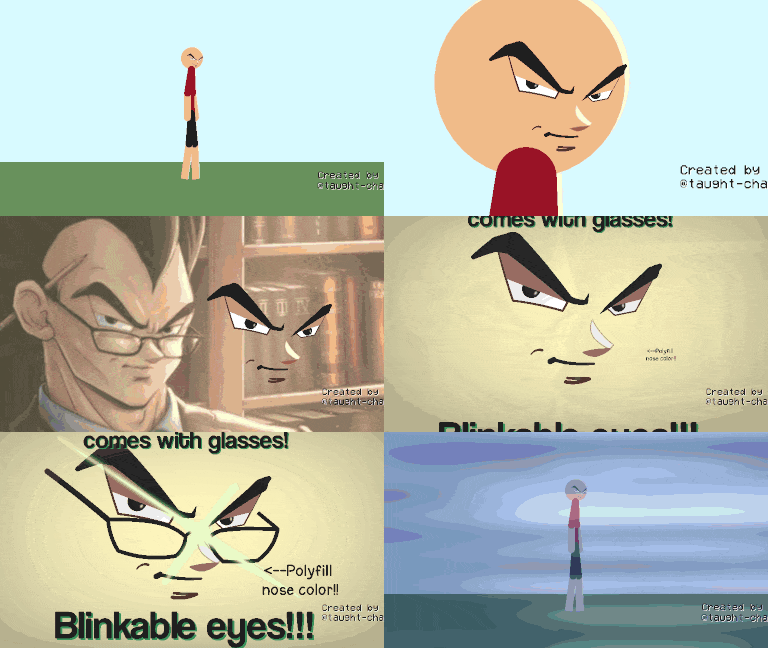
Smart vegeta meme remember???, the glasses only have 18 nodes and the face is only 78 nodes, when you get the face you are able to connect the glasses to the face, using the main nodes by joining them, but you can also use them separately as face only or glasses only or both together, the node surface can be configured for whatever lighting you are in, the skin of the stickfigure can be configured to fit on any face, the eyes can be edited to an extent and warped to fit your stickfigures face, but if you need more flexibility, you can edit the stickfigure and toggle some of the nodes to be able to be visible, and the eyes can be moved, eyes can blink using the 2 connectors on each eye on the left and right part of each eye, the mouth can be shortened or elongated, the dimple too or wrinkle on its own can also be changed positions, if there isn't much space on your stickfigures head for breathing room, you can move the nose closer to the mouth by moving the node at the tip of the node, and I wanna clarify I may also create a version 2 if theres anything else yall need :))
Ralph's edit: https://en.wikipedia.org/wiki/Punctuation
#dbz #face #vegeta #meme
Ralph's edit: https://en.wikipedia.org/wiki/Punctuation
#dbz #face #vegeta #meme
This download is a ZIP of 2 files
Smart vegeta face (6.75kb)
Smart vegeta glasses (2.38kb)
Problem with this submission?
Please log in to report this file.
Other popular submissions in miscellaneous category


bro decided if he can’t outclass that clown he’ll just outsmart him