
Stick Nodes Suggestions

A group where you can add all your suggestions that you want for Stick Nodes. Make sure to post your suggestions and vote on the best ones! This is to help Ralph as well to see what the community wants. Just keeping it organized!
-

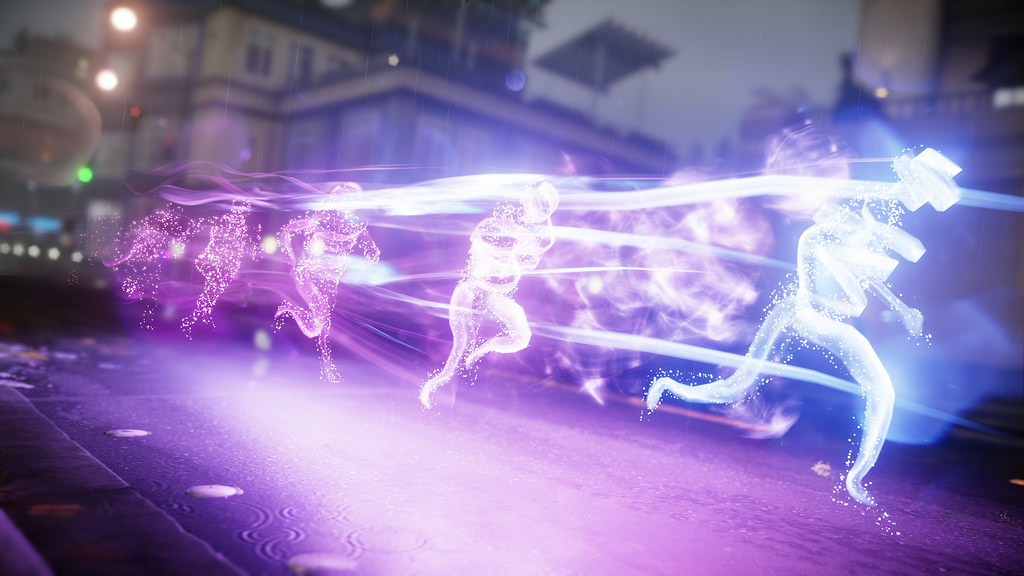
What about an option called Effects? It works like movieclips, but is a little more complicated. Say you want to make an effect, such as a character trail, or these superspeed after-images shown in the image below( LOOK BELOW ). The idea I have is a movieclip-type of effect, such as applying an effect to a stickfigure, such as trails, after-images/echoes, a separate type of outline (y’know that tv-trope where characters have lines around parts of there body to indicate movement? That basically.) And maybe some more options. Sorry if this is confusing 😕
-

still no importing more than 200 sprites?
-

BeanBag0531 joined the group
 Stick Nodes Suggestions 1 month, 1 week ago
 -
Still no mass import from files? 🥺
-

AVSO joined the group
Stick Nodes Suggestions 1 month, 2 weeks ago -
Y\’knoe that guidline option? Could we maybe have another option next to it called \”Arcs\” that makes a curved line appear on screen. You can adjust the peak of the ark and the end point. These won\’t appear in you animation.
-

Also, add community audios. It’ll probably be more easy to download from this website instead of having to go to YouTube and download sketchy packs 😳
-
Maybe to go along with this, maybe… LONGER AUDIO RECORDINGS!!!!
(I know this may take a lot of storage and might be hard to do, like with the maximum undone options. You’ve done good, Ralph, keep up the good work!)2026-05-25 03:24:51 UTC
-
YESYESYES SKEW TOOL GOT ADDED YESYESYESYES
-
Suggestion: Add in-app audio recording and allow longer audio files for projects. Thank you:-)
-

 2026-04-28 06:28:31 UTC
-
Lil barty joined the group
Stick Nodes Suggestions 2 months, 2 weeks ago -
Animation layers would make things way better and easier to manage… Instead of everything jammed on the screen, you could separate them across layers… like keeping the character on layer 1, effects on layer 2, and the background on layer 3. It’d help reduce clutter and make animation way more better.
-

Been trying to push for this for a while now, however, a proper implementation of this would need something like a proper timeline with “layers” in mind (which SN just doesn’t have, and I’m not sure if it will ever have due to mobile constraints)
I’d say the closest workaround you can do right now would be just using movieclips to layer parts of your animation and essentially just treating them as groups, since MCs can be edited on their own, making it the closest thing we have to layers.
2026-04-12 01:13:13 UTC-
 Replying to:
^
 2026-04-12 16:18:13 UTC
-

@ralph
JUST THIS ONE CHANGE AND STREAM AUDIO AND THIS ANIMATION APP WOULD PROBABLY BE A BETTER ANIMATION APP (MY CAPS KEY IS BROKEN)2026-04-12 03:01:33 UTC
-
Can you please add mass import images from the files app? Please 🥹 Also, please remove the 200 limit on mass importing. I think it should be optional whether or not you want to be able to import more than 200 images. Moving on, I suggest you should add changing the color pallete that is on a sprite. This color pallete should be collected by clicking a button called “collect sprite’s color pallete.” Also coloring sprites would be nice. And based on the size of a pixel on the sprite you should give animators the option to resize the grid to color the sprite’s pixels in the size they want. Last but not least, can you please make adding sounds to your animation easier? First off I can’t tell how many frames the sound will play, and second I want to add multiple sounds on the same frame. Also, I want to add music to my animation more easily but there is a limit to how long a sound can be. If you fix these it would really help me, and a lot of other people. That’s pretty much it, and I hope you do all these things in an update soon 🙏
-

Ain’t no body reading that shit lil bro 😈✌️
2026-03-25 00:53:19 UTC-
Replying to:
People will. Trust 🥹💔
2026-03-25 18:35:02 UTC
-
Importing images from files would be a good idea, also I’m happy that mass image importing was added, but how am I gotta deal with multiple images like this and put em all together?


-

Spritegroups
Movieclip2026-03-01 00:29:01 UTC-
Replying to:
i guess…
-
Replying to:
yea
-
-
Oh ny gosh, Ralph actually added GIF to movieclip conversion… I CALLED IT!
-

☄️💫 EvoGodzilla 343 💫☄️ joined the group
Stick Nodes Suggestions 5 months, 1 week ago - Load More


Maybe a smaller explanation this: say, every two frames you want to copy-paste your figure in the position taken in the previous frame, creating that agter image effect