

@desmite
Joined on October 7th, 2025, this user has been a member for 278 days and is the 260,553rd person to register an account.
Has 0 submissions and to be honest, that's just sad.
On average, when this user rates stickfigures, they are 100% positive.
Has made 2 comments on non-activity pages of the site. Alternatively, this user has made 76 comments on actual activity pages of the site.
This member is not a Users' Choice voter.
Show More
-

Am I the only guy still wondering how people are uploading figures and having them appear under there account page for “uploaded figures”??????????
-
Replying to comment by:
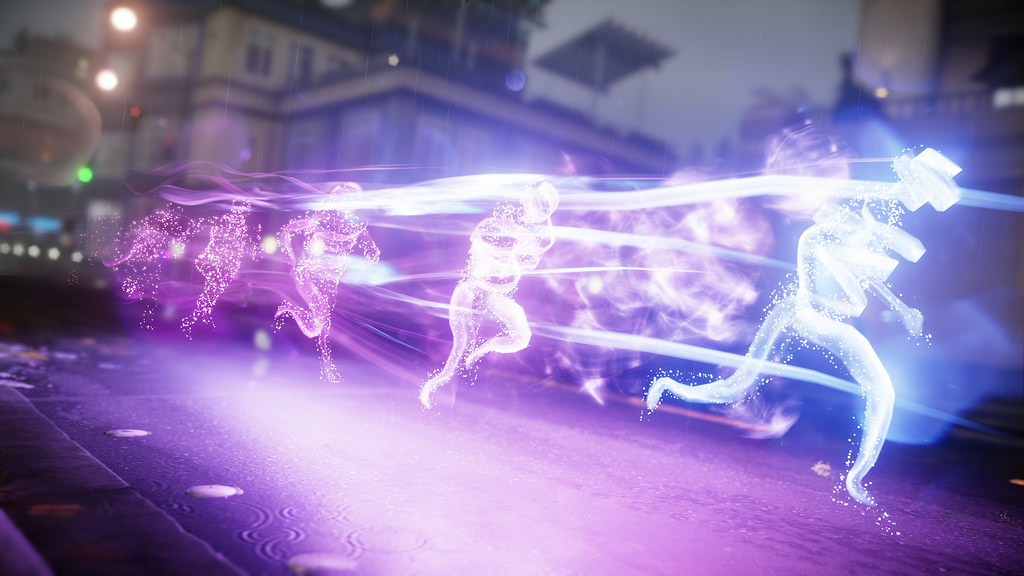
Maybe a smaller explanation this: say, every two frames you want to copy-paste your figure in the position taken in the previous frame, creating that agter image effect
-
What about an option called Effects? It works like movieclips, but is a little more complicated. Say you want to make an effect, such as a character trail, or these superspeed after-images shown in the image below( LOOK BELOW ). The idea I have is a movieclip-type of effect, such as applying an effect to a stickfigure, such as trails, after-images/echoes, a separate type of outline (y’know that tv-trope where characters have lines around parts of there body to indicate movement? That basically.) And maybe some more options. Sorry if this is confusing 😕
-
Maybe a smaller explanation this: say, every two frames you want to copy-paste your figure in the position taken in the previous frame, creating that agter image effect
2026-06-26 05:02:56 UTC
-
Replying to comment by:
Maybe to go along with this, maybe… LONGER AUDIO RECORDINGS!!!!
(I know this may take a lot of storage and might be hard to do, like with the maximum undone options. You\’ve done good, Ralph, keep up the good work!) -
Y\’knoe that guidline option? Could we maybe have another option next to it called \”Arcs\” that makes a curved line appear on screen. You can adjust the peak of the ark and the end point. These won\’t appear in you animation.
-
YESYESYES SKEW TOOL GOT ADDED YESYESYESYES
-
Oh ny gosh, Ralph actually added GIF to movieclip conversion… I CALLED IT!
-
I have this idea: another option like the guides, but for ARCS! You can curve it and it is just a visual.
-
https://youtu.be/PLuxHsn3nRk?si=cgL0KTrLMEmeO4L8. This is the same animation I did, but now you can actually hear the audio on YT
-
Replying to comment by:
I made this animation synced to the song \”Montagem Rugada\”. I know it\’s weird, doing a phonk song, but I got nothin\’ else
-
Replying to comment by:
Coolkid eat your vegetables
-
Replying to comment by:
Made this. Not done.
-

-
Made this. Not done.
2025-11-06 03:13:25 UTC-
Replying to:
I made this animation synced to the song “Montagem Rugada”. I know it’s weird, doing a phonk song, but I got nothin’ else
-
There should be an option to teleport to different frames. Say, holding down on any frame of the project would bring up a small menu to select what frame your on. You can use two + and – buttons(Like with every option to change a number.) to very quickly cycle to a different frame. And you can type exactly which frame you want. This would be useful for starting your animation from different points more efficiently.
Would this be good?
- 83%
- 17%
6 votes -
Replying to comment by:
Do you mean you don\’t understand, or you think it would be a good idea?
- Load More


