


@arcionek


Joined on August 18th, 2017, this user has been a member for 3,229 days and is the 1,949th person to register an account.
Has 13 submissions, the first one uploaded on December 14th, 2016 and the most recent on May 31st, 2019.
Of those, 1 has been featured and 6 have won Users' Choice.
On average, each submission earns 5,414 downloads.
In total, they have been download 75,807 times.
Counting every individual stickfigure, including the contents of all packs, this user has technically made and submitted 52 stickfigures.
On average, when this user rates stickfigures, they are 87% positive.
Also, they are typically 78% positive when rating animation spotlights.
Has made 1,049 comments on non-activity pages of the site. Alternatively, this user has made 12,162 comments on actual activity pages of the site.
They have visited the site consecutively for 5 days, their best streak being 125 days. On average, they post 1 update and 4 comments per week.
This member is a Users' Choice voter!
Their current voting streak is 0 and their longest streak is 27 consecutive votes.
 Arc gaming reviewsOwner
 Rigging Nerd ClubOwner
 ????????????????????????????????????????????????????????????????????????????????????????????????????Owner
- Temp group will deleteOwner
 Stickfigure Starter KitOwner
 Stick Nodes Beta TestersOwner
 No girls allowedOwner
 Sticknodes ModdersOwner
 Mod Talkadmin
 #TeamArcionekadmin
 Admin Talkadmin


-
 Replying to comment by:
Make a good custom thumbnail.
Most of the time dbz sticks get denied in like 0.005 seconds because of the overabundance or endless smeckles… So that thing would help you stand out.
-
Replying to comment by:
Actually…
http://sticknodes.com/sticks/ralph-key-labs-pack-zip/#comment-380624 -
Replying to comment by:
I wanted to do @adolfhitler but I’m actually surprised no one had taken it yet.
-
Replying to comment by:
Banned
-
Replying to comment by:

Good luck -
Replying to comment by:
Okay so. I’d say you almost got it and yeah you’re correct. That’s how the calculator works.
My random guess, and I’m talking out of my ass with this one, is probably cuz the output is at 0.5 increment difference. The reason from it is because the control starts at 100. I’ll check if I’m right if it’s due to the 0.5 thing after I’m done with work.
But overall, pretty good job. You’re the first one to crack this.
-
Replying to comment by:
@beginninganimator u might be interested in this
-
Replying to comment by:
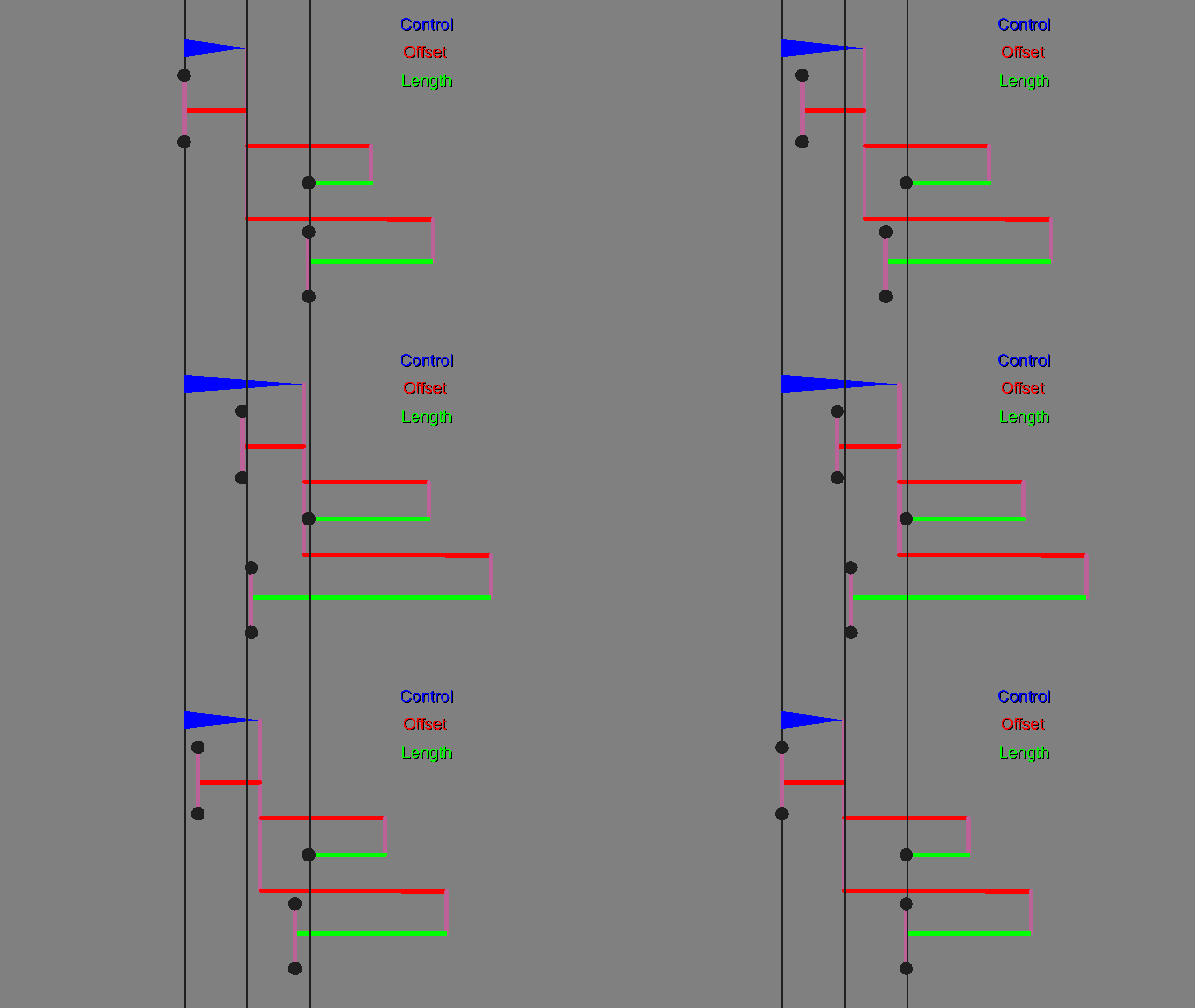
Forgot to put the text over other frames. It goes top to bottom:
0 to 100
200 to 200
200 to 100 -
Small attempt at trying to clarify how the square works. Use the damn calculator.
-
Replying to comment by:
In the guide look at the gif and the first graph. Maybe you\’ll get it.
-
Replying to comment by:
Might be you didn\’t set the offset on the middle part to \”do not smart stretch\”. But that\’s my guess.
-
Replying to comment by:
Have you used the calculator perhaps? It should simplify the whole process.
-
Replying to comment by:
Oh so you\’re trying to make it turn from square to hourglass? That explains a lot lol
-
Replying to comment by:
Oh right also that\’s also partially why I have the number 3 thing in the guide
It basically counters the stretch of the Control, making the point stay in one place. It\’s also where I hooked up the right most side. The left is hooked to the root.
-
Replying to comment by:
My tip is to get all segments to thickness 5 or so with modify branch, it will be easier to see what\’s goin on
- Load More


Forgot to put the text over other frames. It goes top to bottom:
0 to 100
200 to 200
200 to 100
brain hurty
Did i mention we’re on the easy part.
:/
@beginninganimator u might be interested in this