


@auto-angel


Joined on November 28th, 2017, this user has been a member for 3,127 days and is the 4,581st person to register an account.
Has 100 submissions, the first one uploaded on December 9th, 2017 and the most recent on October 1st, 2020.
Of those, 53 have been featured and 58 have won Users' Choice.
On average, each submission earns 16,147 downloads.
In total, they have been download 1,711,649 times.
Counting every individual stickfigure, including the contents of all packs, this user has technically made and submitted 240 stickfigures.
On average, when this user rates stickfigures, they are 97% positive.
Also, they are typically 80% positive when rating animation spotlights.
Has made 1,792 comments on non-activity pages of the site. Alternatively, this user has made 3,455 comments on actual activity pages of the site.
This member is a Users' Choice voter!
Their current voting streak is 0 and their longest streak is 245 consecutive votes.




-
so i have this problem (ios) where the image will not work if i save it to my camera roll.
in order for my custom image to work, i have to send it directly to files from the app i use (ibs paint) which is fine, except it doesn’t give me a transparent image unless i save to my camera roll first
anybody have any suggestions on what i can change?
-
 Replying to comment by:
it’s a vibe
-
Replying to comment by:
-
i didn’t make anything transparent yet
…cuz idk how to
-

 2019-12-19 17:26:09 UTC
-
Replying to:
it’s a vibe
-
Replying to comment by:
ok so it was actually a problem with ibs paint
it saved in some dumb way idk
-
Replying to comment by:
@arcionek
yours works when i try that, but when i replace my image with urs it doesn’t -
it don’t work
i’m on ios, using the files app
don work
-
@arcionek
yours works when i try that, but when i replace my image with urs it doesn’t-
Replying to:
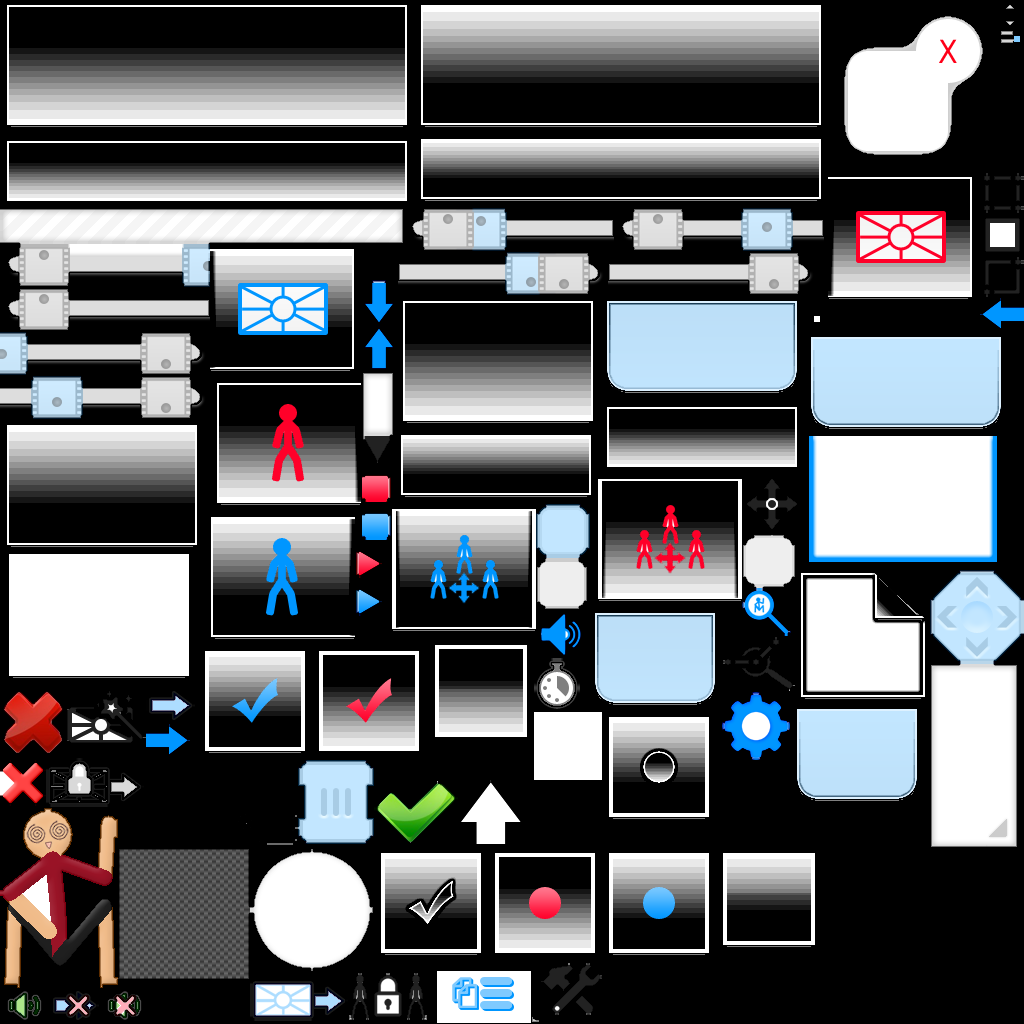
/skin/hd/animationMenuAtlas.png
/skin/textColors.txtthat’s the hierarchy?
-
-
ok so it was actually a problem with ibs paint
it saved in some dumb way idk
-
Replying to comment by:
yeah maybe
-
Replying to comment by:
tragic
-
Replying to comment by:
he’s got good sty
-
omw to shrek nicky in a non consensual way
-

…
2019-12-18 15:52:47 UTC -

I’ll grab the filming equipment, I’ll need this for later
2019-12-18 15:54:53 UTC-
Replying to:
That’s not a bad idea…
-
is @nicky1612 really in 2nd place behind eterphapfth?
damn
2019-12-18 16:50:47 UTC-
Replying to:
he’s got good sty
-
Replying to comment by:
so i used yours and it works, then when i replaces my image with yours it stopped working
-
Replying to comment by:
i put it in both, and does it have to be transparent? i didn’t realize
and yeah i put it in both folders
-
Replying to comment by:
yes otherwise the letters would be blue
-
used this, all it did was change the color of the buttons
-

Bamboozle
-

Is the “enable skins” option enabled?
-
Replying to:
yes otherwise the letters would be blue
-
 Replying to:
*me knowing that’s not how it works*
-
-
-

It’s not even transparent oeuf
Did you double check the name? Did you put HD and SD version? (Your device could be using SD)
-
Replying to:
i put it in both, and does it have to be transparent? i didn’t realize
and yeah i put it in both folders
-
Replying to:
If it’s not transparent 80% of icons would just be having black squares etc. Mega gay. Make sure it’s png. If it isn’t working download some skin from site and check if that works and compare mistakes.
2019-12-18 12:10:01 UTC-
Replying to:
so i used yours and it works, then when i replaces my image with yours it stopped working
-
-
-

Is there a website for this costum stick nodes texture’s???
-
Replying to:
On sidebar that thing with wrench. Also the group description.
-
- Load More


can’t you just download the ZIP of the skin you want
extract
and then move the /skin/ folder into the /Stick Nodes/ app
unless you’re talking about editing the animationMenuAtlas.png file?
I’d assume you just open it with your editing app, save it as a PNG, and then just move the PNG into the /skin/HD/ folder
im just confused where Camera Roll comes into all this
i was talking about editing an image in an app, then saving it to photos, then files
but i fixed the problem anyways, it was some obscure settings thing in the app i was using that i found by accident
something that wasn’t my fault for once
i’ll take it!
transfer the skin image from the camera to files using the share option in photos
Share > Save To Files > Stick Nodes > skin
and then do the rest
nvm problem fixed