
-

Collo


 2022-08-02 20:36:35 UTC
 So arcionek..
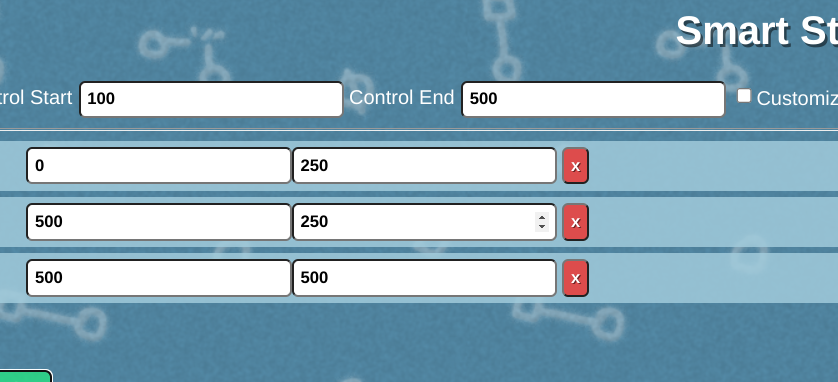
I figured out how to use the calculator by sitting and thinking for a while and came to the conclusion that all the numbers are just supposed to be where the node starts and where its supposed to move next to.
I made my own square but now I’m getting the problem with the movement again, this time it doesn’t seem solvable like it was earlier.
I tried a different way where I duplicated the right side and used it for the left side as well which was a bit more stable but it still moves over to the right a little.I might’ve just made an error in using the numbers


Stick Nodes®
A stickfigure animation app created for mobile devices!
Create your own stickman animations on your Android or iOS device!


Do you mind telling me what you did to keep it from moving?
Okay so. I’d say you almost got it and yeah you’re correct. That’s how the calculator works.
My random guess, and I’m talking out of my ass with this one, is probably cuz the output is at 0.5 increment difference. The reason from it is because the control starts at 100. I’ll check if I’m right if it’s due to the 0.5 thing after I’m done with work.
But overall, pretty good job. You’re the first one to crack this.
Okay yea my ass was wrong. Can u just send me the stick so I can tell wtf is going on with it lmfao.
Here’s both of the ones in the gif
https://www.mediafire.com/file/njbqu60jcll2gyi/My_first_working_smart_stecee.nodes/file
https://www.mediafire.com/file/tdywxuktcr5m6sh/My_first_workinge.nodes/file
okay so you actually got everything down correctly, especially in the My_first_workinge.nodes
all but one thing. The Control node. Your starting length on it is 25 instead of 100. This most likely came also with confusion on negative values, for example on 1 you have both numbers on negative. Means both offset and length point to the left.
So if you extend the control to 100, then flip the axis on the length, it should be overlaying over the root correctly this time.
So after these fixes, when your Control segment is at 100, when you stretch it to 500 you should get it to your desired effect.
Yeah I suppose placeholders for the unlabeled inputs would probably be a good idea 💀
I added them to the calculator just now, so hopefully no-one else needs to be confused by that